
Improving Website Speed for Better Rankings

ATTENTION: Want to Learn Affiliate Marketing from Successful Affiliates?
Websites today face an unrelenting pressure to load quickly. Users want instant access to information, and search engines prioritize fast sites in their rankings. Improving Website Speed for Better Rankings is essential not just for user experience, but also for achieving better rankings on search engines like Google. Let’s explore some effective strategies that can help you enhance your website speed.
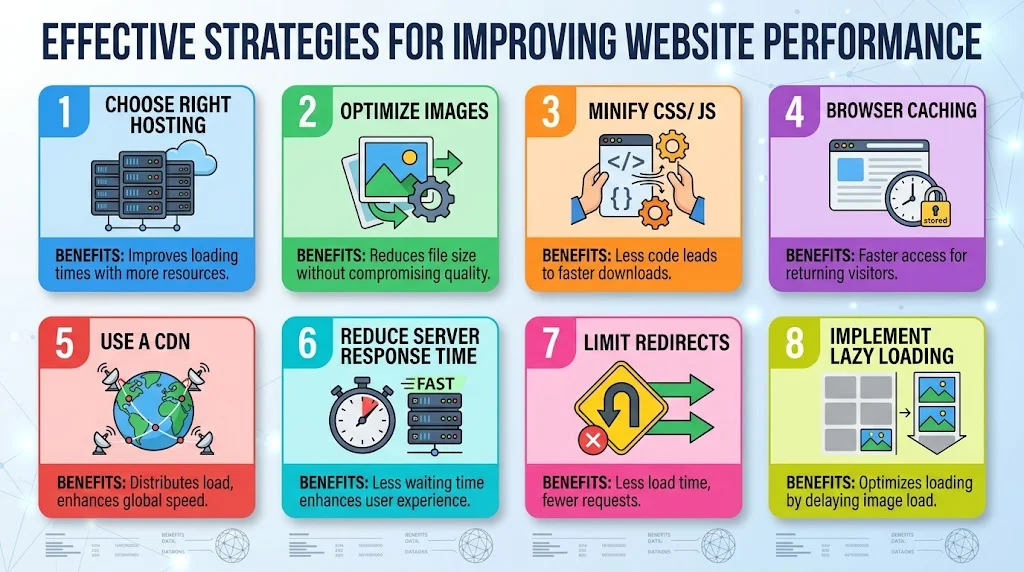
Choose the Right Hosting Plan
Your hosting provider plays a crucial role in website speed. A shared hosting plan may work for small websites, but as your traffic grows, it could slow down your site. Consider upgrading to Virtual Private Server (VPS) hosting or dedicated servers to provide faster loading times. You can compare different hosting services at WPBeginner.
Optimize Images
Large images can drastically slow down your site. Make sure to compress images before uploading them. Use formats like JPEG for photographs and PNG for graphics. Tools like TinyPNG can help reduce file size without sacrificing quality. Implementing responsive images is also beneficial, as they adjust automatically for different devices.
Minify CSS and JavaScript
Minifying your CSS and JavaScript files removes unnecessary spaces, comments, and characters. This reduction in file size can lead to faster load times. Use tools such as CSS Minifier and JavaScript Minifier to streamline your code easily.
Use Browser Caching
Browser caching allows visitors’ browsers to store copies of your website’s files. This way, when they return to your site, the browser pulls information from the cache rather than re-downloading it. You can set caching rules using plugins like WP Super Cache for WordPress.
Implement a Content Delivery Network (CDN)
A Content Delivery Network reduces latency by serving your site from locations closer to your users. CDNs store cached versions of your site on multiple servers around the world. Popular providers such as Cloudflare and Akamai can help speed up your website significantly.
Reduce Server Response Time
The time it takes for your server to respond to a user’s request is another key factor influencing speed. Aim for a server response time of less than 200 milliseconds. You can improve server response time by choosing a more reliable hosting provider, optimizing databases, and minimizing redirects. Check your server’s response times using tools like GTmetrix.
Limit Redirects
Redirects can create additional HTTP requests, slowing down your site. Each redirect adds more load time as browsers have to wait for responses. Minimize the number of redirects you use. If you must use them, try to get rid of unnecessary ones by checking your links regularly.
Implement Lazy Loading
Lazy loading helps Improving Website Speed for Better Rankings by only loading images when they enter the user’s viewport. This minimizes the initial load time, leading to a faster experience. Use plugins like a3 Lazy Load to enable this feature on your WordPress site.
| Strategy | Benefits |
|---|---|
| Choose Right Hosting | Improves loading times with more resources. |
| Optimize Images | Reduces file size without compromising quality. |
| Minify CSS/JS | Less code leads to faster downloads. |
| Browser Caching | Faster access for returning visitors. |
| Use a CDN | Distributes load, enhances global speed. |
| Reduce Server Response Time | Less waiting time enhances user experience. |
| Limit Redirects | Less load time, fewer requests. |
| Implement Lazy Loading | Optimizes loading by delaying image load. |
By applying these strategies, you can significantly improve your website speed and, in turn, enhance your chances of achieving higher search engine rankings. Not only will your visitors appreciate the better experience, but you’ll also see improved SEO performance. Remember, a faster site is a more successful site!
The Impact of Mobile Optimization on Load Times
The rise of mobile device usage has fundamentally shifted how we interact with the web. More than half of all internet traffic now comes from mobile devices. This shift has crucial implications for businesses and websites aiming to enhance user experience and improve their search engine rankings. One of the most significant aspects tied to mobile device usage is load times, which can greatly influence visitor engagement and satisfaction.
When visitors access a website on their smartphones, they expect it to load quickly. In fact, studies suggest that around 53% of mobile users abandon a site that takes longer than three seconds to load. Therefore, optimizing your website for mobile not only enhances user experience but also plays a pivotal role in retaining visitors. When pages load slowly, potential customers may turn to your competitors. The significance of mobile optimization cannot be overstated.
Several factors contribute to mobile optimization and, subsequently, load times:
- Image Optimization: Large images can slow down website loading speed significantly. By compressing images and using appropriate formats like JPEG and PNG, you can reduce the file size without compromising quality.
- Server Response Time: The server’s speed affects how quickly content is delivered to users. Ensure your server responds quickly by choosing a reliable hosting provider and utilizing Content Delivery Networks (CDN).
- Minification of CSS and JavaScript: Reducing the size of your CSS and JavaScript files can greatly speed up loading times. Tools like CSS Minifier and JavaScript Minifier can help with this process.
- Responsive Design: Having a responsive website design means your site adapts seamlessly to different screen sizes. This adaptability not only boosts usability but also impacts load times positively.
- Reducing Redirects: Each redirect generates additional HTTP requests, which slow down loading time. Limiting redirects allows for a more streamlined user experience.
Despite knowing these tips, many still struggle with slow load times on mobile devices. To address this, conducting a website speed test can be your first step. Tools like Google PageSpeed Insights, GTmetrix, and web.dev can pinpoint issues that need attention.
Another critical consideration is your website’s structure. A clean layout with easily accessible navigation helps users find what they need without causing frustration. Not only does this improve user experience, but it also encourages users to stay longer, reducing bounce rates. 🏗️
Here’s a breakdown of the average load times for mobile websites based on various optimization levels:
| Optimization Level | Average Load Time (seconds) | Visitor Engagement % |
|---|---|---|
| No Optimization | 8.0 | 20% |
| Basic Optimization | 5.0 | 45% |
| Moderate Optimization | 3.0 | 70% |
| Advanced Optimization | 1.5 | 90% |
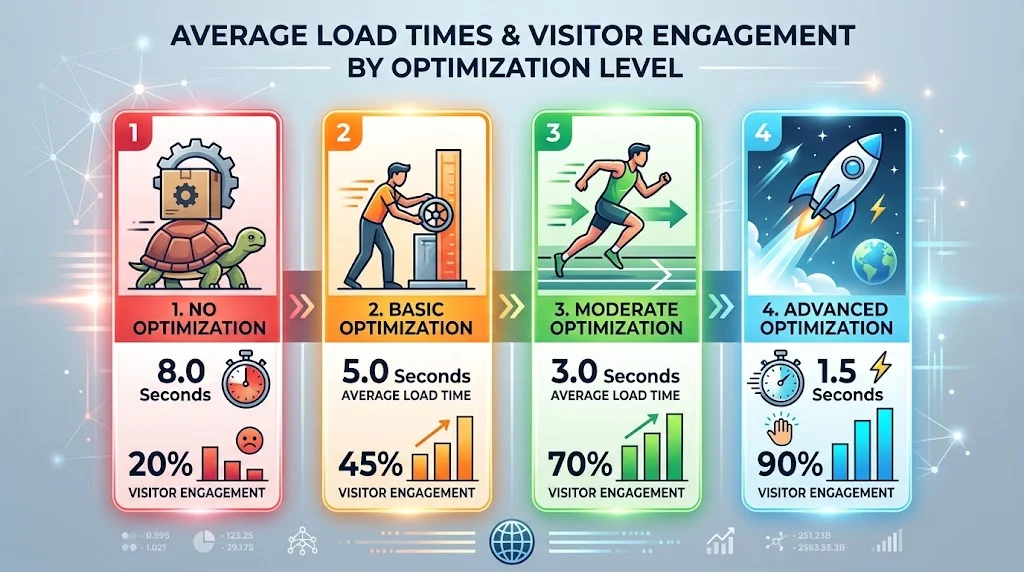
As you can see, there is a clear link between load times and user engagement. The faster your site loads, the more likely users are to interact with it. This correlation is essential for businesses aiming for better conversion rates and long-term customer retention.
In an age where mobile optimization is no longer optional but a necessity, taking actionable steps to enhance your site’s load time can significantly impact your overall success. In addition to the technical aspects, consider conducting user testing to get feedback on your site’s mobile experience. This real-world insight helps you make informed adjustments.
The Role of Image Compression in Enhancing Website Performance
In the digital landscape, website performance plays a crucial role in retaining visitors and ranking well in search engines. One of the most effective methods for enhancing website speed and performance lies in the optimization of images. Image compression is a vital practice that not only improves loading times but also contributes to user experience and overall website success.
When you upload images to your site, their size can significantly impact how quickly your web pages load. Large image files can slow down your site, leading to high bounce rates and decreased rankings on search engines. You want to ensure that your website runs smoothly and quickly, and this is where image compression comes in.
What is Image Compression?
Image compression refers to the process of reducing the file size of an image without significantly compromising its quality. This allows for quicker loading times and a better overall experience for your users. There are two main types of image compression:
- Lossy Compression: This method reduces file size by eliminating certain data from the image. While it can significantly decrease the file size, it may also affect image quality. Formats such as JPEG use lossy compression.
- Lossless Compression: This method retains all image data, ensuring that there is no loss of quality. PNG and GIF formats utilize lossless compression, making them ideal for images requiring sharp quality.
Why is Image Compression Important for Website Performance?
Optimizing images through compression can lead to several benefits, making it a key component in Improving Website Speed for Better Rankings:
- Faster Loading Times: Compressed images load faster, which is essential for keeping visitors engaged. Studies show that even a one-second delay in page load time can increase bounce rates significantly.
- Improved User Experience: A site that loads quickly is more enjoyable for users. Image compression contributes to a smoother browsing experience, encouraging visitors to explore further.
- Better SEO Rankings: Search engines favor websites that load quickly. By ensuring your images are compressed, you may improve your chances of ranking higher on search results pages.
Best Practices for Image Compression
To make the most out of image compression, consider the following best practices:
- Select the Right Format: Choose the appropriate file format based on the type of image you are using. JPEG is great for photographs, while PNG is suitable for graphics that require transparency.
- Use a Compression Tool: Utilize tools like TinyJPG or ImageCompressor, which can easily compress images while maintaining quality.
- Optimize Images Before Uploading: Make it a habit to compress images before uploading them to your site. This proactive approach saves time and helps manage your website’s performance effectively.
- Implement Responsive Images: Ensure that your images are responsive and adapt to different screen sizes. This improves loading efficiency on mobile devices.
Tools for Image Compression
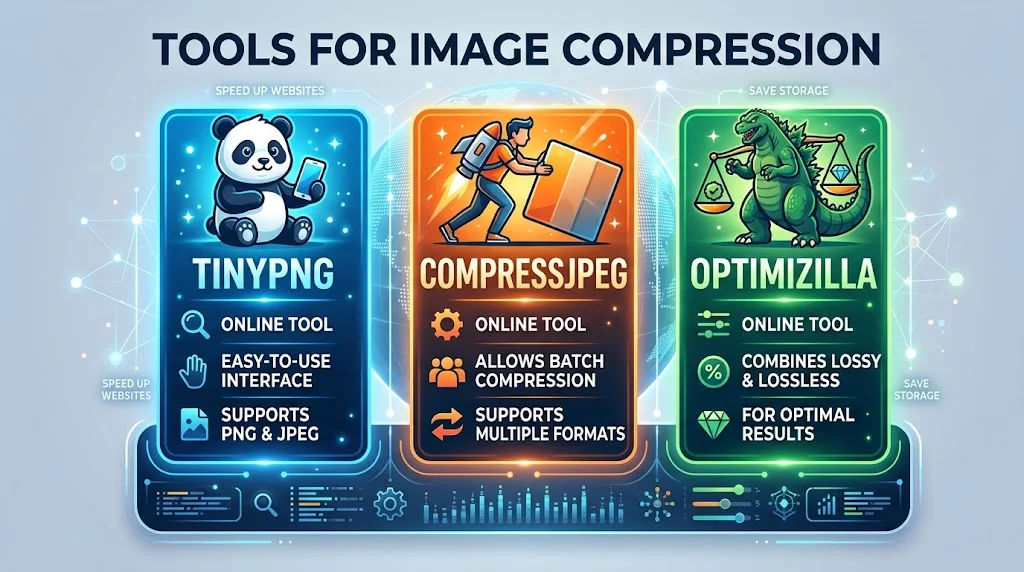
There are several tools available that can help with the image compression process:
| Tool | Type | Features |
|---|---|---|
| TinyPNG | Online | Easy-to-use interface, supports PNG and JPEG. |
| CompressJPEG | Online | Allows batch compression and supports multiple formats. |
| Optimizilla | Online | Combines lossy and lossless compression for optimal results. |
Understanding the Importance of Web Hosting in Site Speed
When you’re building a website, choosing the right web hosting is a fundamental step that can greatly impact your site’s speed and overall performance. Understanding how hosting affects your website speed can help you make informed decisions that not only enhance user experience but also boost your search engine rankings.
Your website hosting provider plays a key role in determining how quickly your pages load. Different types of hosting options come with various features that impact speed, such as server resources, location, and server configuration. Recognizing these elements can guide you in selecting the best plan for your needs.
Server Response Time
The speed at which a server responds to requests from your visitors is critical. A fast server response time can significantly enhance the loading speed of your website. Factors that influence server response time include:
- Server Location: The closer the server is to your visitors, the quicker the response time. If most of your audience is in the U.S., choose a hosting provider with data centers in that region.
- Traffic Handling: Quality hosting can manage a high volume of traffic efficiently. If your website frequently experiences spikes in visitors, opt for scalable hosting solutions.
- Server Quality: Invest in high-performance servers that offer the latest technologies for speed enhancements.
Type of Hosting
The type of hosting you select can also impact speed. Here are some common types and how they affect website performance:
| Hosting Type | Speed Characteristics |
|---|---|
| Shared Hosting | Affordable but can be slower due to shared resources with other sites. |
| VPS Hosting | Offers dedicated resources for better performance. |
| Dedicated Hosting | Maximum speed and performance, ideal for high-traffic websites. |
| Cloud Hosting | Scalable and can handle traffic spikes efficiently; generally faster. |
Bandwidth and Storage
Bandwidth is your website’s data transfer capacity, impacting how many visitors can access your site simultaneously. Sufficient bandwidth ensures that your site remains speedy even during peak times. Additionally, the type and amount of storage can affect how fast data is retrieved. SSD storage is faster than traditional HDD storage, making it a better option for performance-oriented websites.
Content Delivery Networks (CDN)
Integrating a Content Delivery Network (CDN) with your hosting can further improve speed. A CDN distributes your website’s files across multiple servers globally. This means that when a visitor accesses your site, it’s served from the nearest location, reducing load times. Many hosting providers offer CDN options, so consider including this feature for enhanced user experience.
Optimizing Your Hosting Configuration
Even with a high-quality hosting provider, optimizing your configuration is necessary to achieve optimal speed. This includes:
- Using Caching: Employ caching plugins to store a static version of your site, reducing server load and speeding up page loading times.
- Database Optimization: Regularly clean up your databases to ensure they run efficiently and quickly.
- PHP Version: Use the latest version of PHP that your applications support, as newer versions have performance enhancements.
Choosing the right web hosting service is pivotal in Improving Website Speed for Better Rankings. Factors like server response time, server type, bandwidth, CDN integration, and optimization techniques contribute significantly to how quickly your site loads. Investing time and resources into these areas can lead to a noticeable improvement in your website’s performance.
For more information on web hosting options and how they can enhance your site speed, check out WPBeginner or visit Website Planet for detailed insights.
Tools and Methods for Testing and Analyzing Website Speed
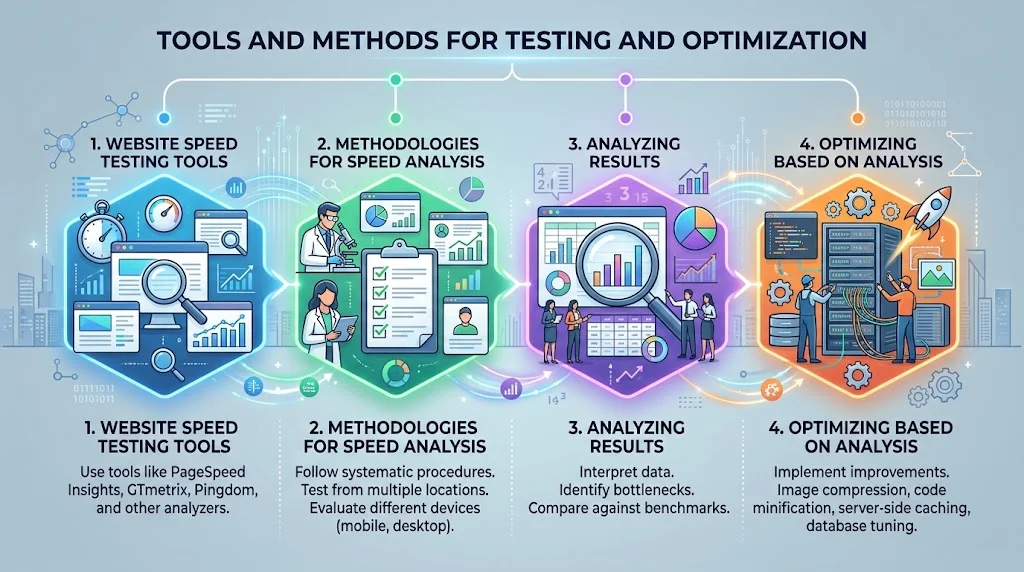
Ensuring your website loads quickly is crucial for providing a good user experience and enhancing your search engine rankings. To achieve this, you need to test and analyze your website speed effectively. Several tools and methods can help you do just that, allowing you to pinpoint areas for improvement.
Website Speed Testing Tools
There are numerous tools available for testing your website speed. Each tool offers unique features, allowing you to analyze various aspects of your website’s performance. Here are some of the top tools you should consider:
- Google PageSpeed Insights: This tool evaluates the performance of your web pages on mobile and desktop devices. It provides detailed insights and specific suggestions to enhance page speed.
- GTmetrix: GTmetrix combines Google PageSpeed Insights and YSlow to assess loading times and recommends optimization strategies. It provides visual timeline charts for better understanding.
- Pingdom: Known for its user-friendly interface, Pingdom allows users to run speed tests from various locations globally. It offers performance grade scores and detailed reports.
- WebPageTest: This tool offers advanced testing options, allowing you to simulate various browsers and connection speeds. WebPageTest gives a comprehensive breakdown of website performance.
Methodologies for Speed Analysis
Understanding how to analyze the data you gather is equally important as collecting it. Here are some effective methodologies for interpreting your speed testing results:
- Analyze Load Time: Focus on overall page load time, measured in seconds. A load time under three seconds is ideal for ensuring a good user experience.
- Evaluate First Contentful Paint (FCP): This metric measures the time it takes for the first piece of content to appear on the user’s screen. Aim for an FCP of less than 1 second.
- Time to Interactive (TTI): This metric gauges how long it takes for a webpage to become fully interactive. Optimizing this time enhances user experience.
- Implement Speed Metrics Regularly: Set regular intervals to conduct speed tests to continuously monitor and improve website performance.
Analyzing Results
Once you have your speed test results, the next step is to analyze them for actionable insights. Here’s a structured approach:
- Identify Bottlenecks: Check areas where loading times lag, such as image sizes, JavaScript, and CSS files.
- Prioritize Issues: Focus on the problems that impact speed the most. For instance, if images are too large, fixing this can yield notable improvements.
- Benchmark Against Competitors: Compare your website’s speeds with your competitors using the same tools to gain a perspective on your performance.
Optimizing Based on Analysis
Optimization strategies can significantly impact website speed. Consider these methods once you analyze your test results:
- Image Optimization: Use modern formats like WebP to reduce image sizes without compromising quality.
- Minimize Redirects: Each redirect creates additional loading time, so limit their use wherever possible.
- Leverage Browser Caching: Caching enables browsers to store static files so that returning visitors do not need to reload them each time.
- Reduce Server Response Time: Choose high-quality hosting options and optimize your backend to minimize response times.
| Performance Metric | Ideal Value | Analysis Insight |
|---|---|---|
| Load Time | Less than 3 seconds | Critical for user retention and SEO |
| FCP | Under 1 second | Improves user experience immediately |
| TTI | Under 5 seconds | Essential for engagement and interaction |
By utilizing these tools and methodologies, you can effectively test and analyze your website speed. Remember, Improving Website Speed for Better Rankings is a continuous process that directly correlates with user satisfaction and better search engine rankings. Monitor your speed regularly and implement actionable steps based on your findings for optimum website performance.
Conclusion
Improving website speed is crucial in today’s competitive online landscape, as it leads not only to better user experience but also to increased search engine rankings. By implementing effective strategies such as optimizing your site for mobile users, you can significantly reduce load times. As mobile traffic continues to rise, ensuring that your website performs well on various devices is no longer optional; it’s a necessity.
Additionally, focusing on image compression can also enhance website performance. Large, unoptimized images slow down loading times and frustrate visitors, leading to higher bounce rates. By ensuring that images are compressed without losing quality, you create a smoother browsing experience for your audience.
The choice of web hosting plays a vital role in your site’s speed as well. Selecting a reputable hosting provider tailored to your needs can drastically improve performance. The right infrastructure supports fast loading times and minimizes downtime, which is essential for retaining visitors and keeping your site functional.
Regularly testing and analyzing your website speed with tools designed for this purpose can provide valuable insights. These tools will help you identify bottlenecks and areas for improvement, enabling you to make informed decisions to enhance speed.
By prioritizing speed, you ultimately create a more user-friendly environment that encourages exploration and higher engagement, leading to better rankings and ultimately, greater success for your website. Embracing these strategies is a step toward a more efficient and impactful online presence.