
How to Optimize Your Affiliate Site for Core Web Vitals?


ATTENTION: Want to Learn Affiliate Marketing from Successful Affiliates?
How to Optimize Your Affiliate Site for Core Web Vitals? It is essential for improving user experience and boosting your search engine rankings. Core web vitals are specific factors that Google considers important for page experience. These metrics include loading time, interactivity, and visual stability. Let’s explore actionable strategies to enhance your affiliate site.
Understanding Core Web Vitals
Core web vitals consist of three main components:
- Largest Contentful Paint (LCP): Measures loading performance, specifically how quickly the largest content element on your page loads.
- First Input Delay (FID): Measures interactivity, assessing how quickly your site responds to user actions.
- Cumulative Layout Shift (CLS): Measures visual stability, indicating how much the layout shifts during loading.
Improving Largest Contentful Paint (LCP)
To optimize LCP, focus on reducing the loading time of the main content. Here are a few strategies:
- Optimize images: Use compressed images and appropriate formats. Tools like TinyPNG can help you reduce image size without sacrificing quality.
- Leverage browser caching: Store frequently accessed resources on users’ devices so they don’t need to download them again. Tools like WP Rocket can assist with this.
- Use a Content Delivery Network (CDN): A CDN speeds up loading times by delivering cached content from servers closer to the user. Services like Cloudflare are great options.
Enhancing First Input Delay (FID)
Improving FID involves making your website quicker to respond to user interactions. Follow these tips:
- Reduce JavaScript execution time: Limit the use of heavy JavaScript libraries or optimize them. Consider using tools like Bundlephobia to find smaller alternatives.
- Minimize third-party scripts: Each script slows down your site. Evaluate which third-party services are essential for your affiliate marketing efforts.
- Defer unused JavaScript: Use a plugin like WP Defer to delay loading non-essential scripts until after the main content has loaded.
Boosting Cumulative Layout Shift (CLS)
Avoid layout shifts that disrupt the user experience. Here’s how to maintain visual stability:
- Specify size for images and videos: Always define the dimensions for images and videos in your HTML or CSS. This way, the browser knows how much space to allocate while loading the elements.
- Load fonts correctly: Use techniques like font-display: swap to ensure that custom fonts do not cause layout shifts during loading.
- Insert ads correctly: If your affiliate site uses ads, make sure you reserve space for them in your initial layout. This prevents sudden layout shifts when ads load.
Tools for Measuring Core Web Vitals
To track your progress, use these tools:
- Google PageSpeed Insights – Provides detailed insights into your site’s performance metrics and suggestions for improvements.
- Web Vitals Extension – A Chrome extension that gives you real-time feedback on your site’s core web vitals.
- Lighthouse – A tool to run audits on your site, which includes core web vitals assessment.
By optimizing for core web vitals, you enhance the overall user experience on your affiliate site. It’s not just about pleasing search engines but providing a seamless journey for your visitors. Implement these strategies today, and watch your affiliate performance improve!
Essential Tools for Measuring Core Web Vitals Performance
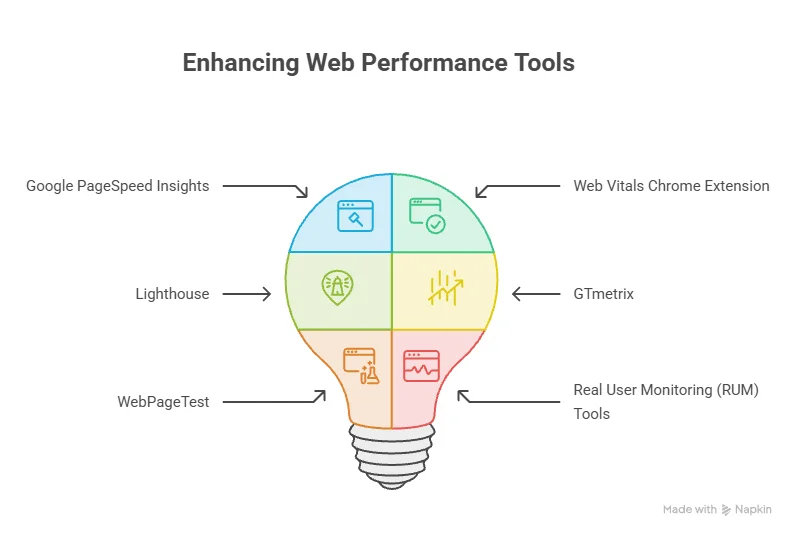
Measuring Core Web Vitals performance is vital for optimizing your website’s user experience and enhancing your search engine ranking. Here are some essential tools you can rely on to track and improve these metrics.
Google PageSpeed Insights
Google PageSpeed Insights is a widely used tool that provides a comprehensive analysis of your web pages. It gives you valuable insights into your Core Web Vitals, including:
- Largest Contentful Paint (LCP): Measures loading performance.
- First Input Delay (FID): Measures interactivity.
- Cumulative Layout Shift (CLS): Measures visual stability.
This tool generates a performance score based on these metrics, accompanied by suggestions for improvement. It also offers mobile and desktop performance reports, making it versatile. You can access Google PageSpeed Insights here.
Web Vitals Chrome Extension
The Web Vitals Chrome Extension provides real-time data for the three main Core Web Vitals metrics. By using this extension, you can easily monitor your website’s performance while browsing. It displays metrics directly in the Chrome Developer Tools, allowing for quick troubleshooting and optimization. This tool is especially beneficial during the development phase, when changes are being made to the site.
Lighthouse
Lighthouse is an open-source tool developed by Google that can be run in Chrome or from the command line. It provides in-depth reports on page performance, accessibility, and SEO, among other factors. The tool evaluates Core Web Vitals and gives actionable insights for improving your site. Lighthouse can help you identify areas where your site could improve its performance, thus enhancing user experience effectively. It’s a robust tool for marketers and developers alike. You can access Lighthouse here.
GTmetrix
GTmetrix is another powerful tool for analyzing the loading speed and performance of your website. It provides detailed reports on various metrics, including Core Web Vitals, and offers recommendations for optimizing your site. You can compare the performance of your site against others, identifying potential areas for improvement. GTmetrix also features a feature-rich dashboard, enabling continuous performance monitoring and comparison over time. Use GTmetrix for a full breakdown of your site’s loading time and optimizations. Check out GTmetrix here.
WebPageTest
WebPageTest is an advanced tool that allows you to test your site’s performance from multiple locations worldwide and on various devices. It gives detailed metrics about loading times, rendering paths, and more, including Core Web Vitals. With extensive test options, this tool lets users analyze their website under various scenarios. Its ability to provide waterfall charts helps identify what slows down loading times, making it easier to implement necessary optimizations. You can find WebPageTest here.
Real User Monitoring (RUM) Tools
Real user monitoring tools like New Relic or Datadog provide actual performance insights from users visiting your site. These tools can track actual user interactions, giving you a better understanding of how your site performs in real-world scenarios. Real user monitoring helps identify performance issues based on how real users experience your website. This perspective can lead to more informed decisions when trying to optimize your site’s Core Web Vitals. These essential tools into your workflow can significantly improve your site’s Core Web Vitals performance. By measuring the right metrics and implementing suggested changes, you create a better experience for your users, ultimately enhancing your affiliate site’s success.
Impact of Core Web Vitals on Affiliate Marketing Success
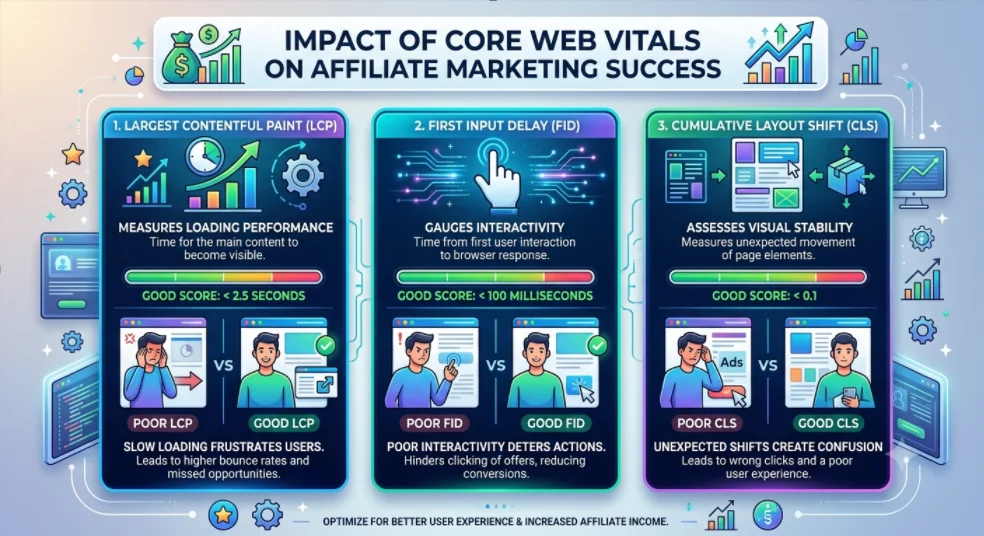
For anyone managing an affiliate site, staying on top of trends can determine your success. One major trend that has surfaced in recent years is the emphasis on Core Web Vitals. These are crucial metrics that assess the user’s experience on your website. Understanding their impact can enhance your affiliate marketing performance significantly. Core Web Vitals primarily focus on three aspects: loading performance, interactivity, and visual stability. Let’s break down these elements:
- Largest Contentful Paint (LCP): This metric measures loading performance. A good LCP takes less than 2.5 seconds. If your affiliate site loads slowly, potential customers may leave before they even see your offers.
- First Input Delay (FID): FID gauges interactivity. This measures the time from when a user first interacts with your site to when the browser responds. A successful FID is less than 100 milliseconds.
- Cumulative Layout Shift (CLS): CLS assesses visual stability. This ensures that users don’t experience unexpected shifts in content that could lead to clicking the wrong link or ad. A good CLS score is less than 0.1.
To see the impact Core Web Vitals have on affiliate marketing, consider the following factors:
- User Retention: Faster loading times mean users stay longer. A smooth experience keeps them engaged with your content, increasing their chances of clicking on affiliate links. For more on user retention strategies, check out Optimizely.
- SEO Ranking: Google has made it clear that Core Web Vitals are a ranking factor. A site that meets these metrics is more likely to rank higher in search results. This will naturally lead to increased traffic. To understand more about SEO best practices, visit Moz.
- Ad Revenue: Many affiliate sites rely heavily on ad revenue. A site with poor loading times can drive users away, impacting not only clicks on affiliate links but also traditional ads. Learn how ads work by checking out AdRoll.
Improving Core Web Vitals doesn’t have to be overwhelming. Here are actionable steps you can take:
- Optimize images: Ensure that images are compressed and served in next-gen formats like WebP.
- Minimize CSS and JavaScript: Reducing the size of these files will enhance loading speed.
- Implement lazy loading: Only load images and content that are visible to users at first. This can dramatically change loading times.
- Use a Content Delivery Network (CDN): CDNs can reduce latency by serving your site’s files from locations closer to the user.
- Choose a reliable hosting provider: A good host can significantly affect site speed and performance.
There are various tools available to check your site’s Core Web Vitals, including Google’s Web Vitals report and PageSpeed Insights. These tools provide insights into where you are excelling and where you can improve. The connection between Core Web Vitals and affiliate marketing success is undeniable. Users are more likely to engage with, trust, and convert on sites that offer a seamless experience. As competition increases in the affiliate marketing space, those who prioritize user experience will find themselves in a much stronger position. Take the time to analyze your Core Web Vitals. By making improvements, not only will you enhance user experience, but you will also likely see a boost in your affiliate marketing success. Staying proactive is key. Keep your website optimized and watch as it converts visitors into loyal customers.
| Core Web Vital | Recommended Value | Impact on Affiliate Marketing |
|---|---|---|
| Largest Contentful Paint (LCP) | Under 2.5 seconds | Improves retention and reduces bounce rates |
| First Input Delay (FID) | Under 100 milliseconds | Enhances user engagement and interaction |
| Cumulative Layout Shift (CLS) | Under 0.1 | Provides a stable experience, reducing accidental clicks |
Adopting these practices into your affiliate marketing strategy not only prepares your site for better search engine rankings but also enhances overall user satisfaction. Better performance means better results.
Common Mistakes to Avoid When Improving Core Web Vitals
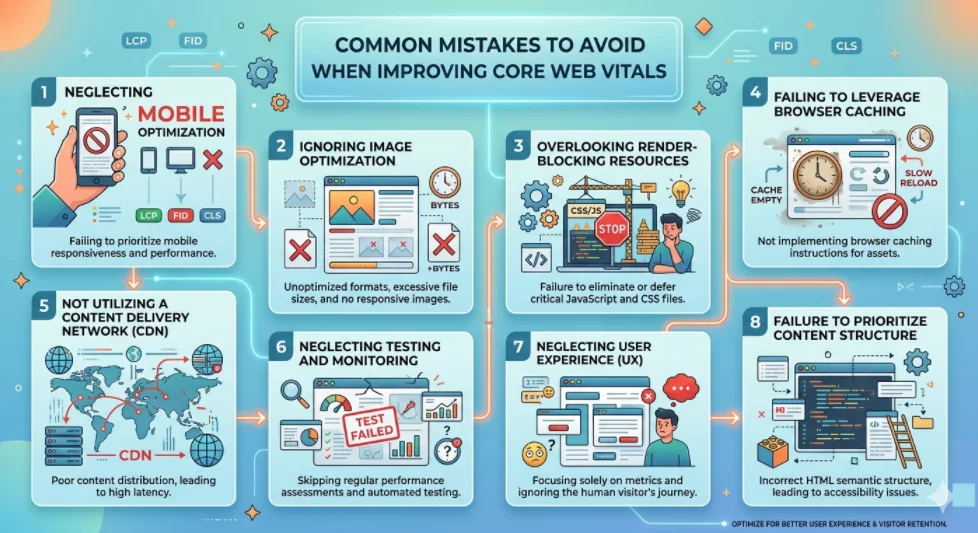
Improving your website’s Core Web Vitals is essential for providing an excellent user experience and boosting your search engine rankings. However, many website owners make several common mistakes that can hinder their efforts. Here are some pitfalls to avoid when striving to enhance your Core Web Vitals.
Neglecting Mobile Optimization
Many website owners focus solely on desktop performance, overlooking how their site functions on mobile devices. With the rise in mobile browsing, it’s crucial that your site offers a seamless experience on both desktop and mobile platforms. Ensure your design is responsive and that elements load efficiently on all devices.
Ignoring Image Optimization
Large and unoptimized images can slow down your site significantly. To improve your Core Web Vitals, you should:
- Use appropriately sized images for different devices.
- Compress images to reduce file size without sacrificing quality.
- Utilize modern image formats, like WebP, which offer better compression than traditional formats.
Overlooking Render-Blocking Resources
Render-blocking resources can delay the loading of important elements on your site. If JavaScript and CSS files are blocking the rendering path, users may experience slower performance. To address this, consider:
- Minifying CSS and JavaScript files.
- Implementing asynchronous loading for non-essential scripts.
- Inlining critical CSS directly in the HTML for faster rendering.
Failing to Leverage Browser Caching
Browser caching can significantly speed up load times for returning visitors. If you don’t leverage caching properly, users may have to reload all resources every time they visit your site. Here are some steps you can take to optimize caching:
- Set a long expiration date for static resources.
- Use tools like PageSpeed Insights to identify which resources can be cached.
Not Utilizing a Content Delivery Network (CDN)
A Content Delivery Network helps distribute your content across various servers worldwide, resulting in faster load times for users regardless of their location. If you’re not using one, you might be missing out on improved performance. Benefits of using a CDN include:
- Reduced latency due to geographically closer servers.
- Improved reliability and uptime.
- Enhanced security features against DDoS attacks.
Neglecting Testing and Monitoring
Many website owners launch their site improvements without ongoing testing and monitoring. Regularly checking your Core Web Vitals is vital for maintaining site performance. Make use of tools like:
- Google’s Web Vitals for real-time analysis.
- GTmetrix to evaluate site speed and performance.
- Chrome DevTools for in-depth debugging.
Neglecting User Experience
Focusing solely on metrics can lead you to overlook the actual user experience. Core Web Vitals are important, but the overall usability of your site should also be a top priority. Make sure to:
- Ensure intuitive navigation and layout.
- Maintain a visually appealing design without excessive ads or distractions.
- Test your website with real users to gather feedback on their experience.
Failure to Prioritize Content Structure
Well-structured content not only aids user comprehension but also contributes positively to Core Web Vitals. Ensure your site follows best practices in organizing content. Consider using:
- Clear headings and subheadings to guide readers.
- Bullet points or tables for easier readability.
Aiming to enhance your core web vitals requires a mindful approach and awareness of common mistakes. By avoiding these pitfalls and continuously optimizing your site, you can improve user engagement and boost your site’s overall performance. For more information on optimizing Core Web Vitals, check out the resources from Web.dev and the Google Developers guide.
Best Practices for Enhancing User Experience on Affiliate Sites
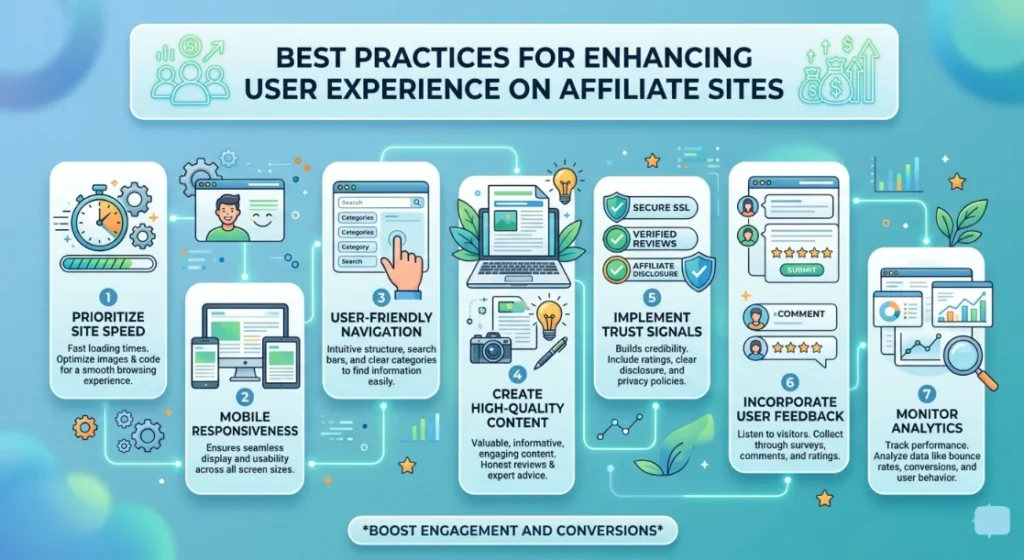
Improving user experience on affiliate sites is crucial for building trust, retaining visitors, and ultimately driving conversions. When users have a positive experience, they’re more likely to interact with your content and make purchases through your affiliate links. Here are some best practices that can help enhance user experience on your affiliate website.
Prioritize Site Speed
Quick loading times are essential for keeping users engaged. If your site takes too long to load, visitors will likely bounce before they even see your content. Here are some tips to optimize site speed:
- Utilize a content delivery network (CDN) to reduce latency and speed up load times.
- Optimize images by compressing them and using appropriate formats like WebP.
- Minify CSS, JavaScript, and HTML files to reduce their size.
- Leverage browser caching to store frequently accessed resources.
Mobile Responsiveness
With a significant number of users accessing websites through mobile devices, ensuring your affiliate site is mobile-friendly is crucial. Here are key points to focus on:
- Use responsive web design techniques to accommodate various screen sizes.
- Ensure your navigation is easy to use on small screens.
- Optimize buttons and links for touch input, ensuring they are large enough to be easily clickable.
User-Friendly Navigation
Navigation plays a vital role in the overall user experience. Here’s how to create a seamless navigation structure:
- Logical Menu Structure: Organize your content into clearly defined categories and subcategories.
- Clear Call-to-Action (CTA): Use prominent and descriptive buttons that encourage user interaction.
- Search Functionality: Incorporate a search bar to help users find specific products or content quickly.
Create High-Quality Content
Content is king, especially in affiliate marketing. Providing valuable and relevant information can significantly enhance the user experience. Consider the following:
- In-depth Product Reviews: Give honest, detailed reviews of products you promote.
- How-To Guides: Create helpful guides that educate users about the products or services you’re promoting.
- Engaging Multimedia: Use videos, infographics, and images to break up text and keep users engaged.
Implement Trust Signals
Building trust with your visitors is essential for converting them into customers. Implement the following trust signals:
- Privacy Policy: Ensure you have a clear privacy policy explaining how user data is handled.
- Testimonials: Showcase positive feedback from users who have benefited from the products you recommend.
- Secure Payment Options: Provide multiple secure payment methods to instill confidence in transactions.
Incorporate User Feedback
Actively soliciting and incorporating user feedback can offer insights into areas needing improvement. Methods include:
- Surveys: Use pop-up surveys to gather user opinions on your site’s usability.
- User Testing: Conduct usability tests with actual users and monitor their interactions.
- Comments Section: Encourage users to leave comments and provide feedback on your posts.
Monitor Analytics
Utilize analytics tools to track user behavior on your affiliate site. Key metrics to observe include:
- Bounce Rate: Analyze the percentage of visitors leaving without interaction.
- Session Duration: Monitor how long users stay on your site.
- Click-Through Rate (CTR): Measure how effectively your CTAs are performing.
Conclusion
Optimizing your affiliate site for Core Web Vitals is crucial in today’s digital landscape. By actively working to enhance your site’s performance, you create a better experience for users and increase your chances of success in affiliate marketing. Utilizing essential tools like Google PageSpeed Insights, Lighthouse, and Web Vitals Chrome Extension allows you to accurately measure your site’s performance and identify areas for improvement. This data-driven approach helps you make informed decisions that can significantly boost your site’s speed, responsiveness, and overall user satisfaction.
Understanding the impact of Core Web Vitals on affiliate marketing success cannot be overstated. A well-optimized site attracts more visitors, retains them longer, and leads to higher conversion rates. By implementing best practices such as optimizing images, leveraging browser caching, and minimizing JavaScript, you enhance user experience, which is vital for earning repeat traffic and increasing revenue.
However, it’s important to be aware of common mistakes that could hinder progress. Overlooking mobile optimization, neglecting to monitor website performance regularly, and failing to address user feedback can all negatively hinder your Core Web Vitals scores. By being proactive and continuously refining your site based on user behavior and performance insights, you can avoid these pitfalls.
Ultimately, prioritizing Core Web Vitals is an investment in your affiliate site’s future. As you enhance performance and user experience, you satisfy Google’s requirements and resonate with your audience—leading to greater loyalty and profits. Focus on making your site not just functional but enjoyable, and watch your affiliate marketing efforts thrive.