
How To Optimize Category Pages

ATTENTION: Want to Learn Affiliate Marketing from Successful Affiliates?
Optimizing category pages can be a game-changer for your site’s SEO and user experience. A well-structured category page not only helps search engines understand your site’s content better but also improves navigation for your visitors. Here are effective strategies to achieve this.
Understand User Intent
Start by identifying what your target audience is searching for when they enter a specific category. Researching keywords is vital for aligning your content with user intent. Utilize tools like Google Trends or Moz to find popular search terms related to your category. This way, you can tailor your content precisely to their needs.
Create Unique and Relevant Content
Each category page should feature unique content that adds value. Avoid generic descriptions; instead, provide engaging text that informs and entices your audience. You might want to include:
- Detailed descriptions of the category’s purpose
- Suggestions on usage or features
- Links to relevant blog posts or resources
Optimize Meta Tags
Your meta title and description are the first impressions users get from search engine results. Make sure to optimize them with relevant keywords, while also keeping them interesting enough to encourage clicks. A well-crafted meta description can dramatically improve your click-through rates. Aim for:
- Meta Title: 60 characters or less
- Meta Description: 155 characters for clarity
Incorporate Internal Linking
Internal linking helps distribute link equity throughout your site and keeps users engaged longer. Link to subcategories, related products, or even blog posts from your category page. This not only aids in SEO but improves overall site navigation.
Utilize High-Quality Images
Including images on your category page can enhance user experience. Make sure to use high-quality images that are relevant to the products or content in the category. Additionally, optimize the alt text of your images with descriptive keywords. This helps with SEO while making your content accessible to all users.
Implement Breadcrumb Navigation
Breadcrumbs improve user experience by showing visitors their location within your website. This can help users easily navigate back to previous sections. Use structured data to mark up your breadcrumbs, which can provide additional SEO benefits.
Ensure Mobile Optimization
With a growing number of users accessing the web from mobile devices, having a mobile-optimized category page is essential. Test your pages to ensure they load quickly and function smoothly on smartphones and tablets. Tools like Google PageSpeed Insights can help identify areas of improvement.
Monitor Page Performance
Utilize analytics tools to track how well your category pages are performing. Google Analytics gives you insights into user behavior, bounce rates, and more. Pay attention to which categories draw the most traffic and which may need improvement. Adjustments based on real data can lead to better engagement and conversion rates.
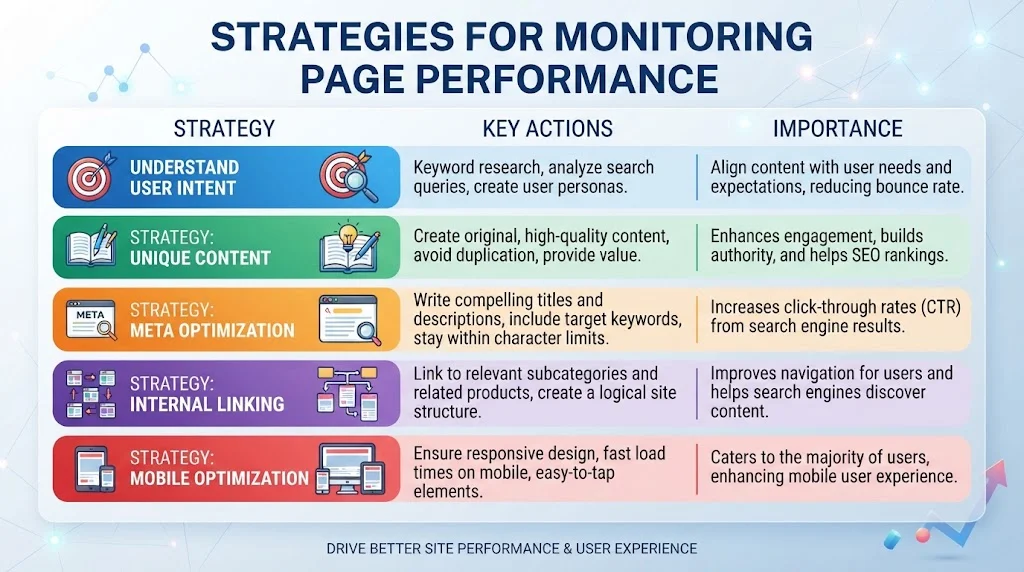
| Strategy | Importance |
|---|---|
| Understanding User Intent | Align content with user needs |
| Unique Content | Enhances engagement and helps SEO |
| Meta Optimization | Increases click-through rates |
| Internal Linking | Improves navigation and SEO |
| Mobile Optimization | Cater to mobile users to enhance experience |
By implementing these strategies, you can effectively Optimize Category Pages for better SEO performance. Regularly updating and analyzing your content will keep your pages relevant and user-friendly. Investing time in optimizing category pages will lead to greater visibility, increased traffic, and ultimately, more conversions.
Understanding the Importance of User Experience on Category Pages
User experience plays a vital role in shaping how visitors interact with your category pages. These pages are often the first touchpoint for users exploring your website, particularly in e-commerce and content-driven websites. A well-optimized category page enhances usability, encourages deeper exploration, and can significantly improve your overall site performance.
When you think about user experience, consider how easily a visitor can navigate your category pages. An intuitive layout, with clear headings and organized content, guides users through their journey. Here are some key elements to focus on:
- Navigation: Ensure that your category pages have straightforward navigation. Clear menus and breadcrumbs help users understand where they are and how to get to other sections of your site.
- Design: A visually appealing design that aligns with your brand will engage users. Use a mix of images and text to make the page attractive without overwhelming the visitor.
- Load Speed: Fast load times are crucial. Users expect pages to load quickly, and delays can lead to increased bounce rates. Optimize your images and leverage browser caching to improve speed.
Providing relevant content on your category pages is essential. This includes clear descriptions that explain what the category is about. Use engaging product images or content snippets that showcase your offerings and draw users in.
Here’s how to enhance the information presented on your category pages:
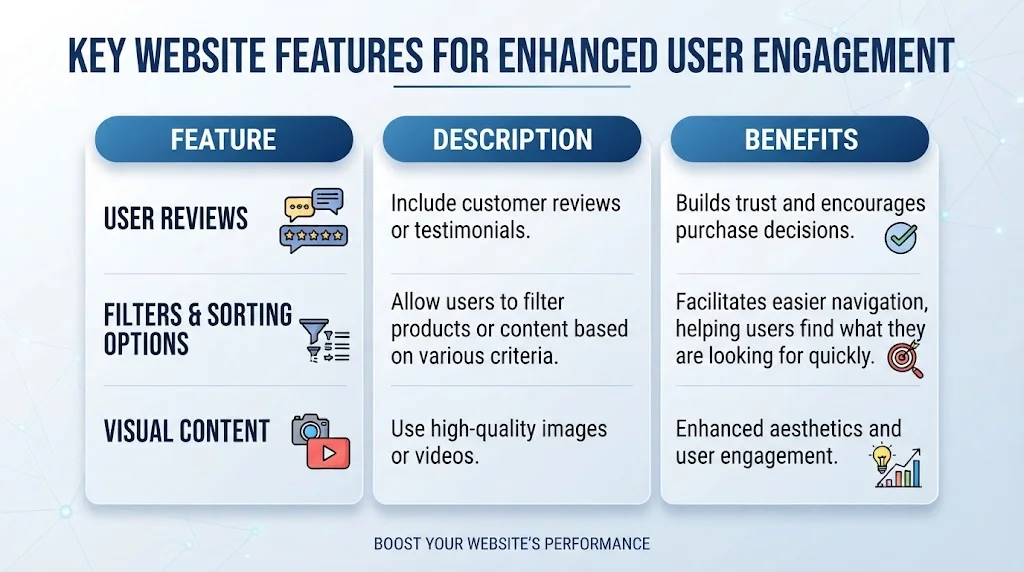
| Feature | Description | Benefits |
|---|---|---|
| User Reviews | Include customer reviews or testimonials. | Builds trust and encourages purchase decisions. |
| Filters & Sorting Options | Allow users to filter products or content based on various criteria. | Facilitates easier navigation, helping users find what they are looking for quickly. |
| Visual Content | Use high-quality images or videos. | Enhanced aesthetics and user engagement. |
Mobile optimization is another cornerstone of user experience. With more users accessing websites via mobile devices, ensuring that your category pages are responsive is essential. This means that the layout should adapt to different screen sizes, making it easy for users to browse your category pages, regardless of the device they are using. Use tools like Google’s Mobile-Friendly Test to check how well your pages perform on mobile.
Another important aspect is the use of internal linking. Effective internal linking helps users discover related content and products within your website. For example, link to popular subcategories or related blog posts that may interest visitors. This encourages them to stay longer and interact more with your site.
When thinking about optimizing user experience, don’t forget to analyze user behavior. Tools like Google Analytics can provide insights into how visitors interact with your category pages. Monitor metrics such as bounce rates, time on page, and click-through rates to make informed decisions. Make adjustments based on what the data reveals to continually enhance the user experience.
Key Elements to Include on Every Category Page for Engagement
Building effective category pages is essential for any website looking to increase user engagement and improve its SEO strategy. The right elements can make your category pages not only more attractive but also more functional for your visitors. Let’s explore the key elements you should incorporate to create engaging category pages.
Compelling Category Title
The title is the first thing visitors see. It should clearly indicate what the category offers and include relevant keywords. A descriptive title helps improve your page’s SEO. For example, instead of “Shoes,” consider “Men’s Running Shoes – Top Brands and Styles.”
Informative Descriptions
Including a brief description under the category title can provide context and engage users. Focus on what visitors can expect to find in that category. This not only informs users but also helps with SEO. Aim for 100-200 words, using primary and secondary keywords naturally.
User-Friendly Navigation
Ensure your category pages are easy to navigate. Include filters and sort features to help users quickly find what they’re looking for. Here are some navigational features to consider:
- Filter by price
- Sort by popularity, newness, or ratings
- Include breadcrumb navigation for easy backtracking
High-Quality Images
Visual content significantly enhances user engagement. Use high-resolution images that are relevant to the products or services in that category. Including product images, lifestyle images, or infographics can help users make decisions more quickly. Always ensure images are optimized to prevent slow loading times.
Product Listings
Your category page should showcase a few products. Make sure to include:
- Product Name
- Price
- Quick Links to Product Pages
- Rating Stars
Arrange your listings in a grid or list format that’s easy to browse. More options encourage users to stay engaged with the page.
Customer Reviews and Ratings
Incorporate customer reviews and ratings next to products. This encourages trust, showing that real people have had positive experiences with the items. Use snippets to show the average rating from all reviews. This helps in persuading potential buyers.
Call to Action (CTA)
Strategically placed CTAs can guide users on the next steps. Use phrases like “Shop Now” or “View More Products” to lead users into engaging with your offerings. Make sure your CTAs are visually appealing and stand out from the rest of the content.
Related Articles or Resources
Including links to related articles or resources can keep users on your site longer and position you as an authority in the field. For instance, if your category is “Healthy Snacks,” you might link to articles about the health benefits of snacking or recipes for quick snacks. Linking to resources like Healthline can provide additional value and credibility.
SEO Optimized URL Structure
Your URL structure should be simple and clear. Use keywords that reflect the category while avoiding complicated strings of numbers. For instance, instead of a URL like “www.example.com/category123,” use “www.example.com/mens-running-shoes.” This structure is friendlier for both users and search engines.
Mobile Optimization
More users are browsing websites on their smartphones, so ensure your category pages are mobile-friendly. Responsive design should make it easy for visitors to navigate without zooming or scrolling excessively. Also, test your pages on various devices to ensure compatibility.
Internal Linking Strategy
Build a robust internal linking ecosystem. Link to related categories and subcategories to encourage exploration. This helps distribute page authority across your site and improves user flow.
Analytics and Feedback
Engage with tools like Google Analytics to monitor user behavior on your category pages. Analyzing metrics like bounce rate and click-through rate can help identify areas for improvement. Encourage feedback through surveys or product reviews, and implement changes based on user experience.
The Role of Content Organization in Category Page Optimization
When it comes to e-commerce or content-heavy websites, the organization of content plays a pivotal role in optimizing category pages. Effective content organization not only enhances user experience but also positively influences search engine rankings. Here are some essential strategies to optimize your category pages through better content organization.
Understand Your Audience
To optimize your category pages, you first need to comprehend your audience’s needs. Consider the following:
- User Intent: Determine what your users are searching for. Are they looking for specific products, information, or services? Tailor your content accordingly.
- Demographics: Know the age, preferences, and behaviors of your target audience. This knowledge will guide how you organize your content.
Clear and Descriptive Category Titles
Category titles should be clear and descriptive. A good title serves as a beacon for users, guiding them to the information they seek. Aim for specificity in your titles. For instance, instead of using “Electronics,” consider “Smartphones & Accessories” for better clarity and relevance.
Use Engaging Introductory Text
An engaging introductory text on your category page not only captures user attention but also provides essential context. Here’s how to craft it effectively:
- Keywords: Integrate relevant keywords naturally into your introductory text to boost SEO. Think about what phrases your audience would use.
- Value Proposition: Highlight what users can find in this category and why it’s beneficial for them.
- Call-to-Action: Encourage users to explore further with a persuasive call-to-action.
Logical Subcategories
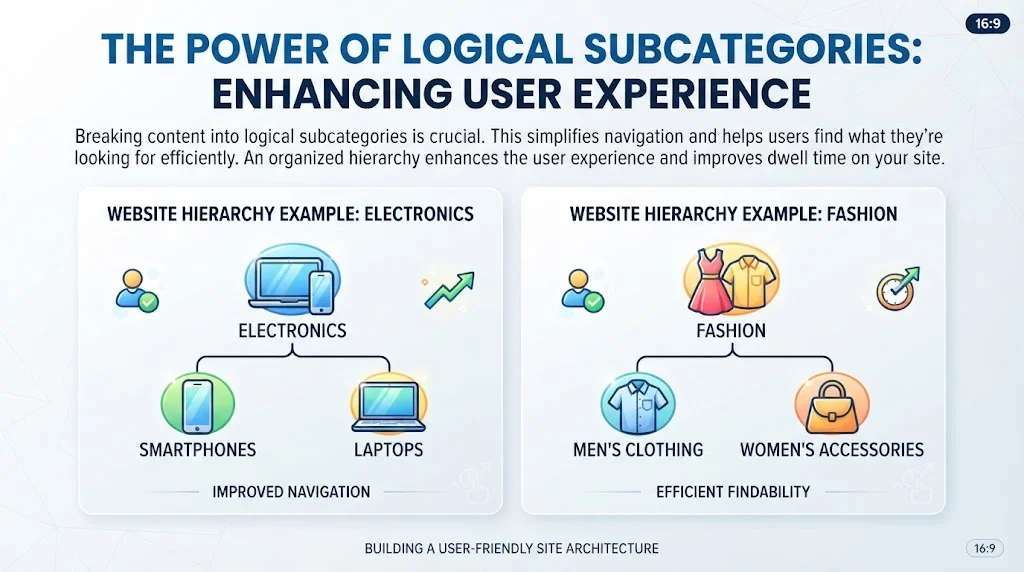
Breaking content into logical subcategories is crucial. This not only simplifies navigation but also helps users find what they’re looking for more efficiently. An organized hierarchy enhances the user experience and can improve dwell time on your site. For example:
| Category | Subcategory |
|---|---|
| Electronics | Smartphones |
| Electronics | Laptops |
| Fashion | Men’s Clothing |
| Fashion | Women’s Accessories |
Product Filtering Options
Adding filtering options allows users to narrow down their choices based on various parameters such as price, size, or brand. This user-friendly feature enhances navigation and keeps visitors on your site longer, reducing the bounce rate. The easier you make it for users to find what they want, the more likely they are to convert.
Internal Links
Internal links within category pages helps with SEO and enhances user experience. Linking related products or articles can guide users on their browsing journey. For instance, if you sell shoes, linking to related socks or shoe-care products keeps users engaged and may lead to additional purchases.
Optimize Images and Descriptions
High-quality images paired with succinct, keyword-rich descriptions can significantly improve user engagement. Ensure that all images have descriptive alt text, as this not only aids in SEO but also helps visually impaired users.
Mobile Optimization
As mobile usage continues to rise, optimizing your category pages for mobile devices is imperative. Ensure that the layout is responsive, loading times are minimal, and navigation is straightforward. Google’s mobile-first indexing makes this aspect non-negotiable for SEO success.
Monitor and Update Content Regularly
Regularly reviewing and updating your category pages is essential to keep them relevant. Use analytics tools to track user behavior and adjust your content strategy based on engagement metrics. If certain categories aren’t performing well, consider re-evaluating the organization or content strategy associated with them.
How to Analyze and Improve Category Page Performance Using Analytics
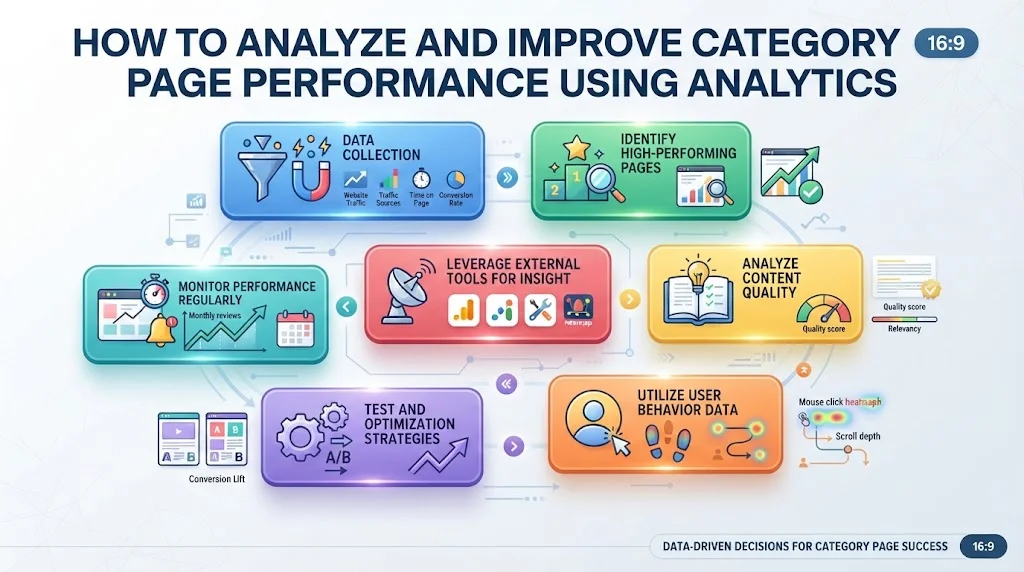
Understanding how to analyze and improve category page performance can significantly enhance your website’s overall effectiveness. It’s essential to take a strategic approach using analytics tools that allow you to identify weak spots and capitalize on strong areas.
Data Collection
Start by collecting data from various sources. Google Analytics is a powerful tool that provides detailed insights into behavior on your category pages. Key metrics to focus on include:
- Traffic Sources: Understand where your visitors are coming from.
- Bounce Rate: Identify how many visitors leave after viewing only one page.
- Average Time on Page: Longer durations can indicate engaging content.
- Conversion Rate: Track how many visitors make a purchase or complete a desired action.
Identify High-Performing Pages
Next, filter your data to discover which category pages are performing well. Look for pages with a high conversion rate or low bounce rate. Analyzing these successful pages can provide direction for optimizing underperforming ones. Make notes on:
- Content layout and structure
- Key phrases and keywords used
- Visual elements like images or videos that encourage engagement
Analyze Content Quality
The content on your category pages should deliver value. Make sure your product descriptions and related content are informative and engaging. In Google Search, quality matters. Consider the following elements:
- Relevance: Ensure that the content is related closely to the category.
- Keyword Optimization: Use relevant keywords throughout but avoid keyword stuffing. Tools like Moz can help you find the right terms.
- Readability: Aim for simple language. Break up long paragraphs and use bullet points for clarity.
Utilize User Behavior Data
Analyze user behavior through tools like heatmaps from Hotjar. Heatmaps show where users click and how they navigate your pages. This data can reveal:
- Areas that gain attention but don’t convert.
- Content that users skim or ignore, indicating a need for improvement.
Testing and Optimization Strategies
Once you’ve gathered your data, it’s time to implement changes and use A/B testing to determine what works best. Consider the following strategies:
- Content Testing: Experiment with different headlines, descriptions, or images to see what resonates with your audience.
- Call-to-Action (CTA) Optimization: Adjust your CTAs to be more compelling. Try different placements, colors, or text.
- SEO Elements: Update title tags and meta descriptions for better visibility in search engines. Check tools like Ahrefs for keyword performance.
Monitor Performance Regularly
Improving category page performance is not a one-time task. Regular monitoring is key. Set monthly or quarterly reviews to assess performance and make incremental changes based on the latest data. During these reviews, track:
- Trends in traffic and conversions
- Progress on any changes made
- User feedback and seasonal variations in behavior
Leverage External Tools for Insight
Consider integrating more advanced tools for deeper analysis. Services from SEMrush or Google Analytics can provide insights on competitors and extend your analysis beyond your website. Keep learning and refining your approach.
By regularly analyzing category page performance and employing effective strategies for How To Optimize Category Pages, you can create a more engaging experience for your users and improve overall site conversions. Start today, and take your category pages to the next level!
Conclusion
Optimizing your category pages is essential for boosting both search engine rankings and user engagement. By implementing effective strategies that focus on SEO, you can create a solid foundation for your site’s visibility. Remember, enhancing user experience is not just an afterthought; it’s a crucial part of your optimization process. When users find what they’re looking for quickly and easily, they’re likely to stay longer and engage more with your content.
Key elements such as clear headings, engaging descriptions, and eye-catching visuals on every category page can significantly enhance user interaction. These elements not only guide users through your offerings but also provide them with valuable information that adds to their browsing experience.
Moreover, a well-organized content structure helps visitors navigate seamlessly through multiple categories, making your site more user-friendly and efficient. This organization also plays a vital role in how search engines crawl and index your pages, contributing to improved rankings.
Using analytics to analyze category page performance allows you to identify strengths and weaknesses, guiding further improvements. Monitoring metrics such as bounce rates, time spent on the page, and user interactions can highlight what works and what doesn’t. This ongoing process helps you refine your strategy over time, ensuring your category pages remain relevant and engaging. By focusing on these aspects, you’re not just optimizing for search engines; you’re creating a richer, more satisfying experience for your users.