
Best Practices for Mobile SEO


ATTENTION: Want to Learn Affiliate Marketing from Successful Affiliates?
In today’s digital landscape, optimizing for mobile devices is crucial for reaching your audience effectively. Mobile SEO involves strategies focused on enhancing the visibility and performance of your website on mobile devices. Here are the best practices to consider for successful Best Practices for Mobile SEO:
Responsive Design is Essential
Creating a responsive design allows your website to adjust smoothly across various screen sizes. This approach improves user experience, ultimately leading to lower bounce rates and higher engagement. Google prioritizes responsive sites in its ranking algorithms, ensuring they appear higher in search results.
Fast Load Times Matter
Speed is key! Mobile users expect websites to load quickly. Aim for a load time of under three seconds. You can improve load times by:
- Compressing images for faster delivery.
- Minifying CSS and JavaScript files.
- Using browser caching to reduce reload times.
Optimize for Local Search
Mobile searches often have local intent. Make sure your local SEO strategies are mobile-friendly. Utilize Google My Business listings, local keywords, and ensure your contact information is easily accessible. This helps you appear in local results when users search for services near them.
Enhance Readability and Usability
Your content should be easy to read on smaller screens. Keep these tips in mind:
- Use larger font sizes and clear, simple language.
- Break content into shorter paragraphs and bullet points for clarity.
- Ensure clickable elements are sufficiently spaced to prevent errors.
Remember, navigating your site should feel natural. Users will leave if they find it hard to read or interact with.
Utilize Structured Data Markup
Structured data helps search engines understand your content better and provides rich snippets in search results. Implementing schema markup can improve your mobile listing’s appearance, helping attract more clicks. Explore Schema.org to learn how to implement structured data.
Focus on Mobile Keywords
Mobile search behavior often differs from desktop. Use tools like Google Trends to identify keywords that are popular among mobile users. Craft content that addresses these keywords, optimizing for voice search where applicable. Content that aligns with the way people speak or ask questions can yield significant traffic.
Test Your Mobile Friendliness
Regularly test your website for mobile friendliness. Use online tools such as the Google Mobile-Friendly Test. It provides insights on how well your site performs on mobile devices, pointing out areas for improvement.
Monitor Analytics and User Behavior
Analytics provide valuable data on how users interact with your mobile site. Utilize Google Analytics to track metrics such as bounce rates, session duration, and the number of mobile users. This information can guide your optimization efforts. For tailored insights, consider tools like Hotjar to observe user behavior.
Ensure All Content is Accessible
Make sure that all of your website’s content is available to mobile users. Use a single URL for both mobile and desktop versions to avoid duplicate content issues. Ensure that any pop-ups or intrusions do not block essential content; these can frustrate users on mobile devices.
| Best Practice | Description |
|---|---|
| Responsive Design | Site adjusts for various screen sizes for better usability. |
| Fast Load Times | Optimize load speed for effective user engagement. |
| Local SEO | Target local searches through optimized listings and queries. |
| Structured Data | Enhances search results with enriched snippets. |

By implementing these Best Practices for Mobile SEO, you can significantly enhance user experience and improve your website’s rankings in search engine results. Stay ahead in the competitive digital landscape by continuously optimizing your mobile presence.
The Importance of Responsive Design in Mobile Optimization
In today’s digital landscape, the significance of responsive design in mobile optimization cannot be overstated. More than half of global internet traffic now comes from mobile devices, which makes it essential for businesses and website owners to create a seamless user experience on small screens. Responsive design not only enhances usability but also improves search engine ranking, making it a crucial aspect of any web strategy.
Responsive design ensures that a website adjusts smoothly to different screen sizes, providing an optimal viewing experience across a wide range of devices. This means visitors can easily read and navigate your site without excessive resizing, panning, or scrolling. Some key reasons underscore the importance of implementing responsive design for mobile optimization:
- Improved User Experience: A responsive design means a consistent and user-friendly interface, leading to longer page visits and lower bounce rates.
- SEO Benefits: Google favors mobile-friendly websites, boosting their rankings on search result pages, which can drive more organic traffic.
- Cost-Effective: Maintaining a single responsive site is generally more efficient than managing separate mobile and desktop versions.
- Adaptability: As new devices emerge with different screen sizes, responsive designs can adapt, ensuring long-term viability.
- Faster Load Times: Often, responsive sites are optimized for faster loading, which is a critical factor in user satisfaction and SEO.
When considering mobile optimization, the following best practices should guide your approach:
- Fluid Grids: Utilize a flexible grid layout for your design, allowing elements to resize proportionally according to the screen size.
- Flexible Images: Ensure that your images can scale, maintaining quality without exceeding their containing element’s dimensions.
- Media Queries: Implement CSS media queries to apply different styles based on the device’s characteristics, like width and orientation.
- Viewport Meta Tag: This tag instructs browsers to adjust the page dimensions and scaling to suit the device, crucial for mobile usability.
- Minimize Load Speed: Optimize resources by compressing images and using browser caching to reduce load time.
To further strengthen your mobile optimization strategy, regularly testing your website on various devices and screen sizes is essential. Utilizing tools like Google’s Mobile-Friendly Test can provide insight into how your site performs and highlight areas for improvement.
Among the responsive design elements, mobile-friendly navigation plays a crucial role in the user experience. It’s important to simplify menus and ensure that buttons are clickable and adequately spaced. Here are some additional tips for effective mobile navigation:
- Keep It Simple: Limit the number of options in your navigation menu to avoid overwhelming users.
- Use Descriptive Labels: Clear and descriptive menu labels ensure users know what to expect when they click an option.
- Prioritize Important Content: Make sure that essential features are easily accessible without extensive searching.
Another critical component in responsive design is considering the touch experience. When designing for mobile, remember that users interact with their devices differently compared to desktops. Here are practical tips for enhancing the touch experience:
| Touch Element | Best Practices |
|---|---|
| Buttons | Ensure they are easy to tap by making them larger and sufficiently spaced. |
| Forms | Simplify forms and reduce the number of required fields to enhance completion rates. |
| Scroll-Links | Enable smooth scrolling for better navigation among long pages or sections. |
Responsive design is not just about aesthetics; it is a powerful tool that impacts performance and engagement. By utilizing mobile optimization best practices, you can improve your site’s reach and effectiveness. Websites like Smashing Magazine provide valuable resources and case studies that can help you solidify these strategies effectively.
These practices into your web design not only facilitates a better user experience but also positions your site favorably in search engine results. Investing in a responsive design is crucial for keeping up with the evolving digital environment, ensuring that you appeal to both users and search engines alike.
As mobile usage continues to grow, consider adopting these strategies to enhance your website’s mobile optimization. For further insights, check additional resources from Google’s Web.dev, which offers in-depth knowledge on responsive web design fundamentals.
Mobile Page Speed: How It Affects SEO and User Experience
In today’s digital age, mobile page speed is critical for both search engine optimization (SEO) and user experience. With more consumers using mobile devices to browse the web, having a fast-loading site isn’t just a nice-to-have; it’s a must. You might wonder how mobile page speed impacts SEO and how it affects the overall experience for users. Let’s break it down.
First, it’s essential to understand that Google takes mobile page speed as a significant ranking factor. This means that if your website loads slowly on mobile devices, you could see a drop in your rankings on search engine results pages (SERPs). Users are quick to leave slow-loading sites, causing higher bounce rates and lower engagement. This relationship between speed and user experience plays a vital role in your website’s overall performance.
Why Mobile Page Speed Matters
Fast-loading pages retain users and improve their experience. Let’s look into some reasons why mobile page speed is so critical:
- User Retention: Research shows that 53% of mobile users abandon sites that take longer than three seconds to load. The faster your page loads, the more likely users will stay and interact with your content.
- Improved SEO Rankings: Google uses page speed as a ranking factor. A faster site can lead to better search visibility.
- Enhanced Conversion Rates: Faster load times can increase conversion rates. A mere one-second delay in loading time can cause conversion rates to drop significantly.
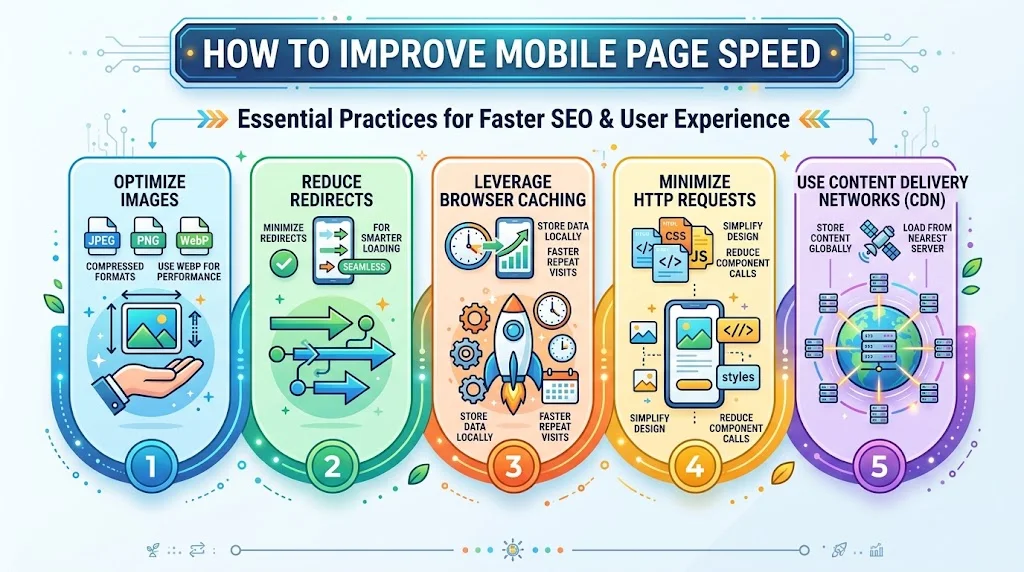
How to Improve Mobile Page Speed
Enhancing your mobile page speed is essential for improving SEO and user experience. Here are some best practices you should consider:
- Optimize Images: Large image files can slow down loading times. Use compressed formats like JPEG or PNG, and consider using alternative formats like WebP for better performance.
- Reduce Redirects: Each redirect can slow down your page load. Minimize the number of redirects for a more seamless user experience.
- Leverage Browser Caching: Setting up browser caching allows users to load your pages faster during repeat visits.
- Minimize HTTP Requests: Each component on your page (images, scripts, styles) requires an HTTP request. Reduce these requests by simplifying your design.
- Use Content Delivery Networks (CDN): CDNs can help deliver content faster by storing it in multiple locations around the globe. This ensures users load content from the nearest server.
Testing Mobile Page Speed
It’s crucial to regularly test the speed of your mobile website. Various tools can help you with this:
- Google PageSpeed Insights: Offers insights on performance and suggestions for improvements.
- KeyCDN Tools: Allows you to test page speed from different locations globally.
- GTmetrix: An in-depth analysis of how well your site loads and what you can do to optimize it.
Measuring the Impact of Page Speed on User Experience
To illustrate the importance of mobile page speed, consider the following metrics:
| Page Load Time (seconds) | Bounce Rate (%) | Conversion Rate (%) |
|---|---|---|
| 1 second | 9% | 2.5% |
| 3 seconds | 32% | 1.5% |
| 5 seconds | 90% | 0.5% |
As seen in the table above, as page load time increases, the bounce rate rises and the conversion rate declines. This reinforces the need to prioritize mobile page speed.
These Best Practices for Mobile SEO can transform your website’s performance. Speed is vital for capturing user interest and maintaining higher rankings on search engines. It’s not just about being seen; it’s about ensuring visitors stay, explore, and ultimately convert. Embrace these strategies, and you’ll create a mobile site that not only ranks well but also provides an exceptional experience for your users.
Local SEO: Optimizing Your Website for Mobile Users
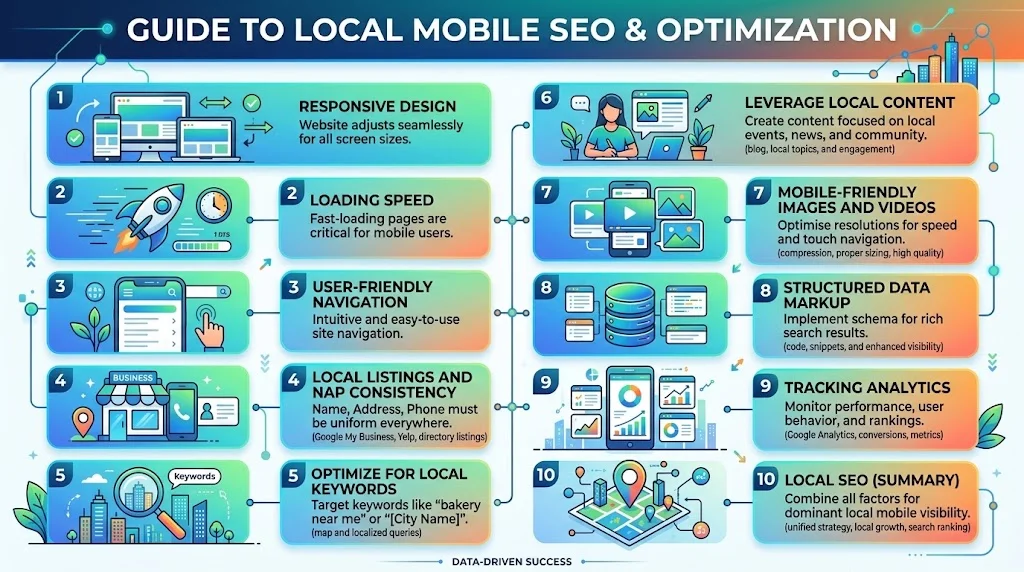
In today’s digital world, optimizing your website for mobile users is essential, especially when it comes to local SEO. With more people using their smartphones for local searches, ensuring your site is mobile-friendly can enhance visibility and improve user experience. Here are several best practices to optimize your website for mobile users.
Responsive Design
First and foremost, embracing a responsive web design is crucial. This approach allows your website to adjust and fit various screen sizes seamlessly. Google prioritizes mobile-friendly sites in its search results, which means a responsive design can contribute significantly to your local SEO efforts.
Loading Speed
Mobile users often expect fast-loading websites. To improve the loading speed of your website, consider the following:
- Compress images and files.
- Reduce server response time.
- Use browser caching.
- Minimize redirects.
A faster website leads to lower bounce rates and better user engagement, factors that positively influence your local search rankings.
User-Friendly Navigation
Ensure that your navigation is intuitive and easy to use on a mobile device. Here are some navigation tips:
- Use a single-column layout to simplify scrolling.
- Keep menus minimal and well-organized.
- Include a search function for easy access to content.
- Make buttons and links easy to tap, ensuring they are spaced apart to prevent mistakes.
By enhancing user experience with simplified navigation, you can keep visitors on your site longer and encourage them to engage with your content.
Local Listings and NAP Consistency
Optimizing your local listings is vital for boosting mobile SEO. Ensure your Name, Address, and Phone number (NAP) are consistent across all platforms, including Google My Business, Yelp, and social media. Inconsistent information can confuse search engines and users alike, negatively affecting your local rankings.
Optimize for Local Keywords
Identify local keywords relevant to your niche and incorporate them naturally into your content. For example, if you’re a bakery in New York, using phrases like “best bakery in NYC” throughout your content can help search engines recognize your relevance to local queries.
Leverage Local Content
Creating content that caters to your local audience can enhance your mobile SEO efforts. Consider producing blog posts or articles that discuss local events, news, or community highlights. This strategy not only improves search rankings but also positions you as a trusted local authority. You might find inspiration from websites like Local SEO Guide and Moz.
Mobile-Friendly Images and Videos
When adding images and videos to your site, ensure they are optimized for mobile. Use appropriate resolutions to avoid long loading times. You can also utilize alt text for images to make them accessible and improve SEO. This way, if a user searches for specific images, your content will appear in their results.
Structured Data Markup
Implement structured data markup, or schema markup, to help search engines understand your content better. This practice can enhance your search listings with rich snippets, improving visibility in search results. Amazon Small Business has a helpful guide on structured data that you can follow. You can access it here.
Tracking Analytics
Regularly analyze your website’s performance using tools like Google Analytics. Pay attention to mobile traffic trends, bounce rates, and user engagement metrics. This information will help you understand how users are interacting with your mobile site and what areas might need improvement.
By applying these best practices, you can significantly improve the mobile-friendliness of your website and enhance your local SEO. Remember, a well-optimized mobile site can lead to increased visibility in search results, more visitors, and ultimately, higher conversion rates. For more insights on mobile optimization, explore Search Engine Journal for expert articles and updated strategies.
Voice Search and Its Impact on Mobile SEO Tactics
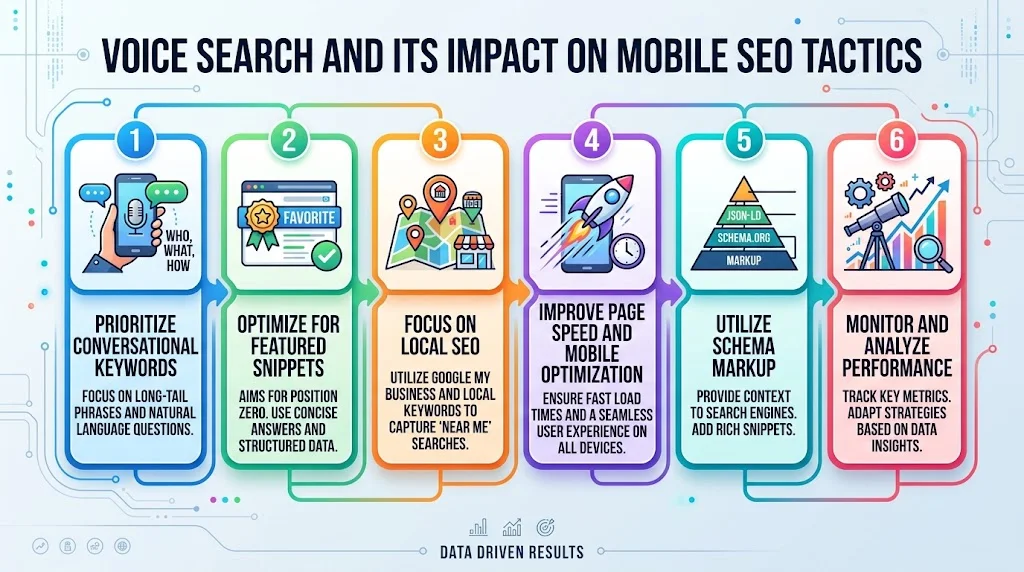
In today’s digital world, voice search is transforming the way users interact with their devices. More people are turning to their smartphones, tablets, and smart speakers to perform daily activities, making voice search optimization essential for mobile SEO. If you’re looking to boost your website’s performance, it’s crucial to adapt your mobile SEO tactics to accommodate this shift.
Understanding how users conduct voice searches is a key factor in optimizing your content. Typically, voice searches are longer and more conversational than text searches. For instance, instead of typing “best coffee near me,” a user may ask, “What is the best coffee shop nearby?” This change in user behavior means that businesses must rethink their keyword strategies accordingly.
Prioritize Conversational Keywords
To tap into the power of voice search, you should focus on integrating long-tail keywords and natural language phrases into your content. These are typically questions or phrases users might say aloud. Strategies to implement include:
- Use questions as headings and subheadings to align with user search behavior.
- Incorporate common phrases that reflect how people would naturally speak.
- Create content that answers specific questions related to your niche.
Optimize for Featured Snippets
Featured snippets are quick answers that appear at the top of Google’s search results. They are particularly vital for voice search, as voice assistants often read them aloud. To optimize for snippets, consider these strategies:
- Provide clear, concise answers to common questions in your content.
- Use bullet points or numbered lists for clarity.
- Include structured data markup to help search engines understand your content better.
Focus on Local SEO
Many voice searches are local in nature, as users often seek information relevant to their immediate location. Therefore, it’s essential to enhance your local SEO practices. Here’s how:
- Claim your Google My Business listing and keep it updated.
- Encourage customer reviews and respond to them promptly.
- Use local keywords in your content to attract nearby customers.
Improve Page Speed and Mobile Optimization
With voice search happening predominantly on mobile devices, ensuring your website loads quickly and is mobile-friendly is paramount. Google’s algorithm favors fast-loading websites, which can also impact your search rankings. Consider these areas:
- Compress images to reduce load times.
- Use a responsive design that adjusts to various screen sizes.
- Minimize pop-ups that may hinder user experience on mobile devices.
Utilize Schema Markup
Schema markup helps search engines understand the content on your site better, which can improve your chances of appearing in voice search results. By implementing schema markup, you can specify details about your business, such:
- Timings of operation.
- Contact information.
- Location and services offered.
You can learn more about using schema from the official Schema.org website.
Monitor and Analyze Performance
Regularly evaluating the performance of your mobile and voice search efforts is essential for ongoing optimization. Utilize tools like Google Analytics and Google Search Console to track how well your content ranks for voice queries. Adjust your strategies accordingly based on this data.
By implementing these practices, you can enhance your mobile SEO for the growing voice search trend. Staying proactive ensures that your website remains competitive while providing valuable information to your users. For further insights, explore resources like Moz or Search Engine Land to stay updated on the latest trends and strategies in mobile SEO and voice search.
Conclusion
Effective mobile SEO is crucial in today’s digital landscape, where more users access the internet through mobile devices than ever before. Implementing Best Practices for Mobile SEO ensures your website not only ranks well in search results but also provides an optimal experience for users. Responsive design stands out as a fundamental strategy, allowing your site to adapt seamlessly to various screen sizes, enhancing user satisfaction.
Page speed is another vital factor in mobile optimization; a slow-loading site can lead to high bounce rates and ultimately hurt your search rankings. Prioritizing fast load times keeps users engaged and improves their overall experience.
Local SEO strategies are equally important, particularly for businesses targeting nearby customers. Making your site mobile-friendly with elements like location-based keywords can drive significant traffic and conversions from mobile users.
Moreover, the rise of voice search is transforming how people seek information on their mobile devices. Tailoring your content to include natural language and question-based queries can boost your visibility in this growing area.
By focusing on these key strategies—responsive design, page speed, local SEO, and adapting to voice search—you set a solid foundation for your mobile SEO efforts. As user habits and search engines continue to evolve, staying informed and proactive will ensure your website remains competitive and relevant for mobile users. Engaging content and an exceptional user experience will ultimately drive traffic and foster loyalty, making your mobile optimization efforts well worth the investment.