
Best WordPress Caching Plugins Comparison

ATTENTION: Want to Learn Affiliate Marketing from Successful Affiliates?
When it comes to improving performance on your WordPress site, caching is crucial. WordPress caching plugins can significantly boost your page loading speed and enhance user experience. With numerous options available, deciding which one to choose can be perplexing. Below is an in-depth comparison of the best WordPress caching plugins based on features, performance, and user-friendliness.
W3 Total Cache
W3 Total Cache is one of the most popular caching plugins available. It’s known for its robust features and flexibility. This plugin enables page caching, database caching, object caching, and browser caching.
- Features: Compatibility with Content Delivery Networks (CDNs), support for mobile caching, and minification of scripts and styles.
- Performance: Often boosts site speed by up to 80%.
- User-Friendliness: More technical compared to other plugins, requiring some configuration.
WP Super Cache
Another great option, WP Super Cache is recognized for its simplicity and effectiveness. It generates static HTML files from your dynamic WordPress blog.
- Features: Caching for mobile devices, preload feature to cache pages for faster loading times, and easy integration with CDNs.
- Performance: Can improve speed significantly, particularly for high-traffic sites.
- User-Friendliness: Extremely easy to set up with minimal configuration required.
WP Rocket
WP Rocket is a premium caching plugin that simplifies caching setup and offers premium features out of the box.
- Features: Page caching, cache preloading, static file compression, and lazy loading of images.
- Performance: Known to have a dramatic effect on website speed.
- User-Friendliness: User-centric interface and easy to configure.
Cache Enabler
Cache Enabler is a lightweight caching plugin that offers a straightforward approach to WordPress caching.
- Features: Simple setup, efficient caching system, and support for WebP image format.
- Performance: Provides good performance for smaller websites.
- User-Friendliness: Very easy to use, making it suitable for beginners.
Fastest Cache
Fastest Cache is another effective caching option that generates static HTML files while supporting features to enhance site speed.
- Features: Minification and combination of CSS and JS, browser caching, and image optimization.
- Performance: Can reduce loading times considerably.
- User-Friendliness: Intuitive interface and straightforward setup process.
Comparison Table
| Plugin | Key Features | Performance | User-Friendliness |
|---|---|---|---|
| W3 Total Cache | Comprehensive caching options, CDN support | 80% speed improvement | Moderate |
| WP Super Cache | Static HTML file creation, mobile caching | Significant for high-traffic | Easy |
| WP Rocket | Comprehensive premium features | Dramatic speed improvement | Very user-friendly |
| Cache Enabler | Lightweight and simple | Good for smaller sites | Very easy |
| Fastest Cache | Minification and image optimization | Considerable | Intuitive |
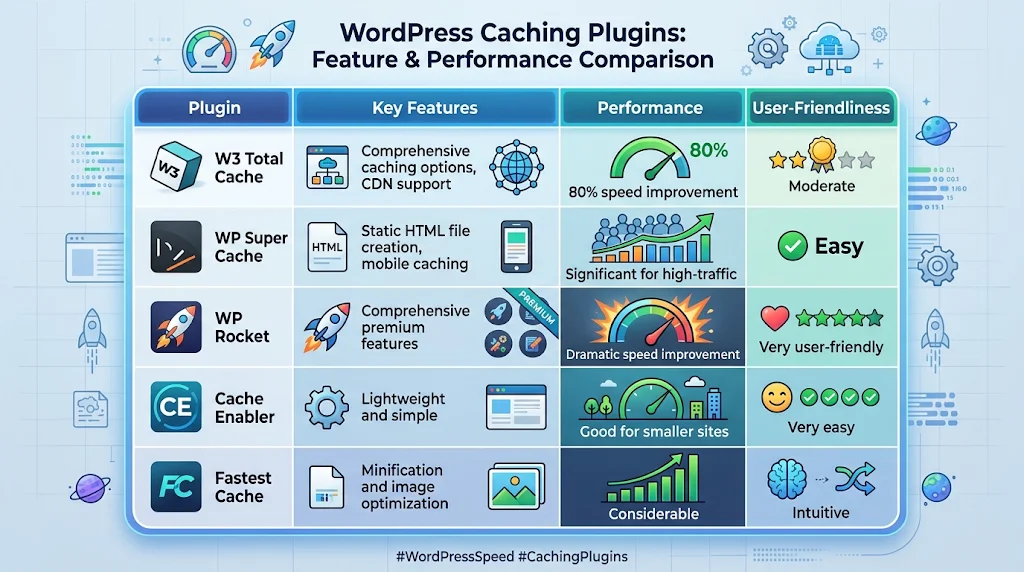
Choosing the right caching plugin for your WordPress site depends on your specific needs. If you want a powerful and flexible option, consider W3 Total Cache. For an easier setup, WP Super Cache or Cache Enabler could be the way to go. If you’re willing to invest in premium features, WP Rocket stands out for its quality and results. For sites focused on simplicity and minimalism, Fastest Cache offers a solid performance.
To learn more about WordPress caching plugins, visit W3 Total Cache, WP Super Cache, and WP Rocket.
Key Features to Look for in WordPress Caching Solutions
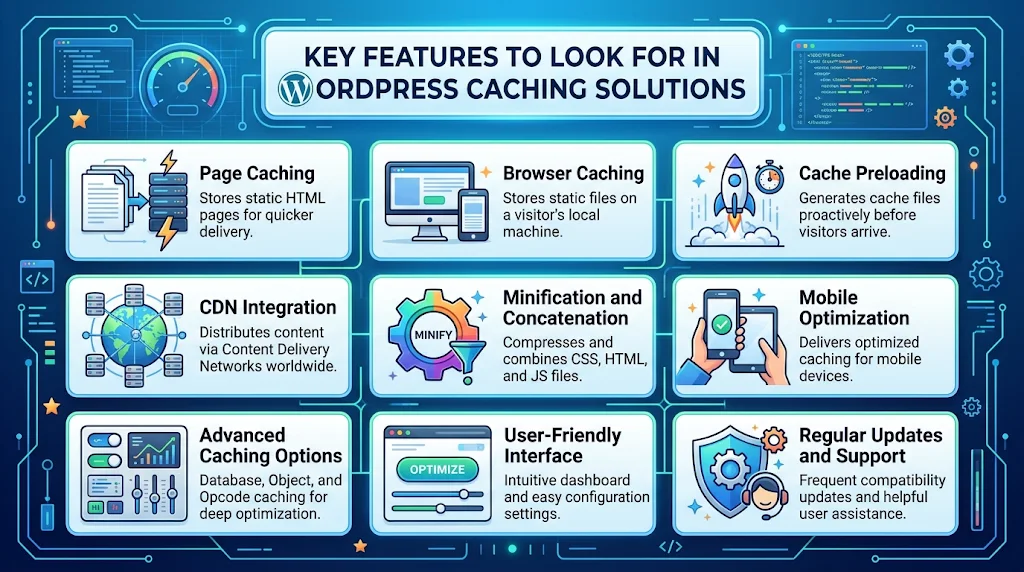
When searching for the ultimate WordPress caching solution, several key features can significantly enhance your website’s performance. Choosing the right caching plugin can help improve loading times, boost user experience, and optimize resource usage. Below are essential features you should consider in your quest for the best caching plugin.
Page Caching
Page caching is the cornerstone of any effective caching solution. It stores a static version of your web pages, reducing the load on your server. This allows users to access your content faster, as the server doesn’t need to process PHP scripts for every request. Plugins like WP Rocket offer advanced page caching options that can dramatically improve your site speed.
Browser Caching
Browser caching allows your website visitors’ browsers to store certain elements of your website. When users return, their browsers can load these elements from cache rather than downloading them again. Look for plugins that easily enable browser caching to minimize loading times for repeat visitors.
Cache Preloading
Cache preloading generates cache files before any visitors arrive. This proactive feature ensures that when a user accesses your site, they receive a quick response rather than waiting for cache generation. Well-designed plugins like W3 Total Cache come with cache preloading to enhance performance from the moment a visitor lands on your site.
CDN Integration
A Content Delivery Network (CDN) can further enhance the speed of your website by distributing content across various servers globally. Many top caching plugins include built-in CDN integration that allows you to link your caching solution with popular CDNs like Cloudflare and MaxCDN. This feature results in faster load times, especially for users located far from your hosting server.
Minification and Concatenation
Minification involves removing unnecessary characters in CSS, HTML, and JavaScript files without affecting functionality. Concatenation merges multiple files into a single file to reduce the number of server requests. Look for plugins that automatically handle these processes, such as WP Fastest Cache, boosting your website’s overall speed.
Mobile Optimization
In today’s digital age, mobile optimization is crucial. Ensure your caching plugin provides options to optimize mobile versions of your site efficiently. Mobile caching views should be fluid and quick. Solutions like Comet Cache are known for their robust mobile features that can help maintain fast loading times across devices.
Advanced Caching Options
For those looking for more than just basic caching, consider plugins providing advanced options like database caching, object caching, or opcode caching. These features improve performance further by storing queries and complex operations in a manner that eliminates redundant processing. A caching solution like LiteSpeed Cache is renowned for incorporating many advanced caching strategies.
User-Friendly Interface
A complex interface can hinder your ability to tune your caching settings. An intuitive dashboard with clear options is essential. Choose a plugin that not only offers robust features but presents them in an easy-to-use format. User-friendly plugins can save time and simplify the optimization process.
Regular Updates and Support
When investing in caching solutions, regular updates are vital for compatibility with the latest WordPress versions and security features. A well-supported plugin ensures ongoing improvements and user assistance when needed. Always gauge the support community surrounding a plugin; effective support can make all the difference.
By keeping these essential features in mind, you can select a caching plugin that aligns perfectly with your website’s needs. Investing time in the right solution can yield significant benefits, resulting in a faster, more efficient site that enhances user experience and improves SEO performance.
Utilizing the right caching plugin tailored to your website’s needs can dramatically improve your site’s performance and user satisfaction. Make sure to evaluate and choose wisely.
Performance Impact of Caching Plugins on WordPress Websites
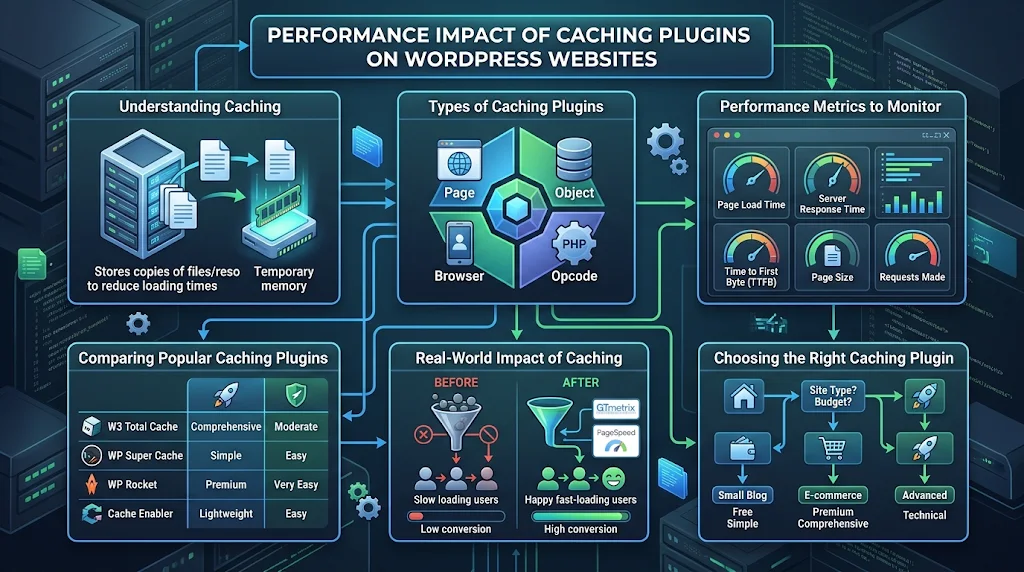
WordPress websites play a crucial role in online presence, and the performance of these sites significantly affects user experience and search engine ranking. One way to enhance the performance of your WordPress site is through caching plugins. These tools can help reduce your site’s load time, improve overall efficiency, and provide a smoother experience for visitors. In this article, we will explore how caching plugins impact performance and what to expect when implementing them.
Understanding Caching
Caching is a method that stores copies of files or resources in temporary storage areas to reduce loading times. For WordPress, caching plugins generate static HTML files from dynamic content to serve users more quickly. This means that instead of querying the database for each page load, the server can deliver a pre-generated static page, resulting in faster response times.
Types of Caching Plugins
When looking at WordPress caching plugins, it’s important to recognize the different types available:
- Page Caching: Stores static versions of pages to reduce server load.
- Object Caching: Caches database query results to speed up resource-heavy queries.
- Browser Caching: Stores certain files on the user’s local device, reducing loading times for repeat visitors.
- Opcode Caching: Compiles PHP code and saves it for faster execution.
Performance Metrics to Monitor
To measure the impact of caching plugins effectively, consider tracking the following performance metrics:
- Page Load Time: How long it takes for a webpage to fully load.
- Server Response Time: The time taken by the server to respond to requests.
- Time to First Byte (TTFB): Measures the time from the initial request to the first byte of the response.
- Page Size: The total size of a web page, including all its resources.
- Requests Made: The number of HTTP requests for various resources on the page.
Comparing Popular Caching Plugins
Here’s a brief comparison of some popular caching plugins that can significantly enhance your WordPress website’s performance:
| Plugin Name | Page Caching | Object Caching | Browser Caching | Ease of Use |
|---|---|---|---|---|
| W3 Total Cache | Yes | Yes | Yes | Moderate |
| WP Super Cache | Yes | No | Yes | Easy |
| WP Rocket | Yes | No | Yes | Very Easy |
| Cache Enabler | Yes | No | Yes | Easy |
Real-World Impact of Caching
Implementing a caching plugin can result in tangible improvements in your website’s performance:
- Improved User Experience: Faster load times create a more enjoyable browsing experience.
- Higher Conversion Rates: Users are more likely to complete purchases on sites that load quickly.
- Better SEO Rankings: Search engines favor websites that load more efficiently.
For specific examples, businesses like Adsy have reported increases in their loading speeds and a significant drop in bounce rates after leveraging caching solutions. Additionally, a benchmark test on SitePoint showed a 40% improvement in load times after installing a popular caching plugin.
Choosing the Right Caching Plugin
When selecting a caching plugin, it’s essential to evaluate your website’s specific requirements:
- If you have a small blog or personal site, a lightweight option like WP Super Cache may suffice.
- For e-commerce sites, investing in a more comprehensive solution like WP Rocket can lead to better performance.
Caching plugins are invaluable tools for optimizing WordPress site performance. The right plugin helps not only in enhancing loading speeds but also ultimately impacts user engagement and search engine visibility. Take the time to assess your needs and choose a caching solution that aligns with your WordPress goals.
User Experience: How Caching Enhances Website Speed
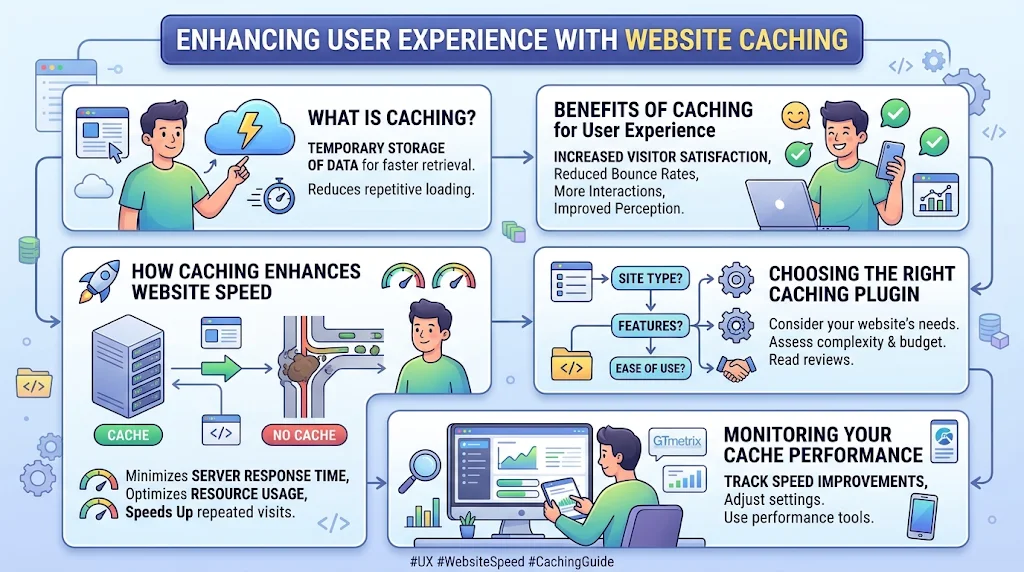
In the fast-paced world of the internet, website speed significantly impacts user experience. When a visitor lands on your site, they expect everything to load quickly. If it takes too long, they may leave and never return. This is where caching plays a vital role. By storing copies of your webpage’s data, caching enhances performance and boosts overall speed.
What is Caching?
Caching is a technique where data is temporarily stored in a “cache,” or a special storage location. This allows frequently accessed information to be retrieved faster than if it had to be fetched anew from the server each time. There are various forms of caching, including:
- Browser Caching: Stores files locally on a user’s device to speed up repeated visits.
- Page Caching: Saves a complete webpage as an anti-duplicated version, reducing server workload.
- Object Caching: Stores database queries, so they don’t have to run for every request.
Benefits of Caching for User Experience
Implementing caching can greatly improve user experience. Here are some key benefits:
- Faster Load Times: Caching significantly reduces load times, as users can access pre-stored data quickly.
- Increased Site Stability: With less demand on servers, caching can prevent slowdowns and crashes during traffic surges.
- Better SEO Rankings: Search engines like Google favor faster websites, leading to better rankings.
- Reduced Server Costs: Less frequent requests to the database can lower hosting costs.
How Caching Enhances Website Speed
Understanding how caching boosts speed is essential for anyone looking to improve their website. Here are key mechanics involved:
- Reduced Server Response Time: Caching minimizes the time needed to deliver web pages by decreasing server calls.
- Efficient Resource Usage: It optimizes server resources by limiting database processing, which is usually the slowest part of web delivery.
- Improved Performance During High Traffic: With caching, your website can handle more visitors without crumbling under pressure.
Choosing the Right Caching Plugin
There are many caching plugins to choose from, particularly for WordPress users. Here are some popular options:
| Plugin Name | Features | Best For |
|---|---|---|
| WP Rocket | Page caching, preloading, and image optimization | Beginners and advanced users |
| W3 Total Cache | Page caching, database caching, and CDN support | Advanced users |
| WP Super Cache | Static page generation and easy setup | Beginner-friendly |
Monitoring Your Cache Performance
After implementing caching, it’s essential to monitor its performance. Use tools like:
- GTmetrix
- Google PageSpeed Insights
- Pingdom Tools
These tools will help you assess speed improvements and troubleshoot any issues that arise.
Ultimately, caching is an invaluable asset for enhancing website speed and improving user experience. By understanding its mechanisms and choosing the right tools, you can create a seamless, fast, and engaging online environment for your visitors.
Troubleshooting Common Issues with WordPress Caching Plugins
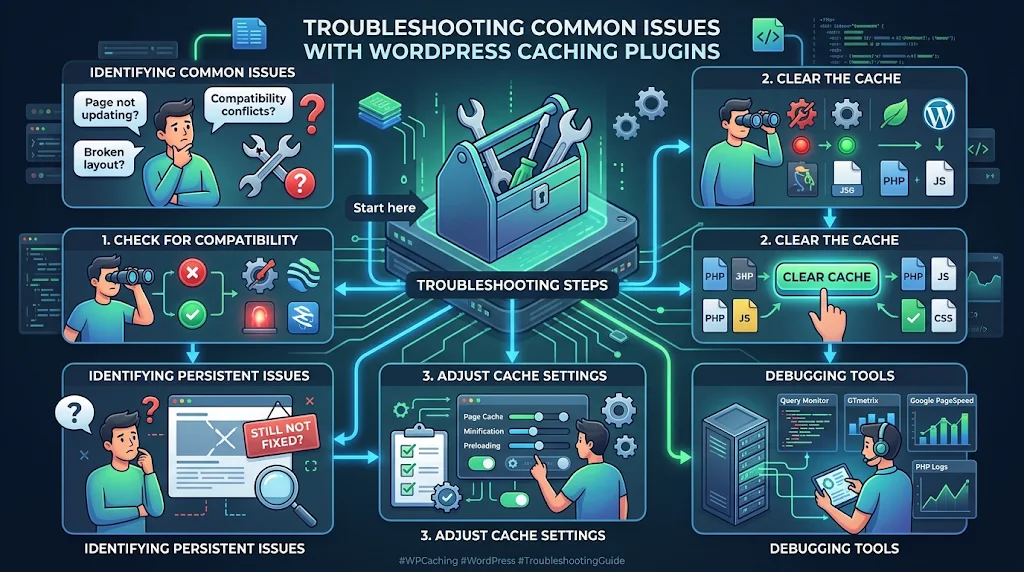
WordPress caching plugins are essential for improving website speed and performance. However, users may encounter several common issues when utilizing these plugins. Understanding how to troubleshoot these problems can save you time and enhance your site’s overall efficiency.
Identifying Common Caching Plugin Issues
When your WordPress site’s speed isn’t improving, it’s often due to misconfiguration or compatibility issues with caching plugins. Here are some common problems you might face:
- Page not updating: Changes you make to your content might not appear immediately.
- Compatibility conflicts: Some caching plugins may conflict with other plugins or themes.
- Server errors: Excessive caching can lead to server overload and errors.
- Images not loading correctly: Sometimes, cache can interfere with how images are displayed on the site.
Troubleshooting Steps
Resolving the issues caused by caching plugins can often be a straightforward process. Here are detailed steps to troubleshoot common problems:
Check for Compatibility
Ensure your caching plugin is compatible with other plugins and the theme you are using.
- Deactivating other plugins one by one can help identify if a specific plugin is causing the conflict.
- Update all plugins and your theme regularly to avoid compatibility issues.
Clear the Cache
When you make any changes, always clear your cache. This ensures that visitors see the latest content. You can do this manually, depending on the plugin you use. Most caching plugins have a clear cache button in their settings.
Adjust Cache Settings
Improper settings can cause numerous issues. Make sure to check:
- Page caching: Is it enabled? If not, enable it.
- Browser caching: This helps speed up reload times for returning visitors.
- Object caching: If your plugin supports it, ensure it’s properly configured for dynamic data.
Identifying Persistent Issues
If you’re still experiencing problems after troubleshooting, you might have deeper issues.
- Checking your server configuration: Some server settings might need adjustments for the caching plugin to work optimally.
- Contact your hosting provider: They can offer insights and assistance, especially if the server might be causing issues.
Debugging Tools
Tools can help you analyze slow-loading pages or identify which elements are causing issues. Consider the following:
- Google PageSpeed Insights: A great tool for analyzing your page speed and provides suggestions for optimization.
- GTmetrix: Offers detailed reports on performance and provides hints on how to improve. Visit GTmetrix
- Pingdom Tools: Another helpful resource for testing your site’s loading speed. Check Pingdom
When All Else Fails
If you’ve tried everything and the plugin still doesn’t perform as required, you might consider switching to another caching solution. Popular alternatives include:
In closing, successful troubleshooting of WordPress caching plugin issues relies on your understanding of both your site and the tools you’re using. Regular maintenance, thoughtful configuration, and the use of the right resources can keep your site running smoothly and loading quickly.
Conclusion
When considering the best WordPress caching plugins, it’s essential to evaluate the features that align with your website’s specific needs. Each plugin offers unique benefits, from customizable caching options to advanced settings that can optimize performance. Understanding how these caching solutions impact load times is crucial; they enhance user experience significantly by ensuring your site runs smoothly and quickly. Faster websites not only retain visitors but also improve search engine rankings, making them a vital component of your online success.
Moreover, troubleshooting common issues related to caching plugins can help maintain your site’s efficiency and functionality. Knowing how to resolve problems, such as caching conflicts or outdated content, can save you time and enhance your site’s reliability. Implementing the right caching plugin effectively decreases server load and maximizes website speed, providing an overall better experience for your users.
Just remember, the selection of a caching plugin should not be a one-size-fits-all process. Take the time to assess your site’s specific needs and the unique features offered by each plugin. This investment will pay off in improved performance, user satisfaction, and ultimately, a more successful WordPress site. With the right caching solution in place, you can ensure that your website remains fast and responsive, catering to both your audience and search engine demands.