
How to Reduce Website Bounce Rate

ATTENTION: Want to Learn Affiliate Marketing from Successful Affiliates?
Reducing your website’s bounce rate is crucial for engaging users effectively and improving your site’s performance. A high bounce rate means visitors leave your site quickly, often without exploring further. To keep people on your site longer, consider implementing these effective Website Bounce Rate strategies.
Optimize Page Load Speed
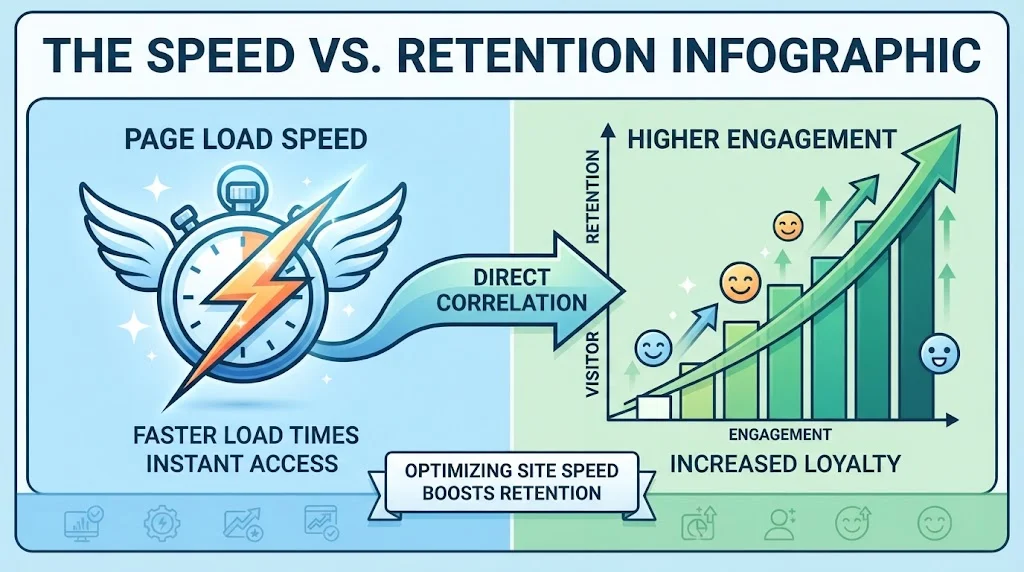
Speed is vital in today’s digital world. Users abandon sites that take too long to load. To get started, use tools like Google PageSpeed Insights to analyze your site’s performance and get recommendations.
- Compress images without losing quality.
- Minimize CSS and JavaScript files.
- Utilize browser caching to store website data.
Improve Content Quality
Your content must be relevant and engaging. High-quality content holds the reader’s attention and encourages them to explore more. Here are key elements to focus on:
- Consistency: Regularly update your content to keep it fresh.
- Value: Provide informative and actionable insights related to your audience’s interests.
- Readability: Use simple language and break up text with headings and bullet points.
Enhance User Experience (UX)
A smooth, pleasant user experience can drastically lower bounce rates. Consider the following tactics:
- Mobile Optimization: Ensure your site is mobile-friendly. You can use Google’s Mobile-Friendly Test to check your site’s compatibility.
- Intuitive Navigation: Make it easy for users to find what they’re looking for. Clear menus and understandable layouts help.
- Use Clear Calls-to-Action: Guide users on what to do next. Use buttons like “Learn More” or “Contact Us” strategically.
Utilize A/B Testing
Testing different versions of your site can pinpoint what works best for your audience. Experiment with:
- Headlines and subheadings.
- Button colors and placements.
- Images and layouts.
Tools like VWO or Optimizely can assist in running these tests and analyzing results.
Create Engaging Visuals
Visual elements can capture attention and reduce bounce rates. Here’s how to leverage visuals:
- Use high-quality images that relate to your content.
- Incorporate videos to explain concepts or provide tutorials.
- Infographics can summarize information effectively.
Implement Internal Linking Strategy
Internal links keep users on your site longer by guiding them to related content. Ensure links are relevant and incorporate them naturally within your articles. This strategy helps visitors discover more of your content, thus lowering the chance of leaving without exploring further.
Monitor Analytics Regularly
Use tools like Google Analytics to track your bounce rate and understand user behavior. Look for trends and patterns that could inform your next steps in reducing bounce rate. Adjust your strategies based on the data collected to see continuous improvement.
Provide Clear Value Proposition
Make sure that your website communicates its value clearly. Within the first few seconds of landing on your page, users should understand what you offer. Use concise language and appealing graphics to communicate your unique selling points.
Utilize Social Proof
Showing user testimonials or reviews can build trust. If potential customers see others have had positive experiences, they may be more inclined to stay and explore your site. Consider using ratings, reviews, and case studies prominently on your pages.
Keeping visitors engaged on your website requires a multi-faceted approach. By optimizing speed, improving content, enhancing user experience, and monitoring performance, you will see a reduction in bounce rate over time. Adapting these strategies helps ensure that users not only visit your site but also stay longer to engage with the content you offer.
The Impact of Content Quality on Visitor Retention
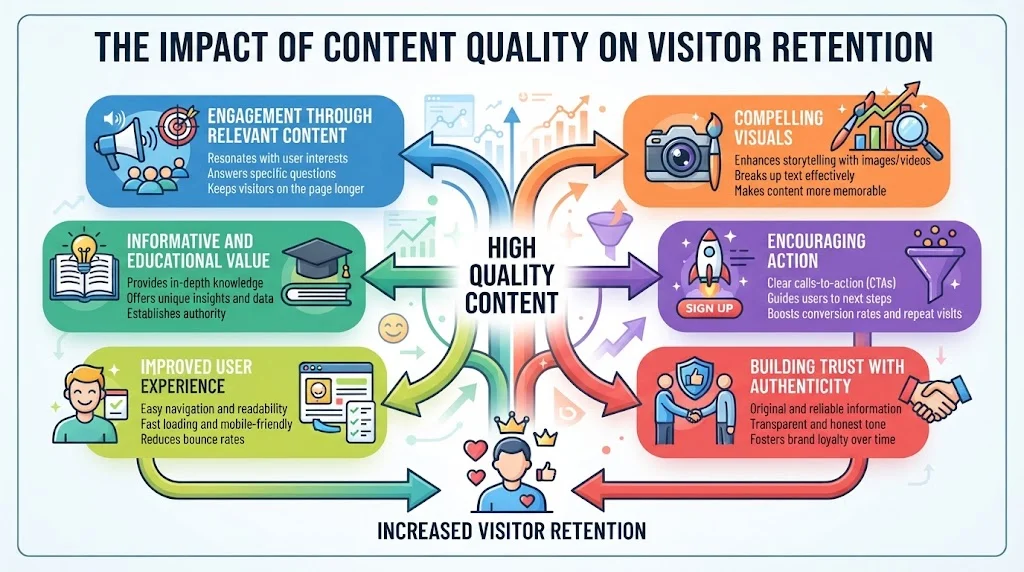
In today’s digital landscape, the quality of your content plays a crucial role in retaining visitors. When users land on your website, they come with certain expectations. If your content meets or exceeds these expectations, they are likely to stay longer and return in the future. Here’s how content quality influences visitor retention.
Engagement Through Relevant Content
High-quality content is relevant to the audience’s interests and needs. When visitors find articles, videos, or images that resonate with them, they are more likely to engage. Studies show that relevant content can increase user engagement by up to 80%. This engagement can take various forms, including:
- Reading blog posts
- Watching videos
- Sharing content on social media
- Leaving comments or feedback
By producing content that speaks directly to the needs of your audience, you create a connection that encourages them to explore more pages on your site.
Informative and Educational Value
Content that provides educational value helps users gain knowledge and skill. If visitors come away from your website feeling more informed, they are likely to return for more. Adding guides, tutorials, or how-to articles can increase the chances of repeated visits. Consider these points:
- Offer step-by-step tutorials related to your niche.
- Include infographics that simplify complex information.
- Utilize case studies to showcase real-world applications.
Providing this level of information not only establishes authority in your niche but also instills trust in your brand.
Improved User Experience
High-quality content isn’t just about the text; it also involves usability. A well-structured website enhances the reading experience. Key factors that contribute to user experience include:
| Factor | Importance |
|---|---|
| Fast loading times | Reduces frustration and keeps users engaged. |
| Mobile optimization | Ensures accessibility for users on all devices. |
| Clear navigation | Makes it easier for users to find relevant content. |
A seamless experience encourages visitors to explore further and decreases the likelihood of them bouncing away.
Compelling Visuals
Visual elements can significantly enhance content quality. Images, videos, and infographics not only break up text but also make the information more digestible. Compelling visuals can:
- Attract attention quickly.
- Enhance understanding of complex concepts.
- Encourage social sharing, increasing reach.
When selecting visuals, ensure they are high-resolution, relevant, and appropriately sized to maintain loading speed.
Encouraging Action
Effective content also leads to interaction. A strong call to action (CTA) can guide your visitors toward the next step, whether signing up for a newsletter, following your social media, or making a purchase. Clear, actionable statements can:
- Direct users to related articles for further reading.
- Encourage signing up for exclusive content.
- Motivate visitors to comment or share their opinions.
This interaction not only nurtures a sense of community but also helps in retaining visitors.
Building Trust with Authenticity
Authenticity plays a vital role in content quality. Users can spot generic or superficial content from a distance. To build trust, consider the following:
- Share personal experiences to create relatability.
- Provide citations and links to credible sources.
- Encourage guest authors to bring diverse perspectives.
An authentic voice not only attracts new visitors but also keeps them coming back.
High-quality content directly impacts how long visitors remain on your site. By focusing on user engagement, educational value, improved user experience, compelling visuals, actionable steps, and authenticity, you create a compelling online presence that nurtures visitor retention.
Designing User-Friendly Navigation to Keep Users Engaged
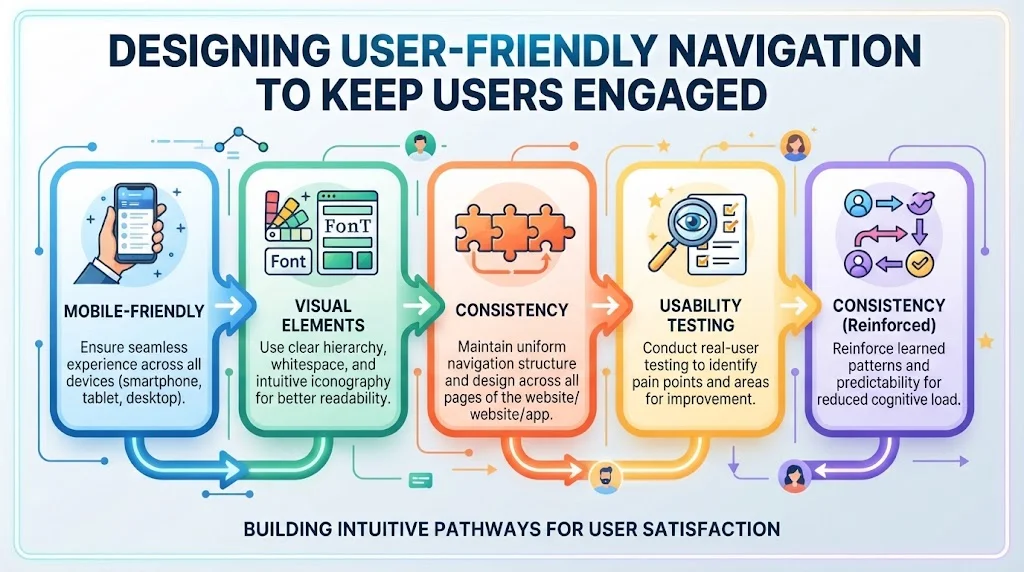
Creating a website that captures and retains visitor interest involves several key elements, one of the most critical being user-friendly navigation. An intuitive navigation system allows users to find the information they seek quickly and efficiently, leading to a more satisfying experience and ultimately reducing bounce rates. Understanding how to design navigation that works for your audience can keep them engaged and coming back for more.
The first step in designing effective navigation is to keep it simple. An overly complex navigation menu can confuse users and lead to frustration. Consider the following points:
- Limit Menu Options: Aim for no more than seven main menu items. This guideline helps visitors make choices quickly without feeling overwhelmed.
- Use Clear Labels: Ensure that each menu item is labeled clearly. Avoid jargon or obscure terms that can leave users guessing about the content.
- Prioritize Important Content: Place the most critical information where it is easily accessible. If you want users to find your blog, ensure it’s prominently featured in the main menu.
Another essential element of user-friendly navigation is the use of a logical hierarchy. The navigational structure should reflect the organization of your content. By creating a clear hierarchy, users can quickly understand how your site is laid out. Consider implementing breadcrumb navigation that shows users where they are within the site and allows them to backtrack easily. This feature helps users feel in control and encourages them to explore more content.
- Home
- About Us
- Services
- Blog
- Blog
- Tutorials
- Case Studies
- User Tips
- Contact
- Support
- Feedback
Search functionality is another vital component of user-friendly navigation. Having a search bar allows users to quickly find specific information without having to navigate through multiple pages. It’s particularly helpful for larger sites with extensive content. Ensure the search functionality is visible and responsive, providing suggestions as users type. This feature improves the user experience by saving time and offering instant access to relevant content.
Mobile-friendly
Mobile-friendliness plays a crucial role in navigation design, especially as more users access websites via their phones. Responsive design ensures that your navigation adapts to various screen sizes. A mobile-friendly website might display a hamburger menu, for example, that keeps options hidden until the user clicks to access them. This design keeps the interface clean and user-friendly.
Visual elements
Additionally, consider the use of visual elements to aid navigation. Icons can serve as visual shortcuts that allow users to recognize different sections at a glance. However, ensure that these icons are universally understood or are supplemented with text labels. In this way, you cater to both visually-oriented users and those who prefer textual cues.
Consistency
Consistency is vital in navigation design. Ensure that your navigation menus appear in the same location on every page. This consistency helps visitors to develop a mental model of how to use your site. Changes to the navigation layout can confuse returning users and lead to higher bounce rates.
Analyzing user behavior
Furthermore, analyzing user behavior using tools like Hotjar or Google Analytics can provide insights into how visitors interact with your site’s navigation. These insights can then be employed to make data-driven decisions to improve user experience. Look for patterns like where users drop off or which pages see the most traffic. Understanding these trends will help fine-tune your navigation for optimum engagement.
Usability testing
Don’t underestimate the power of usability testing. Invite real users to navigate your site and observe their behavior. Gather feedback on the navigation experience and be open to making necessary adjustments. This direct insight can be invaluable for enhancing your site’s usability.
By focusing on simplicity, hierarchy, search functionality, mobile-friendliness, visual aids, consistency, user behavior analytics, and usability testing, you can create an effective navigation system. This system not only guides users but also keeps them engaged, ultimately reducing bounce rates and increasing user retention.
Importance of Page Load Speed in User Experience
When you visit a website, the first thing you notice is how fast it loads. In today’s fast-paced digital world, page load speed plays a vital role in user experience. If a site takes too long to load, users tend to abandon it. Research indicates that even a one-second delay in loading time can significantly decrease user satisfaction. This can lead to lost visitors and ultimately cost businesses potential revenue. Optimizing your website for fast loading times should be a top priority.
Page load speed not only affects how quickly users can access content, but it also impacts search engine rankings. Search engines like Google consider load speed as a crucial ranking factor. If your site is slow, it may not perform well in search results, leading to decreased visibility. This creates a perfect storm where your audience’s experience and your site’s search performance are tightly linked.
Here are several key factors that illustrate the importance of page load speed:
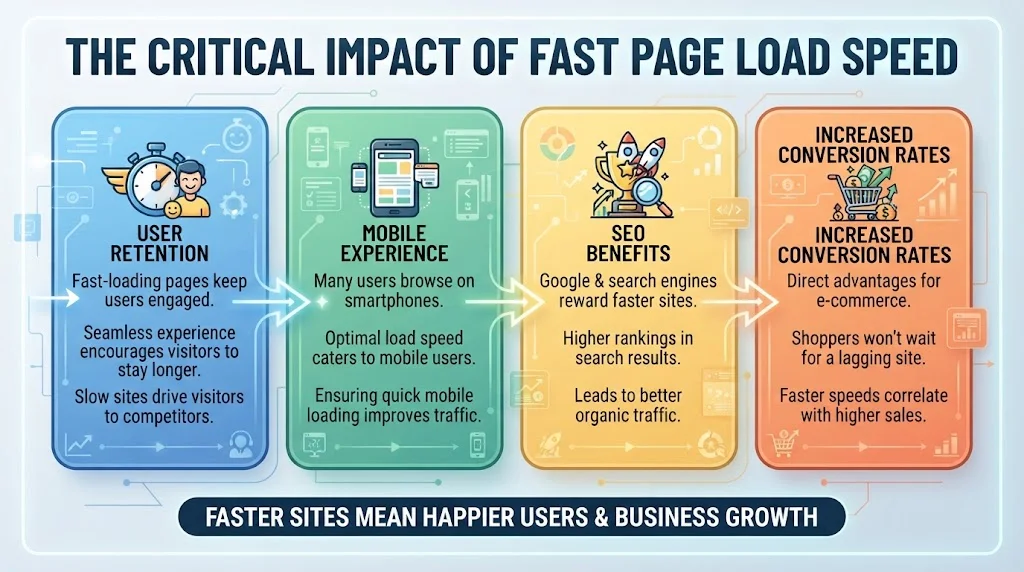
- User Retention: Fast-loading pages keep users engaged. A seamless experience encourages visitors to stay longer. If your site takes too much time to load, visitors will likely move on to your competitor’s site.
- Mobile Experience: Many users browse on smartphones. Optimal load speed caters to mobile users, making it essential for responsive design. Ensuring quick loading on mobile can improve your website’s traffic significantly.
- SEO Benefits: Google and other search engines reward faster sites with higher rankings. Implementing strategies to reduce loading time can lead to better organic traffic.
- Increased Conversion Rates: E-commerce sites see direct advantages from faster loading times. Shoppers won’t wait for a site that lags. Studies have shown that faster page speeds correlate with higher conversion rates.
To visualize the relationship between page load speed and user behavior, let’s look at the following data:
| Load Time | Bounce Rate | Conversion Rate |
|---|---|---|
| 1 second | 9% | 22% |
| 3 seconds | 38% | 11% |
| 5 seconds | 61% | 6% |
| 8 seconds | 80% | 3% |
This table shows a clear connection between page load times, bounce rates, and conversion rates. As load times increase, bounce rates also climb while conversion rates drop. Clearly, website owners should pay attention to these metrics.
There are several strategies that you can implement to reduce your site’s loading time:
- Optimize Images: Large image files can slow down a site. Use image compression tools to decrease file sizes without losing quality. Websites like TinyPNG are great for this purpose.
- Minify CSS, HTML, and JavaScript: This process reduces the amount of code that needs to be loaded. Numerous online tools can help with minification, such as CSS Minifier.
- Enable Browser Caching: When users visit your site, their browser saves files for later use. This speeds up their next visit. Configuring caching settings can dramatically improve load times.
- Choose a Reliable Hosting Provider: A good web host can make a significant difference in your site’s speed. Look for hosts known for delivering solid performance, such as SiteGround or Bluehost.
Remember, page load speed directly influences user experience, search engine visibility, and conversion potential. By optimizing your website, you not only create a better experience for your users but also enhance your business’s potential for growth.
Prioritizing page speed can lead to sustained user engagement and ultimately, increased loyalty. Make it a goal to continuously monitor and refine your website’s performance.
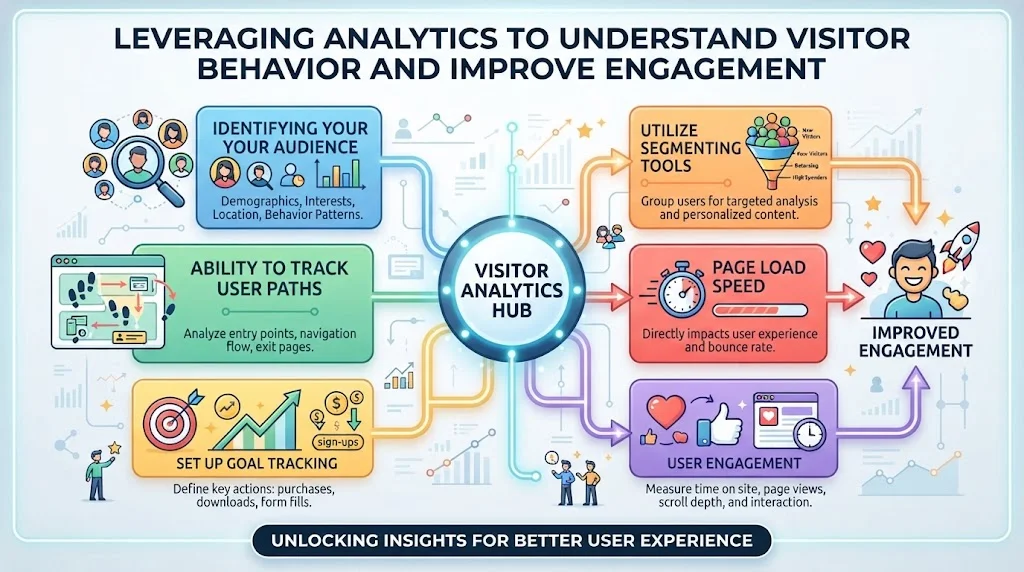
Leveraging Analytics to Understand Visitor Behavior and Improve Engagement
Identifying your audience
Start by identifying your audience. Know who they are and what they expect from your website. This demographic information can be found in your analytics tools. You can also see what devices visitors use, their geographic locations, and the time spent on different pages. Such details allow you to craft personalized content that resonates with your audience.
Ability to track user paths
Another powerful feature of analytics is the ability to track user paths. Understanding how visitors navigate through your site can spotlight common entry and exit points. For example, if many users leave after visiting a specific page, it may need optimization. Consider more engaging visuals, clear calls to action, or an adjusted layout to encourage users to explore further.
Set up goal tracking
To dive deeper, set up goal tracking within your analytics software. This feature enables you to measure specific actions that align with your business objectives, such as newsletter sign-ups or completed purchases. By tracking conversions, you can assess which pages contribute to your goals and which do not.
Utilize segmenting tools
Utilize segmenting tools within your analytics platform to distinguish between different user groups. For instance, you might want to compare new visitors to returning users. Segmenting allows you to analyze behavior more specifically and adjust content according to each group’s preferences.
To focus on website engagement, pay attention to metrics such as:
- Average session duration
- Bounce rate
- Pages per session
- Return visitor rate
These metrics offer a snapshot of how effectively your website retains visitors. A high bounce rate could indicate that your content is not resonating or that users are not finding what they expected. To counter this issue, evaluate the quality of your content. Ensure it is relevant, informative, and easy to digest. Use engaging headlines and visuals to create a compelling first impression.
Page load speed
From a technical standpoint, page load speed is crucial. Analytics tools can help monitor how quickly your pages load. Research shows that even small delays can lead to higher bounce rates. Aim to optimize images, use browser caching, and reduce server response time. By improving load speed, you not only enhance user experience but also boost your search engine rankings.
User engagement
Another analysis to consider is user engagement with your content. Metrics such as social shares, comments, and interactions provide insight into how well your content resonates. Use tools like Google Analytics or Mixpanel to analyze user engagement across different content types. Determine which formats yield the highest interaction and replicate that success in future posts.
| Metric | Goal | Action |
|---|---|---|
| Average Session Duration | Increase to over 3 minutes | Enhance content quality and relevance |
| Bounce Rate | Keep below 40% | Optimize landing pages |
| Pages per Session | Target at least 3 pages | Include internal links |
| Conversion Rate | Maximize with constant tracking | Refine calls to action |
Continuously A/B testing different elements can lead to further insights. Experiment with headlines, images, or calls to action to see what works best. Monitoring the results can shape future strategies to boost engagement.
Incorporate insights gained from analytics into your content strategy. You can provide added value that aligns with user interests. Stay updated by regularly reviewing your analytics data, as user preferences and behaviors can change over time. Keeping a pulse on these shifts will enable you to adapt quickly and keep your audience engaged.
Utilizing analytics is not just about tracking numbers but transforming insights into actionable strategies. By understanding visitor behavior in-depth, you can craft a more engaging website that draws in users and keeps them coming back.
For more information on effective analytics strategies, consider checking Google Analytics and Hotjar, both of which offer valuable tools to deepen your understanding of visitor behavior.
Conclusion
Reducing your website’s bounce rate is not just about numbers; it’s about creating an inviting and engaging experience for your visitors. By implementing effective strategies, such as enhancing content quality, you can keep users interested and encourage them to explore further. High-quality content addresses your audience’s needs and sparks curiosity, making them more likely to stay on your site.
User-friendly navigation plays a critical role in retaining visitors. When users can easily find what they’re looking for, they’re more inclined to stick around. Investing time in designing a seamless layout can significantly improve their browsing experience, leading to lower bounce rates. Furthermore, website performance matters; fast-loading pages are essential for keeping users engaged. If a page takes too long to load, visitors are likely to leave before they even see your content.
Utilizing analytics is another powerful tool. By examining visitor behavior, you can identify trends that highlight areas needing improvement. Understanding what draws users in and what causes them to leave allows you to make data-driven decisions that align with your audience’s interests.
Ultimately, it’s all about enhancing user experience. A combination of quality content, intuitive design, speed, and analytics will lead to higher retention rates. Focus on making these elements a priority, and you’ll not only reduce bounce rates but also foster a community of engaged visitors who return for more. By embracing these strategies, you can create a website that resonates with users and keeps them coming back.