
How to Optimize Images for SEO

ATTENTION: Want to Learn Affiliate Marketing from Successful Affiliates?
Optimizing images for SEO is a vital aspect of web content management. It not only enhances user experience but also contributes significantly to your website’s search engine visibility. Here are effective techniques that can help you achieve optimal results.
Choose the Right File Format
Selecting the appropriate image file format is the first step in optimizing images. Two of the most commonly used formats are:
- JPEG: Great for photographs and images with many colors.
- PNG: Ideal for images that require transparency or sharp edges, such as logos and graphics.
By understanding the strengths of each format, you can make informed decisions on which type to use, ultimately enhancing your site’s performance.
Compress Images
Large image files can slow down your website. Use image compression tools to reduce file size while maintaining quality. Tools like TinyPNG or ImageOptim can significantly compress your images with minimal loss of quality.
Add Descriptive Filenames
Before uploading an image, rename the file with relevant keywords that describe the content. Instead of using generic names like “IMG001.jpg,” opt for a more descriptive filename such as “blue-widget-2023.jpg.” This practice informs search engines about the image content, assisting in better indexing.
Use Alt Text Effectively
Alt text, or alternative text, is an essential aspect of image SEO. It provides descriptions that help both search engines and visually impaired users understand your images. Here’s how to create effective alt text:
- Keep it concise but descriptive.
- Include relevant keywords where appropriate.
- Avoid keyword stuffing—write naturally.
Here’s an example of good alt text: “A blue widget displayed on a wooden table at sunrise.”
Optimize Image Dimensions
Ensure that the dimensions of your images are suitable for their display on your website. Oversized images can slow loading times and affect user experience. Use CSS and HTML attributes to define display sizes that fit your website layout.
Implement Responsive Images
With the rise of mobile browsing, responsive images are crucial. Use the srcset attribute in your <img> tags to allow browsers to select the correct image size based on the device’s screen size. This technique prevents unnecessary data usage on mobile devices and enhances load times.
Leverage Image Sitemaps
Creating an image sitemap provides search engines with information about the images on your site. Use plugins like Google XML Sitemaps to automatically generate one. This process aids in better indexing of your images, increasing visibility in search engine results.
Utilize Social Media for Image Sharing
Images shared on social platforms can drive traffic back to your site. Ensure that they include relevant watermarks and text overlays to encourage shares. Also, implement Open Graph tags for images—this allows the selected image to be displayed correctly when content is shared on platforms like Facebook.
Keep Accessibility in Mind
Image optimization also ties into web accessibility. Make sure your images are usable by all users, including those with disabilities. Including high-quality alt text not only enhances SEO but also adheres to accessibility guidelines, making your site a better experience for everyone.
By applying these techniques, you will significantly enhance your images for SEO, ultimately contributing to better search engine rankings and user experience.
For additional insights into image optimization and SEO strategies, check out Moz’s Beginner’s Guide to SEO and Search Engine Journal.
The Role of Alt Text in Image Optimization
Images play a significant role in online content, making it visually appealing and engaging. However, simply adding images is not enough. To fully optimize images for search engine visibility and enhance user experience, incorporating alt text is essential. Understanding the role of alt text in How to Optimize Images for SEO can lead to improved SEO performance and a better experience for your audience.
Alt text, or alternative text, describes the content and function of an image. It is embedded in the HTML code of an image. This text is crucial for various reasons, and knowing how to use it effectively will enhance your website’s image optimization strategy.
One of the primary functions of alt text is accessibility. Individuals with visual impairments rely on screen readers to understand webpage content. When images lack proper alt text, these users miss out on essential information. By providing descriptive alt text, you ensure that all your visitors can enjoy the content of your site regardless of their abilities.
Here are key elements to consider when writing effective alt text:
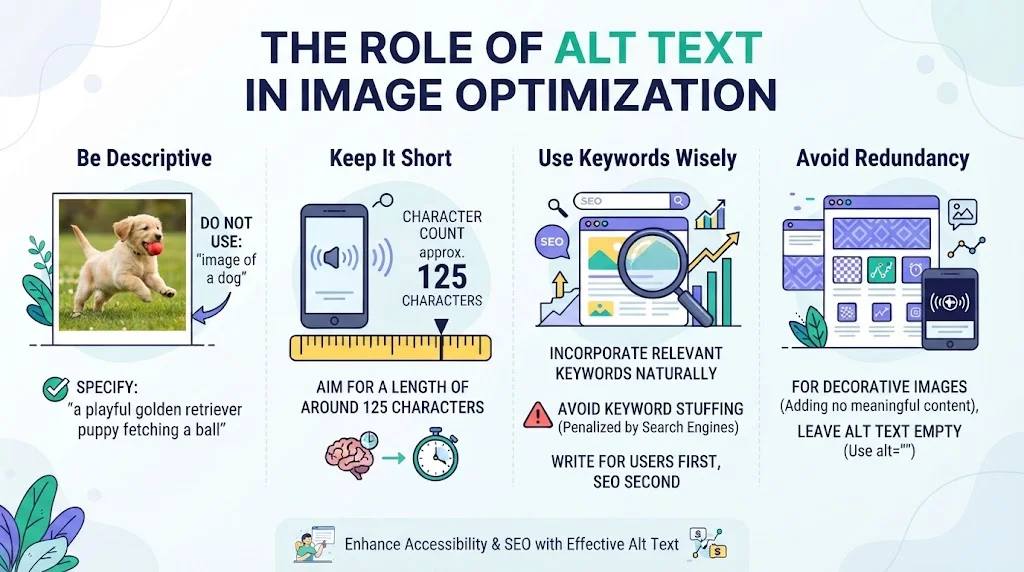
- Be Descriptive: Describe the image clearly and concisely. Instead of using phrases like “image of a dog,” specify the type, breed, and action, such as “a playful golden retriever puppy fetching a ball.”
- Keep It Short: Aim for a length of around 125 characters. This length helps ensure that screen readers convey the information effectively without cutting off important details.
- Use Keywords Wisely: If it fits naturally, incorporate relevant keywords. However, avoid keyword stuffing, as search engines penalize sites for such tactics. Instead, write alt text for users first and SEO second.
- Avoid Redundancy: If the image is decorative and does not add meaningful content, you can leave the alt text empty (use an empty alt attribute: alt=””). This practice indicates to screen readers that the image is non-essential.
In addition to enhancing accessibility, alt text benefits image SEO. When search engines crawl your site, they can’t ‘see’ images like humans can. They rely on alt text to understand what an image is about. Optimized alt text can help improve your chances of ranking in image search results, increasing your visibility and potentially driving more traffic to your site.
Alt text is also beneficial for contextual relevance. When search engines evaluate the overall context of your web pages, the alt text you provide works together with the page content. Ensuring that your alt text aligns with your content supports better keyword association, boosting your page’s SEO.
In the competitive digital landscape, ensuring your images are correctly optimized is crucial. It fosters a better user experience while working towards improving your search engine rankings. Here’s a practical approach to implement alt text efficiently:
- Audit Existing Images: Review the images across your website to check for missing or inadequate alt text. Update them accordingly, keeping in mind the guidelines mentioned.
- Develop a Consistent Naming Convention: Apart from alt text, consider naming your image files descriptively. For instance, use “golden-retriever-fetching.jpg” instead of “IMG_12345.jpg” to provide better context from the file name itself.
- Incorporate Structured Data: Using schema markup for images can further enhance visibility in search results. This markup informs search engines about the imagery and can lead to rich snippets.
As you incorporate alt text into your How to Optimize Images for SEO strategy, it’s also helpful to refer to reliable resources for further learning. Websites like Moz and Search Engine Land provide valuable insights that can enrich your understanding of image SEO.
Alt text is not just an afterthought in image optimization; it’s a vital part of a comprehensive SEO strategy. By making your images accessible and informative, you’re also enhancing the experience for all users. Properly used, alt text can significantly contribute to your site’s SEO success, increasing both visibility and user engagement.
How Image Size Affects Website Performance and SEO
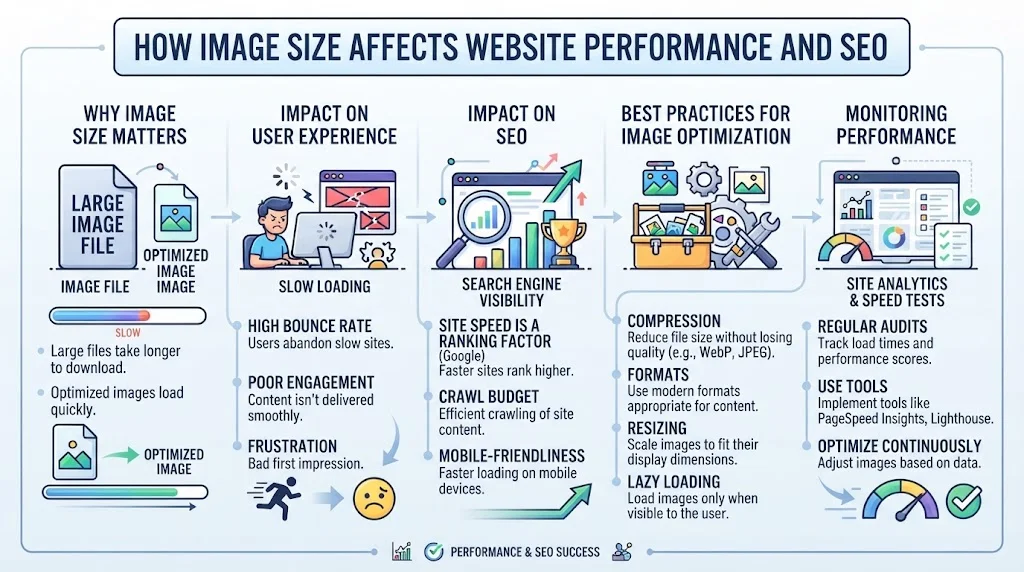
Images play a crucial role in captivating visitors and enhancing the visual appeal of a website. However, the size and optimization of these images directly affect website performance and SEO. When images are too large, they can slow down your site’s loading speed. This slow speed can lead to user frustration and higher bounce rates, which in turn negatively impacts your search engine rankings. Let’s explore how image size impacts your website’s performance and what you can do to How to Optimize Images for SEO.
Why Image Size Matters
The size of your images can either bolster your website’s speed or drag it down. Large image files can take longer to load, which can frustrate users. When visitors experience slow loading times, they are more likely to leave the website before it even finishes loading. This can lead to increased bounce rates, indirectly affecting your ranking on search engines like Google.
Impact on User Experience
A smooth browsing experience is vital to keeping users on your site. Large images contribute to longer loading times, which can deter potential customers or readers. Research shows that:
- 47% of users expect a web page to load in two seconds or less.
- 40% of users will abandon a website that takes more than three seconds to load.
By optimizing your images, you can vastly improve user experience, leading to lower bounce rates and increased duration of visits. This can positively influence your SEO ranking.
Impact on SEO
Search engines prioritize websites that offer fast loading times. Since image size and loading speed are closely linked, optimizing your images directly contributes to better SEO. Here’s how:
- Page Speed: Google uses page speed as a ranking factor. Faster sites are rewarded with higher rankings.
- Mobile Optimization: Many users access websites via mobile devices. Optimized images help ensure mobile pages load quickly.
- Image Search: Optimized images can appear in Google Image Search, increasing your website’s visibility.
Best Practices for Image Optimization
Here are some effective strategies you can implement to How to Optimize Images for SEO for your website:
- Choose the Right File Format: Use JPEG for photographs, PNG for graphics with transparent backgrounds, and GIF for simple animations.
- Use Image Compression: Compress images using tools such as TinyPNG or CompressJPEG. This reduces file size without significantly affecting quality.
- Implement Responsive Images: Utilize the
srcsetattribute to serve different image sizes based on the user’s device. This ensures that smaller devices load smaller images, enhancing speed. - Use Descriptive File Names: Instead of generic names like “image1.jpg,” use descriptive names that hint at the content, like “red-sneakers-on-display.jpg.” This can help with SEO.
- Add Alt Text: Always include alt text that describes the image. This not only aids visually impaired users but also provides context for search engines.
Monitoring Performance
After implementing image optimization strategies, it’s essential to monitor your website’s performance. Use tools such as Google PageSpeed Insights or GTmetrix to analyze loading speeds and give you an overview of how your optimizations are performing.
Optimizing images is a vital aspect of enhancing both website performance and SEO. By considering image size, format, and optimization techniques, you can significantly improve your site’s speed and user experience. This proactive approach not only helps retain visitors but also boosts your website’s visibility in search engine results. Remember, every small optimization contributes to a better overall experience for your users and can lead to higher rankings on search engines, making your website stand out in a crowded digital landscape.
Best File Formats for SEO-Friendly Images
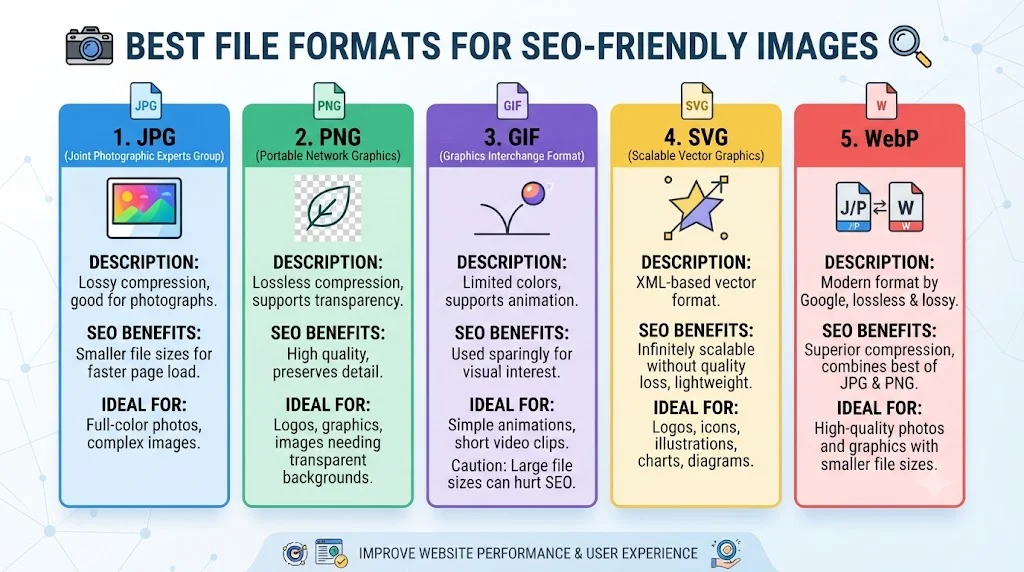
When optimizing images for your website, choosing the right file format plays a crucial role in enhancing your SEO. Different file formats come with their own advantages and disadvantages. Here, you will learn about the best file formats for SEO-friendly images and how each can impact your website’s performance.
Understanding Image File Formats
Images can be saved in various formats, but the most common are JPG, PNG, GIF, and SVG. Each format has unique characteristics that can affect your page’s load speed and SEO.
1. JPG (Joint Photographic Experts Group)
JPG is one of the most universally recognized formats and is widely used for photographs. Here are some key points about JPG:
- Compression: JPG files use lossy compression, which reduces file size without significantly affecting image quality.
- Best For: Photographs and images with gradients.
- SEO Benefits: Smaller file sizes can lead to faster loading times, which is favorable for SEO.
For more detailed information on JPG optimization, visit Shopify.
2. PNG (Portable Network Graphics)
PNG is favored for images that require transparency and high-quality graphics, like logos and icons.
- Compression: PNG uses lossless compression, maintaining image quality at the cost of larger file sizes.
- Best For: Graphics, logos, and images needing transparency.
- SEO Benefits: Retaining high image quality can enhance user experience, positively affecting SEO.
Learn more about PNG images on WebFX.
3. GIF (Graphics Interchange Format)
GIF is often used for simple animations and graphics. Its characteristics include:
- Compression: GIFs use lossless compression but are limited to 256 colors.
- Best For: Simple animations and graphics with few colors.
- SEO Benefits: Easy to implement for social media sharing, increasing visibility.
For a deeper understanding of GIF usage, check out Adobe.
4. SVG (Scalable Vector Graphics)
SVG is a vector format ideal for web graphics. Here’s what you need to know:
- Compression: SVG files are scalable without loss of quality, making them ideal for responsive design.
- Best For: Logos, icons, and illustrations.
- SEO Benefits: Small file sizes and scalability help with fast loading, improving user engagement and SEO.
For more on SVG optimization, visit Smashing Magazine.
5. WebP
WebP is a modern image format developed by Google that provides superior compression for images.
- Compression: WebP provides both lossy and lossless compression, achieving smaller file sizes than JPG and PNG while maintaining quality.
- Best For: Both photographs and graphics.
- SEO Benefits: Smaller size leads to faster loading times, thus improving the overall user experience and site ranking.
To explore WebP further, check out Google Developers.
Choosing the Right Format for Your Needs
While the choice of format can impact your SEO, it’s essential to balance quality and file size. Here are some tips to help:
- Use JPGs for most photography to minimize load times.
- Opt for PNGs when you need high-quality images or transparency.
- Employ GIFs for animations, but be mindful of file size.
- Consider SVG for logos and icons to leverage scalability and clarity.
- Utilize WebP when possible for superior compression on websites.
By understanding these image formats and their implications for SEO, you’ll create a more efficient and engaging website that meets both user and search engine expectations.
Tools and Resources for Enhancing Image SEO
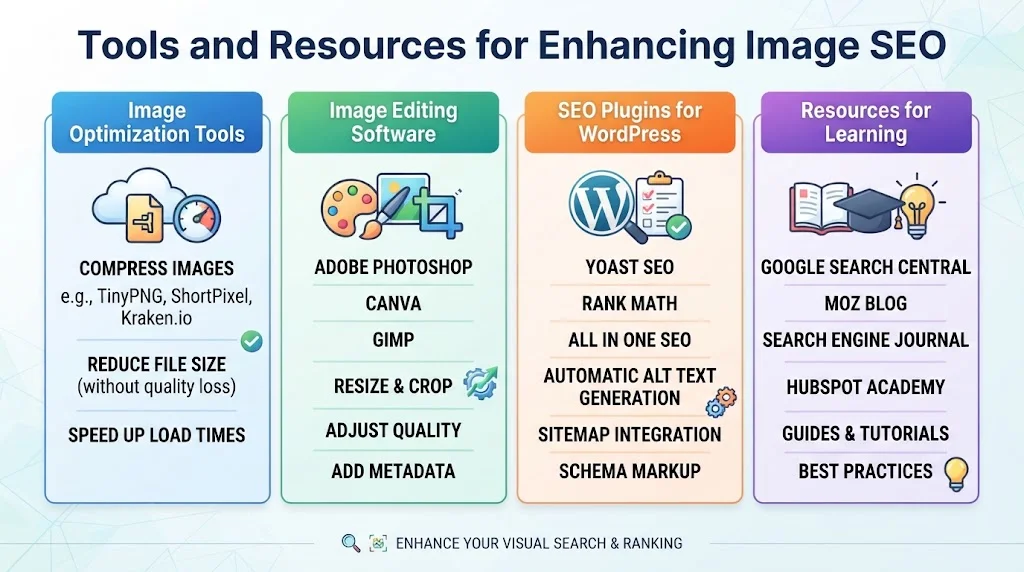
Optimizing images for SEO is essential for boosting your website’s search engine visibility. Several tools and resources can significantly enhance your How to Optimize Images for SEO process, making it easier for you to improve load times, increase engagement, and rank better in search results. Let’s explore some effective tools and resources that can elevate your image SEO strategy.
Image Optimization Tools
Using the right image optimization tools can help streamline your image handling process. Consider incorporating the following tools into your workflow:
- TinyPNG: This online tool compresses PNG and JPEG images without losing quality, ensuring faster loading times.
- Kraken.io: A comprehensive image optimizer with a user-friendly interface, Kraken.io provides both lossless and lossy compression options for various formats.
- ImageCompressor.com: This free tool allows you to compress images easily while maintaining visual integrity.
- Optimizilla: A web-based tool that lets you compress images online. You can upload up to 20 images at a time and adjust your compression level for optimal results.
- Cloudinary: A powerful service for manipulating, optimizing, and delivering images. It supports a wide variety of formats and provides amazing tools for responsive image delivery.
Image Editing Software
Good image editing software can help you enhance your visuals before uploading them to your website. Here are refined options to consider:
- Adobe Photoshop: The industry standard for image editing, Photoshop allows you to adjust image size, improve quality, and save in various formats.
- GIMP: A free and open-source image editor that provides numerous features similar to Photoshop. It’s suitable for users looking for advanced editing capabilities.
- PicResize: A user-friendly online tool that enables you to resize, crop, and apply effects to your images easily.
SEO Plugins for WordPress
If you’re using WordPress for your website, special plugins can help you How to Optimize Images for SEO efficiently. Some effective WordPress plugins include:
- SEO Friendly Images: Automatically adds alt and title attributes to your images, helping search engines understand your visual content more easily.
- WP Smush: This plugin automatically compresses and optimizes images while you upload them to your media library.
- ShortPixel Image Optimizer: A powerful tool that compresses and resizes images for improved site performance.
Resources for Learning
Staying updated with the latest trends and techniques in image SEO is crucial. Here are some valuable resources:
| Resource | Link |
|---|---|
| Moz | SEO insights and guidelines, including image optimization best practices. |
| Search Engine Land | Latest news and tips on SEO strategies, including image SEO. |
| Backlinko | In-depth articles on optimizing various elements of SEO, with sections dedicated to images. |
By leveraging these tools and resources, you can significantly improve your image SEO strategy. Remember that the goal is to enhance user experience by providing fast-loading, quality images that are well-optimized for search engines. Regularly assessing and optimizing your images will keep your website competitive and engaging for visitors.
As you implement these strategies, you’ll likely notice an improvement in your search rankings and an increase in organic traffic. Invest time in refining your image SEO practices, and reap the benefits of a well-optimized site. Happy optimizing!
Conclusion
Optimizing images for SEO is a crucial step in enhancing your website’s performance and visibility in search engines. By implementing effective techniques such as proper naming conventions and using relevant keywords, you increase your chances of ranking higher in search results. Alt text plays a vital role in this process; it not only improves accessibility but also contributes to image indexing, allowing search engines to understand your content better.
Considering image size is essential, as larger files can slow down your website, which may lead to higher bounce rates. Smaller, optimized images improve load time, enhancing user experience and ultimately benefiting your SEO. Choosing the right file format is another significant factor; formats like JPEG, PNG, and WebP each have their advantages, so selecting the one that fits your needs can further optimize your images.
Furthermore, leveraging tools and resources designed for image SEO can save you time and improve efficiency. Software like image compressors and SEO analysis tools can help streamline the process, ensuring your images are not only visually appealing but also appropriately optimized for search engines.
By focusing on these strategies, you can create a visually compelling website that loads quickly and appeals to both users and search engines alike. Effective image optimization is an ongoing effort, but with the right practices in place, you’ll be well-equipped to boost your site’s overall SEO performance. Embrace these techniques for a more engaging and successful online presence.