
The Ultimate On-Page SEO Checklist for Websites

ATTENTION: Want to Learn Affiliate Marketing from Successful Affiliates?
Because ranking on page one isn’t luck — it’s a checklist, done right.
Here’s an uncomfortable truth: most websites don’t lose the SEO game because of some mysterious Google algorithm conspiracy. They lose because of the boring stuff — a missing meta description, a jumbled heading structure, images the size of a small country, or a page that quietly loads for six agonizing seconds while visitors bounce straight back to the search results.
On-page SEO is the part of search optimization you actually control. You can’t bribe Google’s algorithm and you can’t force other sites to link to you overnight, but you absolutely can control your title tags, your content structure, your internal linking, and your page speed. This is the low-hanging fruit that so many websites leave to rot on the tree.
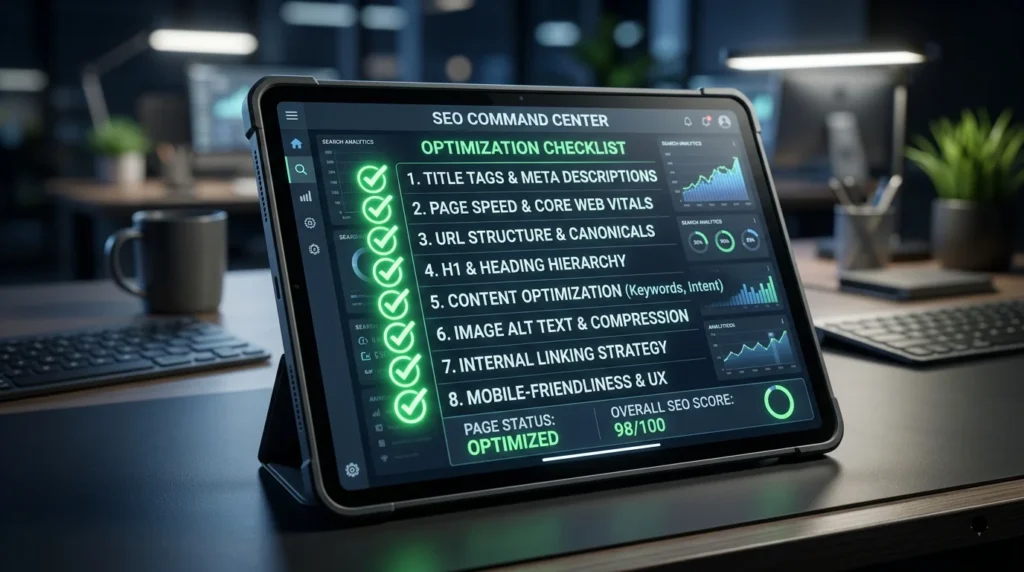
This guide is your no-fluff, fully actionable on-page SEO checklist — the kind you can genuinely run through page by page, whether you’re optimizing a five-page portfolio site or a five-thousand-page ecommerce catalog. No vague advice, no recycled filler — just the exact elements that separate pages stuck on page three from pages sitting comfortably in the top three results. Let’s get into it.
Why On-Page SEO Deserves Your Full Attention
Think of your website as a shop. Off-page SEO (backlinks, social signals, brand mentions) is the word-of-mouth that gets people walking toward your door. On-page SEO is everything about the shop itself once they arrive — the signage, the layout, how fast they can find what they need, and whether the checkout process actually works.
You can have the best word-of-mouth in the world, but if your shop is a maze with flickering lights and a broken cash register, people leave. Search engines notice that too. Google’s own Search Central documentation makes it clear that content quality, structure, and technical health are core ranking considerations — not afterthoughts.
Here’s what makes on-page SEO especially powerful: it’s entirely within your control. You’re not waiting on another website to link back to you, hoping an influencer mentions your brand, or crossing your fingers that a competitor’s backlink profile crumbles. Every element on this checklist lives on your own server, in your own code, ready to be improved the moment you decide to improve it. That’s rare in the world of digital marketing, where so many outcomes depend on forces outside your hands.
There’s also a compounding effect worth understanding. A page with a strong title tag, tight content structure, and fast load time doesn’t just rank better — it also converts better, gets shared more often, and naturally attracts more backlinks over time because people actually want to reference something well-built. On-page SEO isn’t a separate discipline from content marketing, conversion optimization, or brand building. It’s the shared foundation underneath all three.
Nail Your Title Tags Before Anything Else
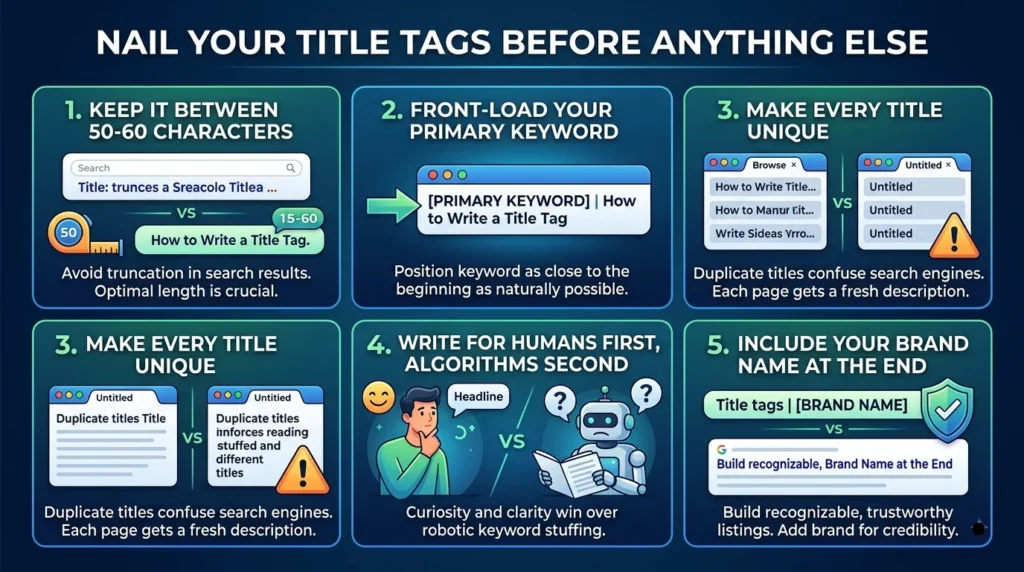
Your title tag is the first handshake between your page and a potential visitor. It shows up as the clickable blue headline in search results, in browser tabs, and often in social shares. A weak title tag is like showing up to a job interview in pajamas — technically present, but not making the impression you need.
- Keep it between 50–60 characters so it doesn’t get cut off in search results
- Front-load your primary keyword as close to the beginning as naturally possible
- Make every title unique — duplicate titles confuse search engines and dilute rankings
- Write for humans first, algorithms second — curiosity and clarity beat robotic keyword stuffing
- Include your brand name at the end for recognizable, trustworthy listings
A dull title says “10 SEO Tips.” A magnetic one says “10 SEO Tips That Actually Doubled Our Organic Traffic.” Same topic, wildly different click-through rate.
It’s also worth remembering that Google frequently rewrites title tags in the search results when it thinks it can create a better match for the query, especially if your original title is vague, stuffed with keywords, or doesn’t match the page content closely enough. The best defense against this is simplicity: write a title that’s honest, specific, and genuinely reflects what the page delivers. The more naturally aligned your title is with both the content and the searcher’s intent, the less reason Google has to touch it.
Write Meta Descriptions That Sell the Click
Google doesn’t officially use the meta description as a ranking factor, but it absolutely influences your click-through rate — and click-through rate has a well-documented relationship with how pages perform in search over time. Think of the meta description as your page’s elevator pitch: the searcher has already seen a dozen other blue links before yours, and you’ve got one sentence to convince them yours is worth the click.
- Stay within roughly 150–160 characters to avoid truncation
- Include your target keyword naturally — it gets bolded in search results and draws the eye
- Add a clear value proposition or benefit, not just a summary
- End with a soft call-to-action like “See how” or “Get the checklist”
- Never duplicate meta descriptions across multiple pages
- Write a fresh description for every page — templated, auto-generated descriptions rarely persuade anyone to click
If you leave a meta description blank, Google will pull a snippet directly from your page content instead — and it’s often an awkward, out-of-context sentence that does nothing to sell the click. Writing your own description isn’t optional busywork; it’s one of the cheapest conversion-rate improvements available to any page on your site.
Build a Clean, Logical Heading Structure
Your heading tags (H1 through H6) aren’t decoration — they’re a roadmap. Both readers and search engine crawlers use them to understand what your page is actually about and how the content is organized. A page with no clear hierarchy is like a book with no chapter titles: technically readable, but exhausting.
- Use exactly one H1 tag per page — it should mirror your primary topic and ideally include your main keyword
- Organize supporting sections under H2 tags, and break those down further with H3s where needed
- Never skip levels (don’t jump from an H2 straight to an H4)
- Keep headings descriptive and scannable — someone skimming your headings alone should understand the whole page
- Avoid using heading tags purely for styling large or bold text; that’s what CSS is for
It helps to think of your headings as a table of contents that just happens to live inside the page rather than above it. A visitor skimming on their phone, half-distracted, should be able to scroll through your H2s and H3s alone and walk away understanding the gist of your entire argument. If that skim-test fails, your structure needs work — no amount of clever keyword placement will fix a page that’s genuinely hard to navigate.
Craft URLs People (and Crawlers) Actually Trust
A messy URL structure filled with random numbers, session IDs, or stacked folders is a red flag for both users and search engines. Clean URLs build trust before a visitor even clicks, and they make your links far more shareable — nobody wants to paste a wall of query parameters into a text message or email.
- Keep URLs short, descriptive, and readable
- Use hyphens to separate words, never underscores or spaces
- Include your target keyword where it fits naturally
- Avoid unnecessary parameters, capital letters, or deep nested folders
- Keep your URL structure consistent across the whole site (e.g., yoursite.com/blog/topic-name)
- Avoid changing URLs after they’ve been indexed unless absolutely necessary — and always redirect properly if you do
Compare yoursite.com/p?id=48291&cat=3 to yoursite.com/blog/on-page-seo-checklist. One looks like spam. The other looks like a page worth clicking. Search engines draw the same conclusion, and so does anyone glancing at the address bar before deciding whether to trust your site.
Optimize Content Around Real Search Intent
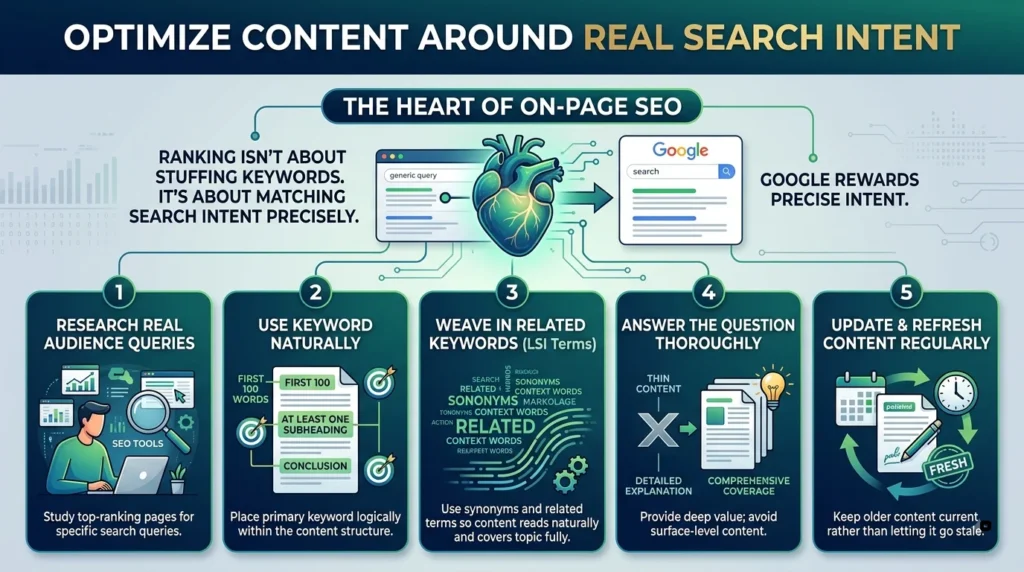
This is the heart of on-page SEO, and it’s where most sites either win big or quietly fail. Ranking isn’t about stuffing a keyword fifty times — it’s about matching search intent so precisely that Google has no choice but to reward you.
- Research what your audience is actually typing using tools and study the top-ranking pages for that query
- Use your primary keyword naturally in the first 100 words, at least one subheading, and the conclusion
- Weave in related keywords and synonyms (LSI terms) so the content reads naturally and covers the topic fully
- Answer the question thoroughly — thin, surface-level content rarely holds its ranking
- Update and refresh older content regularly rather than letting it go stale
Sites like Ahrefs’ on-page SEO guide and Moz’s Beginner’s Guide to SEO are excellent free resources if you want to go deeper into intent-matching and keyword research strategy.
Build Trust Signals With E-E-A-T in Mind
Google evaluates content quality partly through the lens of E-E-A-T — Experience, Expertise, Authoritativeness, and Trustworthiness. This matters even more for topics that touch on health, finance, safety, or anything where bad information could genuinely harm someone, but it influences how every page is perceived.
- Include a visible author byline with relevant credentials or experience where appropriate
- Cite credible sources and data rather than making unsupported claims
- Keep an About page and clear contact information easy to find
- Showcase real experience — first-hand results, screenshots, or case studies carry far more weight than generic advice
- Correct outdated or inaccurate information promptly rather than letting it linger
Trust isn’t just a soft, feel-good metric — it directly shapes whether search engines consider your page a safe, reliable answer worth surfacing above competitors covering the exact same topic.
Make Your Internal Linking Work Harder
Internal links are one of the most underrated tools in your entire SEO toolkit. They guide visitors deeper into your site, distribute ranking authority (“link equity”) to important pages, and help search engines discover and understand your content structure.
- Link to relevant pages using descriptive anchor text instead of generic phrases like “click here”
- Prioritize linking to your most important money pages or cornerstone content
- Avoid orphan pages — every important page should be reachable through internal links
- Keep your site architecture shallow so key pages are just a few clicks from the homepage
- Regularly audit for broken internal links that quietly hurt user experience
A simple habit that pays off enormously: every time you publish new content, go back and add a link to it from two or three older, relevant pages. This one small routine keeps your entire site interconnected, helps new content get discovered and indexed faster, and steadily reinforces the topical relevance of your most important pages over time.
Optimize Every Image, Not Just the Homepage Hero
Image optimization is a two-for-one deal: it improves accessibility and it improves your page speed and search visibility simultaneously. Yet it’s consistently one of the most neglected items on any SEO checklist.
- Write descriptive, keyword-relevant alt text for every meaningful image
- Compress images before upload using modern formats like WebP or AVIF
- Use descriptive file names instead of generic strings like IMG_2938.jpg
- Implement lazy loading so images load only as users scroll to them
- Specify image dimensions to prevent layout shift while the page loads
Alt text deserves a special mention because it does triple duty: it helps screen readers describe your images to visually impaired users, it gives search engines context they otherwise couldn’t extract from a picture, and it’s a genuine opportunity to rank in image search, which drives real, often-overlooked traffic. Skip the keyword stuffing here too — “blue running shoes on a trail” beats “shoes running blue trail buy cheap shoes” every time, for humans and algorithms alike.
Chase Speed Like It’s a Ranking Factor — Because It Is
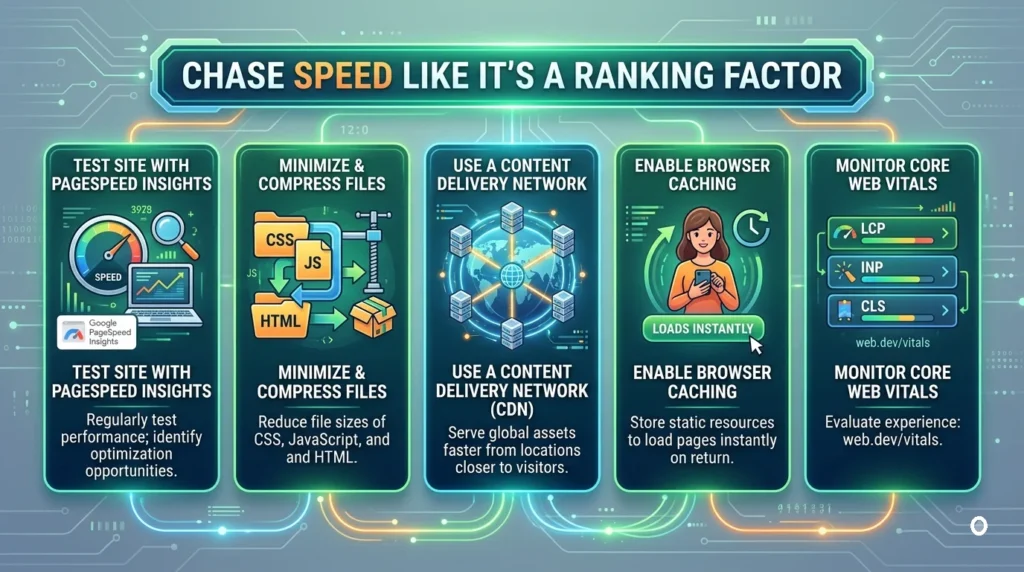
Page speed and Core Web Vitals are now baked directly into how Google evaluates page experience. A slow site doesn’t just frustrate visitors — it actively suppresses your rankings, no matter how good your content is.
- Test your site regularly with Google PageSpeed Insights
- Minimize and compress CSS, JavaScript, and HTML
- Use a content delivery network (CDN) to serve assets faster globally
- Enable browser caching so returning visitors load pages instantly
- Monitor your Core Web Vitals — Largest Contentful Paint, Interaction to Next Paint, and Cumulative Layout Shift — through web.dev/vitals
Speed problems are rarely caused by one giant issue — they’re usually death by a thousand cuts: an unoptimized hero image here, three unnecessary tracking scripts there, a font file loading from a slow third-party server. Run your pages through PageSpeed Insights, work through the specific recommendations it gives you, and re-test. This is one area of SEO where the tooling genuinely tells you exactly what to fix.
Design for Mobile First, Not as an Afterthought
Google indexes and ranks the mobile version of your site first, thanks to mobile-first indexing. If your mobile experience is clunky, your entire site’s visibility suffers — even for desktop searches. And with the majority of search traffic now happening on phones, a poor mobile experience isn’t a minor inconvenience for some users — it’s a broken experience for most of them.
- Use a fully responsive design that adapts smoothly to any screen size
- Keep tap targets (buttons, links) large enough for comfortable thumb use
- Avoid intrusive pop-ups that cover content on smaller screens
- Test your pages using Google’s Mobile-Friendly Test
- Keep font sizes legible without requiring users to pinch and zoom
- Make sure mobile menus and dropdowns are easy to operate with one thumb, not two hands
Optimize for Featured Snippets and Voice Search
Featured snippets — those highlighted answer boxes that appear above the regular search results — are some of the most valuable real estate in all of search, often earning far more clicks than the standard first-place listing. They’re also the primary source for many voice search answers read aloud by smart assistants.
- Directly answer common questions in a concise paragraph right after the relevant heading
- Use numbered lists for process-based content and bullet points for feature or benefit lists
- Structure comparison content using simple, clean tables where relevant
- Phrase subheadings as natural questions when the content genuinely answers a question
- Keep snippet-style answers between roughly 40–60 words for the best chance of being pulled directly into the answer box
Add Structured Data So Search Engines Truly “Get” You
Structured data (schema markup) is like handing search engines a cheat sheet about your content — this is a recipe, this is a product with a price, this is an FAQ, this is a review with a rating. It won’t guarantee rankings, but it can unlock rich results that dramatically boost click-through rate.
- Implement relevant schema types from Schema.org — Article, Product, FAQ, Review, Breadcrumb, and more
- Validate your markup with Google’s Rich Results Test
- Use breadcrumb schema to reinforce your site’s navigational structure in search results
- Keep structured data accurate and up to date — mismatched schema can trigger manual penalties
Think of schema markup as translating your content into a language machines understand perfectly, with zero ambiguity. A human reader can tell at a glance that “4.8 stars, 320 reviews” refers to a product rating. A search engine needs that spelled out explicitly in code — and when you do, it often rewards you with star ratings, prices, or FAQ dropdowns sitting right in the search results, taking up more visual space than a plain blue link ever could.
Format Content So People Actually Read It
Readability directly affects how long visitors stay, how deeply they engage, and whether Google interprets your page as genuinely useful — or just another wall of text nobody finishes.
- Break content into short paragraphs — two to four sentences is usually the sweet spot
- Use bullet points and numbered lists to make key information scannable
- Bold or highlight the truly important terms and takeaways, without overdoing it
- Add relevant subheadings every few hundred words so readers can navigate at a glance
- Write in a natural, conversational tone rather than dense, jargon-heavy paragraphs
- Use white space generously — a cramped page feels exhausting before a reader even starts
Readability isn’t about dumbing content down; it’s about removing friction. Every unnecessary word, every unnecessarily long paragraph, is one more small excuse for a reader to hit the back button. Read your own content out loud before publishing — if you find yourself running out of breath mid-sentence, so will your reader’s attention span.
Clean Up Duplicate Content With Canonical Tags
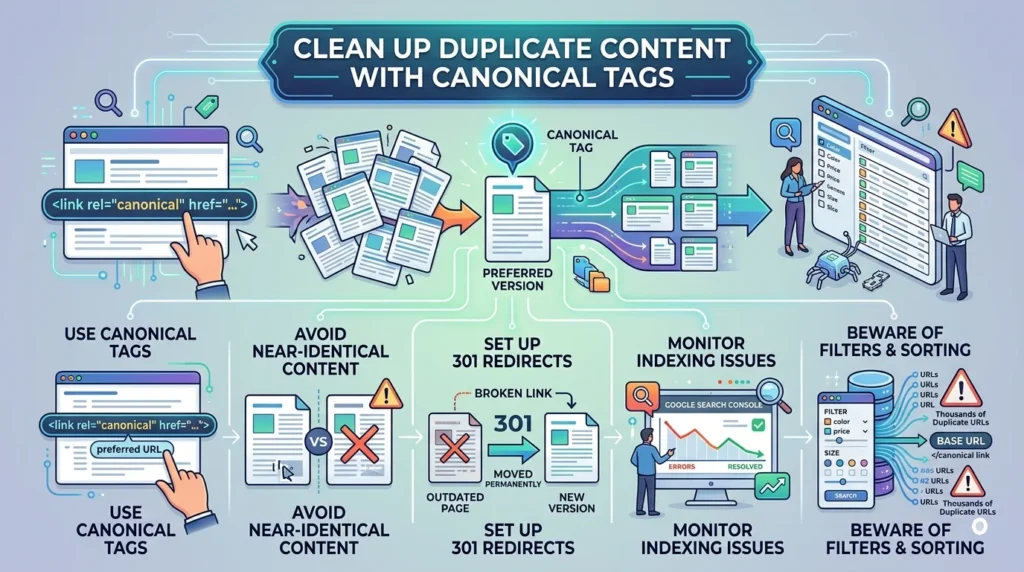
Duplicate content — even unintentional duplication from filters, tracking parameters, or printer-friendly pages — can confuse search engines about which version deserves to rank, and can dilute ranking signals across multiple competing URLs instead of consolidating them into one strong page.
- Use canonical tags to point to the preferred version of a page
- Avoid publishing near-identical content across multiple URLs
- Set up proper 301 redirects for outdated or merged pages
- Monitor indexing issues directly inside Google Search Console
- Be especially careful with ecommerce filter and sort parameters, which can generate thousands of near-duplicate URLs if left unchecked
Keep Content Fresh Instead of Letting It Fossilize
Search engines have a soft spot for content that’s actively maintained. A page published three years ago with outdated statistics, broken screenshots, or references to tools that no longer exist signals neglect — and neglect rarely ranks well against fresher, more current competitors.
- Revisit your top-performing pages every few months to update statistics, examples, and screenshots
- Add new sections as a topic evolves rather than leaving gaps unaddressed
- Update the publish date only when you’ve made a genuinely meaningful revision, not for cosmetic reasons
- Remove or consolidate old, thin pages that no longer serve a useful purpose
- Track performance trends inside Search Console to catch declining pages before they fall too far
Don’t Be Afraid of Outbound Links
Linking out to high-authority, relevant sources isn’t “leaking” your SEO value — it’s a trust signal. Thoughtful outbound linking tells search engines and readers that your content is well-researched and part of a credible web of information, not an isolated island.
- Link out to reputable, authoritative sources when citing data or claims
- Use descriptive anchor text rather than bare URLs
- Open external links in a new tab to keep visitors on your site
- Avoid linking to low-quality, spammy, or irrelevant domains
There’s a quiet fear among site owners that outbound links “send visitors away.” In practice, a handful of well-placed, relevant outbound links rarely hurts engagement — and the credibility boost they provide, both to readers and to search engines evaluating your content’s rigor, is almost always worth the trade.
Design for Genuine User Experience, Not Just Crawlers
Search engines increasingly measure success through real user experience signals — how long people stay, whether they bounce immediately, and whether they engage further. Optimizing purely for algorithms while ignoring humans is a losing long-term strategy.
- Design clear, intuitive navigation menus
- Use a strong visual hierarchy so key information stands out immediately
- Ensure your calls-to-action are obvious and easy to act on
- Eliminate intrusive interstitials that frustrate visitors on arrival
- Regularly test your site on real devices, not just in a browser preview
Frequently Asked Questions About On-Page SEO
How long does on-page SEO take to show results?
Most sites start noticing movement within a few weeks of meaningful changes, though full re-ranking can take one to three months depending on how competitive the topic is and how frequently search engines recrawl your pages. Technical fixes like speed improvements often show impact faster than content-based changes, which need time for search engines to re-evaluate relevance.
Is on-page SEO a one-time task or ongoing work?
Ongoing, always. Search intent shifts, competitors publish better content, algorithms update, and your own business evolves. Treat this checklist as a recurring audit — quarterly for most sites, monthly for highly competitive or fast-moving industries.
What’s the single highest-impact item on this checklist?
If forced to pick one, it’s matching content to genuine search intent. Perfect title tags and lightning-fast load times mean little if the content itself doesn’t actually satisfy what the searcher was looking for. Everything else on this list amplifies great content — none of it can substitute for it.
Do I need to hire an agency to handle on-page SEO?
Not necessarily. Every item covered here is something a site owner, in-house marketer, or freelance writer can implement directly using free tools like Google Search Console and PageSpeed Insights. Agencies add the most value at scale — hundreds of pages, complex technical migrations, or when time is the scarcest resource — but a small site can absolutely be optimized in-house.
Ready to Put This Checklist Into Action?
Bookmark this guide, pull up your site’s most important page right now, and start checking items off. Your future rankings will thank you.