
How to Create A “Comparison Table” for Affiliate Products in HTML?

ATTENTION: Want to Learn Affiliate Marketing from Successful Affiliates?
Creating a comparison table for affiliate products in HTML can be a powerful way to provide value to your audience. Not only does it allow your readers to make informed decisions, but it also enhances the functionality and user experience of your website. Below is a step-by-step guide on how to create an effective comparison table using HTML.
Understanding the Basics of HTML Tables
Before diving into the coding aspect, it’s important to have a basic understanding of HTML structure. An HTML table is made up of rows and columns which organize data into a grid fashion. The basic elements you’ll use include:
<table>: This tag defines the table.<tr>: This tag defines a table row.<th>: This tag defines the header cell in a table.<td>: This tag defines a standard cell in a table.
Step-by-Step Guide to Create Your Comparison Table
Now that you know the basic structure, let’s walk through the steps to create your comparison table.
Step 1: Define Your Table Structure
First, decide which products you want to compare. Let’s assume you are comparing three different affiliate products. Your table might have the following headers:
- Product Name
- Price
- Rating
- Features
Step 2: Write the HTML Code
Here is a simple HTML code snippet that represents a comparison table:
| Product Name | Price | Rating | Features |
|---|---|---|---|
| Product A | $20.00 | 4.5 | Feature 1, Feature 2 |
| Product B | $25.00 | 4.0 | Feature 1, Feature 3 |
| Product C | $15.00 | 5.0 | Feature 1, Feature 2, Feature 3 |
Step 3: Add Links to the Products
Make your table more useful by adding clickable links to the products. This is crucial for affiliate marketing. Here’s how to incorporate links:
| Product Name | Price | Rating | Features |
|---|---|---|---|
| Product A | $20.00 | 4.5 | Feature 1, Feature 2 |
| Product B | $25.00 | 4.0 | Feature 1, Feature 3 |
| Product C | $15.00 | 5.0 | Feature 1, Feature 2, Feature 3 |
Step 4: Style Your Table
Add some CSS to enhance the appearance of your comparison table. Here’s a simple CSS snippet you can include:
This CSS will make your table look more appealing and easier to read.
Tips for a Successful Comparison Table
Here are some additional tips to make your comparison table even more effective:
- Keep the content concise and relevant.
- Regularly update the table to ensure the information is current.
- Consider adding user reviews or testimonials for additional credibility.
- Use clear and descriptive product names.
- Ensure the links are functional and lead to the correct product pages.
Essential HTML Tags for Building Effective Comparison Tables
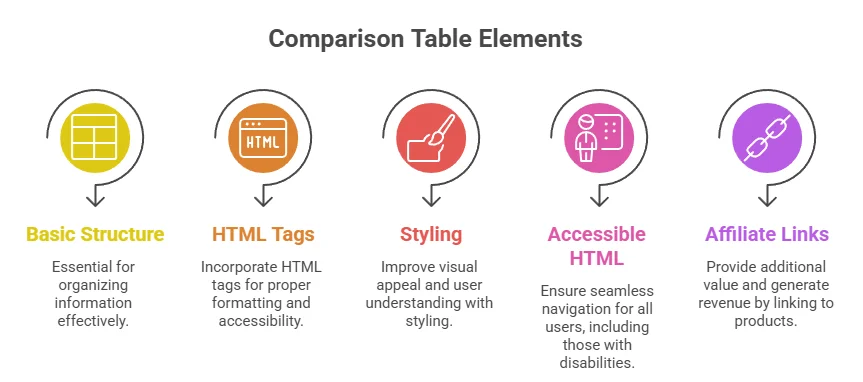
Creating effective comparison tables in HTML is essential for presenting affiliate products clearly and engagingly. Using the right HTML tags not only structures your content but also enhances user experience. Below, you’ll find key HTML tags you need to build compelling comparison tables that can help increase click-through rates and conversions.
Basic Structure of a Comparison Table
A comparison table typically consists of rows and columns that categorize and describe the products you are promoting. The two fundamental HTML tags to start with are <table> for the overall table and <tr> for each table row. Each row will contain data cells represented by <td> tags and header cells using <th> tags.
Important HTML Tags to Use
<table>: Defines the table itself.<tr>: Used to create table rows.<th>: Represents table headers, typically found in the top row.<td>: Specifies data cells in the table.<caption>: Provides a title or summary for the table.
Example of a Basic HTML Comparison Table
| Product | Price | Rating | Buy Now |
|---|---|---|---|
| Product A | $199 | 4.5 | Buy |
| Product B | $259 | 4.7 | Buy |
Styling Your Comparison Table
While HTML provides the structure, CSS enhances the visual appeal of your comparison table. You can use inline CSS, or external stylesheets, to achieve this. Consider the following:
- Border Styles: Use the border property to define the structure of your table.
- Background Colors: Adding alternate background colors to table rows can help differentiate them and make the data easier to read.
- Font Styles: Customizing fonts, sizes, and weights can significantly improve readability.
Utilizing Accessible HTML
Accessibility is essential when building a comparison table. Use the scope attribute within your <th> tags to specify whether it describes a row or column. This addition helps screen readers interpret your table correctly.
An example of accessible HTML is shown below:
| Product | Price | Rating | Buy Now |
|---|---|---|---|
| Product A | $199 | 4.5 | Buy |
Linking to Affiliate Products
Make sure your “Buy Now” buttons link directly to your affiliate products. This ensures that when a visitor clicks to purchase, they navigate through your affiliate link. Examples of sites you might link to include
Amazon or ClickBank.
Best Practices for Designing User-Friendly Comparison Tables

Creating a user-friendly comparison table is an effective way to help your audience make informed decisions about affiliate products. By following best practices, you can ensure that your comparison tables are not only visually appealing but also functional and easy to navigate. Here are some tips to enhance the utility of your comparison tables.
Keep It Simple
When designing a comparison table, simplicity is key. Aim for clarity by limiting the number of products you include. A focused table with 3 to 5 products allows readers to easily compare features without feeling overwhelmed. This prevents information overload and keeps the user engaged.
Use a Clear Layout
The layout should facilitate quick reading and understanding. Use a grid-like structure where products are listed in rows and features in columns. This layout allows users to scan the table efficiently. Ensure each cell is adequately sized so that text can be read easily without clutter.
Select Relevant Features to Compare
When showcasing affiliate products, selecting the right features to compare is essential. Include attributes that significantly impact purchasing decisions. Common features may include:
- Price
- Product size or dimensions
- Material or build quality
- Warranty period
- User ratings
Highlighting these attributes helps potential buyers quickly grasp how products stack against each other.
Incorporate Visual Elements
Visual elements can enhance your comparison table. Use colors to indicate the best option in each category or to show pros and cons. For example, you might use a green background for the top choice and a red for the least favorable option. Be cautious with colors; they should improve readability rather than impede it.
Utilize Responsive Designs
With a growing number of users browsing on mobile devices, ensuring your comparison table is responsive is crucial. A table that adjusts based on screen size will provide a better user experience. Make sure tables stack vertically on smaller screens while retaining readability and functionality on larger displays.
Highlight Affiliate Links Effectively
Your comparison table should lead users smoothly to affiliate links. Use call-to-action buttons or hyperlinked text to direct users to the products. For instance, include buttons labeled “Buy Now” or “View More Info” right below each product. You can enhance these links with contrasting colors to make them stand out.
Test Your Table’s Usability
Once your comparison table is designed, testing its usability is vital. Gather feedback from real users, paying attention to areas where they may struggle or become confused. Optimize the design based on this feedback to create the best possible user experience.
Include a Well-Structured Table
| Product | Price | Rating | Warranty | Link |
|---|---|---|---|---|
| Product A | $99 | 4.5/5 | 2 years | Buy Now |
| Product B | $79 | 4.0/5 | 1 year | Buy Now |
| Product C | $89 | 4.2/5 | 18 months | Buy Now |
Optimize for Search Engines
When creating comparison tables, it’s important to optimize them for search engines. Use keywords naturally within the table’s surrounding text, as well as in the alt attributes of images if applicable. Applying structured data such as schema markup can also improve visibility in search results, helping more users find your content.
These best practices into your comparison tables will not only enhance user experience but will also positively impact your site’s performance. For more detailed information on creating effective comparison tables, you can explore resources at
WPBeginner or Smashing Magazine.
Tips for Integrating Affiliate Links in Your Comparison Tables

Creating an effective comparison table for affiliate products is essential in helping your audience make informed decisions. But integrating affiliate links seamlessly into your comparison tables can be tricky. Here are some invaluable tips to ensure you do it right.
Choose the Right Products
Before you even start building your comparison table, make sure you’re selecting products that resonate with your audience. Opt for affiliate products that are:
- Relevant: The products should match the interests and needs of your target audience.
- High Quality: Partner with reputable brands to ensure credibility and trust.
- Widely Reviewed: You want products that have received positive feedback already.
Use Clear and Descriptive Titles
Your comparison table should feature clear and descriptive titles for each product. Avoid vague phrases and ensure that the titles reflect what the product offers. This makes it easier for users to find exactly what they’re looking for. You can include important features in the titles to provide context. For example, instead of simply stating “Product A,” use “Product A – Best for Beginners” which gives more insight into the product.
Format Your Table for Easy Readability
A cluttered table can confuse readers. Here are a few formatting tips:
- Consistent Layout: Ensure that each column has uniform width to avoid disorganization.
- Highlight Key Features: Use bold text or color to highlight significant features or benefits of the products.
- Responsive Design: Ensure your table looks good on both mobile and desktop devices. This can easily be done using CSS.
How to Integrate Affiliate Links
When it comes to integrating affiliate links, the approach can be straightforward. Here are some best practices:
- Clickable Product Images: Use images of the products as clickable links. This visually engages users and makes it more likely they’ll click through.
- Text Links: Accompany each product description with a text link. Ensure the link text is compelling and actionable, such as “Get it Now” or “See Pricing.”
- Use Shortened URLs: Utilize link shorteners like Bitly to make your affiliate links cleaner and less intimidating.
Example Comparison Table
| Product Name | Price | Features | Link |
|---|---|---|---|
| Product A | $29.99 | Best for beginners | Buy Here |
| Product B | $39.99 | Advanced features | Buy Here |
Track Your Performance
Monitoring the performance of your affiliate links is key to success. Use tracking tools to find out which products are getting the most clicks and conversions. This data can help you tweak your comparison table and highlight products that perform well. Consider using services like ThirstyAffiliates or Affiliatly to streamline your tracking process.
Provide Value Beyond the Table
While a comparison table is a fantastic way to display products, don’t forget to offer additional value. Write detailed reviews or guides surrounding the products in your table. This can enhance your audience’s experience and improve your site’s SEO.
Integrating affiliate links within your comparison tables doesn’t have to be overwhelming. By choosing the right products, formatting your table clearly, and having a strategy for your links, you can create an engaging and effective resource for your readers. Ultimately, providing trustworthy and useful information will encourage clicks on your affiliate links and drive conversions.
Analyzing the Impact of Comparison Tables on Affiliate Marketing Success
The affiliate marketing landscape is ever-evolving, and the tools you use can make a significant difference in your success. One powerful tool is the comparison table. These tables allow you to present affiliate products side-by-side, highlighting features, prices, and benefits in an easily digestible format. Understanding the impact of such comparison tables on your marketing efforts can help enhance your strategy and drive conversions.
When you create a comparison table, you are effectively organizing information in a way that makes it simple for potential buyers to see what’s offered. This clarity can lead to better decision-making. Here’s how a comparison table can benefit your affiliate marketing:
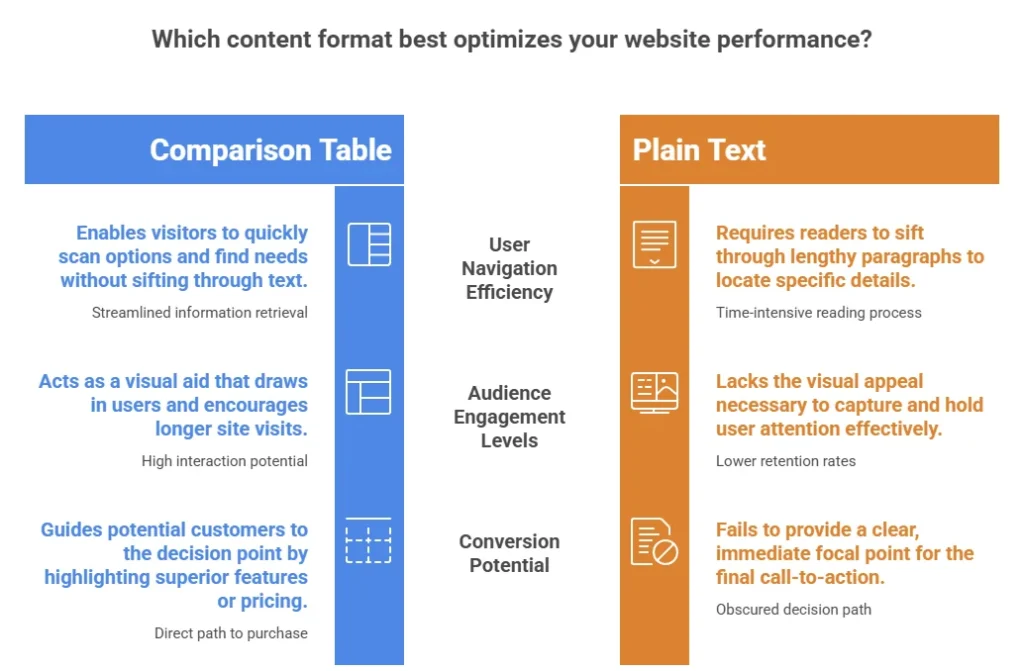
- Enhanced User Experience: A well-designed comparison table improves navigation. Visitors can quickly scan options and find what best fits their needs without sifting through lengthy paragraphs of text.
- Increased Engagement: Interaction is key in affiliate marketing. Compared to plain text, visual aids like tables draw in users. The easier it is for them to absorb information, the longer they stay on your site.
- Improved Trust: Transparency breeds trust. By laying out all the relevant information plainly, you show that you have nothing to hide. This honesty builds rapport with your audience, increasing their likelihood to purchase.
- Boosted Conversions: A clear call-to-action, combined with a well-structured comparison table, leads potential customers right to the decision point. If they see that one product stands out in features or pricing, they are more likely to convert.
Creating a comparison table in HTML is easier than you might think. Here’s a straightforward example of how to set one up:
| Product | Price | Rating | Features |
|---|---|---|---|
| Product A | $99 | 4.5 | Feature 1, Feature 2, Feature 3 |
| Product B | $89 | 4.0 | Feature 1, Feature 2 |
| Product C | $79 | 4.2 | Feature 1, Feature 3 |
As you can see, using a table allows you to quickly convey essential information about products that may interest your audience. You should continually update the data as prices change or new products are released. This strategy keeps your content relevant and helpful.
Your comparison table should highlight factors that matter most to your audience. Key aspects to consider include:
- Pricing: Ensure that your users see different price points for products. This transparency helps them find the best deal.
- User Ratings: Show product ratings from real customers to add credibility to your comparisons.
- Essential Features: List features that your target audience is likely to value, making sure to align your product selections with their needs.
Boosting user interaction with your comparison table can foster better outcomes. You might consider integrating user reviews or testimonials, linking directly to the products you are promoting. For instance, direct your readers to a trusted affiliate site like
Amazon for product purchases or to workshop resources like Capterra for software comparisons.
Ensure your comparison tables are mobile-friendly. As more consumers turn to their smartphones for shopping, an optimized experience across devices will enhance user retention and increase purchase likelihood. Test your tables on different devices to guarantee they maintain functionality and visibility.
The success of your affiliate marketing efforts relies heavily on how clearly and effectively you present information. By utilizing a comparison table, you not only improve user experience but also build trust, boost engagement, and ultimately drive conversions. So, start creating your comparison tables today and watch how they transform your affiliate marketing strategy.
Conclusion
Creating a comparison table for affiliate products in HTML can significantly enhance user experience and drive conversions. By understanding the essential HTML tags, such as <table>, <tr>, <th>, and <td>, you can structure your table efficiently, making it easy for users to digest information quickly.
Designing user-friendly comparison tables is crucial. By following best practices like using clear headers, highlighting key features, and maintaining consistent formatting, you can create visually appealing tables that guide your audience in making informed decisions.
Integrating affiliate links within these tables can be done elegantly by ensuring they are easily identifiable and accessible. Placing links strategically can encourage users to click through, increasing your potential earning without being overly aggressive in your approach.
Moreover, analyzing the impact of well-designed comparison tables on your affiliate marketing strategy reveals their importance. They can lead to higher engagement rates, increased time on page, and ultimately boost conversions. By providing valuable comparisons, you position yourself as a trustworthy source, making visitors more likely to convert.
Ultimately, mastering the art of creating effective comparison tables in HTML not only enhances your website’s functionality but can also propel your affiliate marketing success. Focus on crafting tables that prioritize clarity and user engagement, and you’ll likely see a positive impact on your affiliate revenue.