
How to Track Affiliate Link Clicks Using Google Analytics 4

ATTENTION: Want to Learn Affiliate Marketing from Successful Affiliates?
Join this FREE community where successful marketers share their secrets!
Learn directly from highly successful affiliate marketers
Access free, actionable training content regularly
Connect with an active community of over 5,000 members
Network with multiple six-figure earning affiliates
Get your questions answered by real experts
JOIN FREE NOW!
ATTENTION: Want to Learn Affiliate Marketing from Successful Affiliates?
Tracking affiliate link clicks is essential for marketers who want to understand their audience better and optimize their strategies. Google Analytics 4 (GA4) provides a user-friendly interface and robust features for tracking these vital metrics. Here’s a detailed guide on effectively using GA4 to monitor your affiliate link clicks.
First, you need to set up your affiliate links correctly. An affiliate link often includes a tracking code that tells you where the clicks come from. Use a URL builder to help create these links. Simply add questions into a standard URL to make it more trackable. You’ll want to ensure your links look like this:
https://yourwebsite.com/product-link?utm_source=source&utm_medium=medium&utm_campaign=name
Next, integrate these links into your content naturally, so they resonate with your readers. It can be in blog posts, email campaigns, or social media. Now, let’s dive into the steps to create an event in Google Analytics 4 to track these clicks.
- Access Google Analytics: Log in to your GA4 account and choose the property tied to your website.
- Create an Event: From the left sidebar, navigate to the “Events” section. Click on “Create Event.”
- Define the Event: You’ll want to name your event something descriptive, like
affiliate_click. Under “Matching conditions,” set the conditions that will track your affiliate links. For example, define the event as:- Event name: affiliate_click
- Parameter name: page_location
- Parameter value: regex (yourwebsite.com).* (using the actual URL part here)
- Save the Event: Ensure you save your event to begin tracking. This method uses regular expressions (regex) to ensure that clicks are counted when users land on any page that matches your affiliate links.
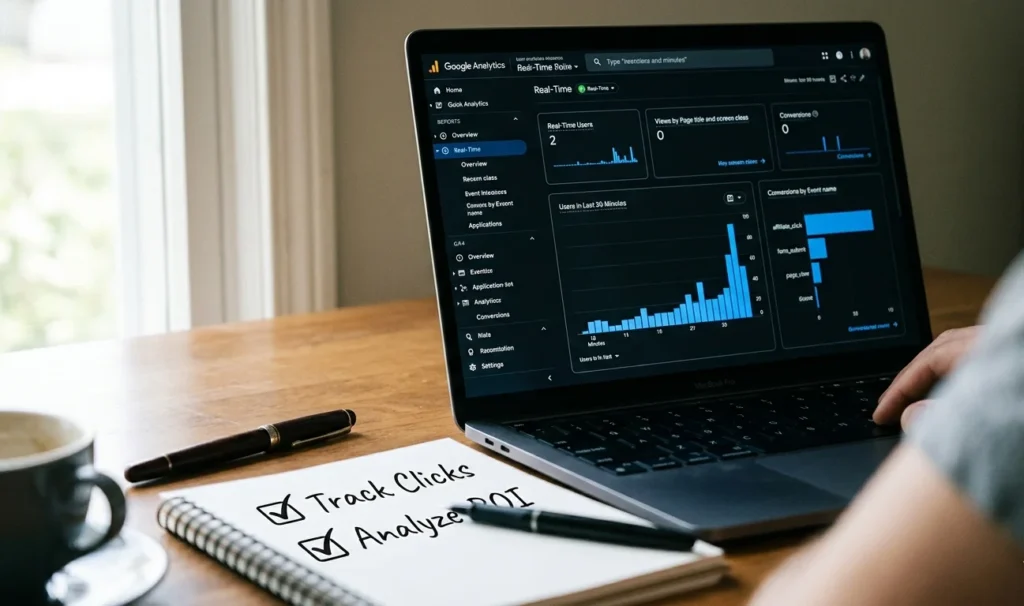
Once you save the event, it may take some time for data to start appearing. To view the data, you can navigate to the “Reports” section and select “Engagement” followed by “Events.” Here, you’ll be able to see the clicks on your affiliate links as they come in.
Besides tracking the number of clicks, you might want to analyze more granular data. Setting up enhanced ecommerce tracking in Google Analytics can allow you to analyze users’ behavior when they click these links. This feature can provide insights such as:
- How users interact with your affiliate products
- Which links perform best
- Conversion rates from these clicks
To enable enhanced tracking, follow these steps:
- Go to the “Admin” section in Google Analytics.
- Under the “Data Streams” settings, select your web data stream.
- Enable “Enhanced Measurement” and toggle the “Scrolls,” “Outbound clicks,” and “Site Search” options on to track more interactions.
This is crucial, as it can give further insight into user behavior before they leave your site. To get even more insights, you might find it beneficial to set up goals that track not only link clicks but also conversion actions that happen after those clicks.
Implementing UTM parameters in your affiliate links can provide additional data on the sources and campaigns that lead to clicks. UTM parameters in your affiliate URLs will help you track where your visitors come from and how they interact with your site. For setting up UTM parameters, consider this format:
- utm_source: The source of your traffic (e.g., newsletter, social media)
- utm_medium: The medium sending the traffic (e.g., email, CPC)
- utm_campaign: The campaign name for tracking (e.g., spring_sale)
After all this setup, running reports is key. Google Analytics provides customizable reporting tools that can display your incoming traffic, concluding which affiliate links are fruitful. This understanding is vital to refine strategies and target better to boost commissions.
Moreover, regular monitoring will keep you up to date with performance metrics, allowing timely interventions if you notice any declines in engagement. By understanding user behavior through these clicks, marketing efforts can be adjusted to suit audience preferences effectively.
The Benefits of Monitoring Affiliate Marketing Performance
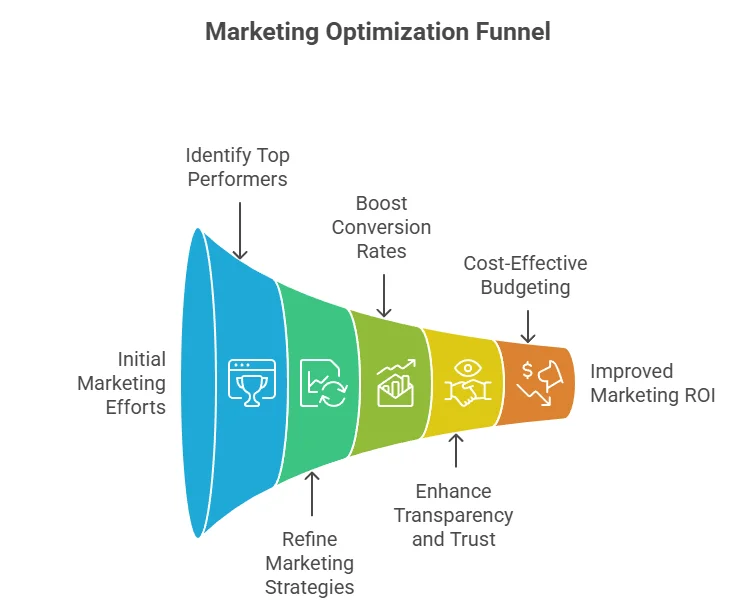
In the fast-paced world of online marketing, affiliate marketing has gained tremendous traction. Businesses partner with affiliates to promote their products or services in exchange for a commission. However, to truly leverage this model, monitoring performance is essential. By closely tracking affiliate marketing metrics, you can make informed decisions that enhance both your strategies and your revenue.
Understanding how your affiliate links perform can significantly impact your return on investment (ROI). Tracking link clicks enables you to see which affiliates drive traffic and which strategies yield the best results. This data is not just numbers; it translates into actionable insights. You can optimize your campaigns based on what works and discard tactics that don’t.
Identifying Top Performers
One of the primary benefits of monitoring affiliate marketing performance is the ability to identify your top-performing affiliates. By analyzing click data, you can determine which affiliates generate the most traffic and conversions. This allows you to:
- Reward high-performing affiliates with higher commissions.
- Focus efforts on your best partners to maximize revenue.
- Develop tailored strategies that cater to their strengths.
Refining Your Marketing Strategies
When you can accurately track affiliate link clicks, you acquire valuable information about your audience’s preferences. Knowing which products or offers yield the most clicks helps you refine your marketing strategies. You can adjust your approach based on insights such as:
- Best-performing product categories.
- Time frames when clicks peak.
- Geographical locations of your audience.
Boosting Conversion Rates
Tracking affiliate link clicks isn’t just about understanding traffic; it’s also about improving conversion rates. If an affiliate is driving significant traffic but not converting that traffic into sales, it’s a sign to reassess. You can examine factors like:
- Landing page effectiveness: Are they appealing and relevant to visitors?
- Alignment with target audience: Is the offer resonating with potential customers?
- Call-to-action clarity: Are users compelled to take action?
By monitoring these elements, you can enhance not only your affiliate partnerships but also your overall marketing strategies. This constant optimization is crucial for sustainable growth and improved sales.
Enhancing Transparency and Trust
Another significant advantage of tracking affiliate performance is that it fosters transparency and builds trust among all parties involved. Affiliates appreciate when merchants provide clear metrics regarding their performance. This transparency encourages:
- Stronger partnerships: Affiliates are more likely to invest time and effort into promoting your products.
- Open communication: Regular updates on performance promote dialogue and feedback.
- Long-term collaboration: Trusting relationships lead to consistent results and loyalty.
Cost-Effective Budgeting
Effective monitoring also aids in budgeting and resource allocation. When you identify which affiliates are generating the best ROI, you can allocate funds more effectively. Here’s how to make your budget work harder for you:
- Invest in the best-performing affiliates by increasing their commissions or offering promotions.
- Reduce efforts on underperforming affiliates who do not bring sufficient traffic or sales.
- Test new affiliates strategically using the data you’ve gathered to minimize risks.
Utilizing Tools for Better Tracking
To track affiliate link clicks effectively, utilize tools like Google Analytics 4. This platform provides advanced functionalities that allow you to monitor user interactions with affiliate links. You can set up events, track conversions, and generate reports to analyze the performance of each affiliate campaign. Employing URL shorteners such as Bitly can also help track clicks and gather valuable data. Additionally, affiliate marketing platforms often come with built-in analytics tools, simplifying the tracking process for marketers.
Monitoring affiliate marketing performance is crucial for businesses seeking to optimize their affiliate programs. By recognizing top performers, refining marketing strategies, boosting conversion rates, enhancing transparency, and utilizing effective tools, you can unlock the full potential of your affiliate partnerships. Remember, informed decisions lead to better outcomes! For more detailed insights, consider visiting Affiliate Programs, which features resources and information tailored for affiliate marketers.
Setting Up Events and Parameters for Affiliate Links
Tracking affiliate link clicks is essential for understanding the performance of your marketing efforts. When using Google Analytics 4 (GA4), it’s important to set up events and parameters correctly to capture valuable data. The information you collect can help you optimize your affiliate strategies and improve your return on investment (ROI). Here’s a step-by-step guide to help you set up these tracking mechanisms effectively.
Understanding Events and Parameters
Events in GA4 represent interactions with your content. Each time a user clicks on an affiliate link, it can be recorded as an event. Parameters are additional details that provide context about the event. For example, you can identify which specific affiliate link was clicked by adding relevant parameters. Setting these up ensures that you gather comprehensive data to better analyze user behavior.
Steps to Set Up Events for Affiliate Links
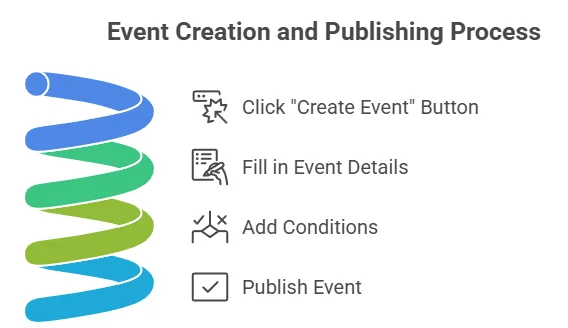
Follow these steps to create and implement the tracking for your affiliate links:
- Log in to Google Analytics 4: Start by accessing your GA4 account. Choose the property where you want to set up tracking.
- Navigate to Events: In the left-hand menu, select the “Configure” option, then click on “Events”. You will manage your events from this section.
- Create a New Event: Click on the “Create Event” button. Fill in the necessary details, including the event name. A descriptive name like “affiliate_link_click” will help you identify the event later.
- Add Conditions: Set conditions to specify when the event should be triggered. Use parameters such as page location or button click to ensure it aligns with your affiliate link.
- Publish the Event: Once you have configured the event, save your changes. This event will now be active and ready to track clicks on your affiliate links.
Defining Parameters for Your Events
Adding parameters to your events allows you to capture more details about affiliate link clicks. Here’s how you can do it:
- Choose Key Parameters: Decide on the parameters you want to track. Some examples are:
- link_name: The name of the affiliate link
- campaign: The campaign associated with the link
- source: The source of the click, such as ‘newsletter’ or ‘social media’
- Add Parameters When Creating Events: Use the parameters you selected while creating or editing the event. This inclusion provides a deeper level of insight when analyzing the data.
Testing Your Setup
Before relying on your data, it’s crucial to test whether your tracking is working properly. Here’s how you can do that:
- Use the DebugView in GA4: This tool allows you to see events as they happen in real-time. Click on an affiliate link to verify if the event triggers as expected.
- Check the Parameter Details: Ensure that the parameters you set are recording correctly. This information can be seen in the DebugView after clicking the link.
- Review Real-Time Reports: Access the real-time section to double-check data accuracy. Make sure your clicks and associated parameters show up correctly.
Monitoring and Analyzing Data
Once your events and parameters are properly set up, you can begin analyzing the data. Use the reports available in GA4 to understand user behavior better:
- Engagement Reports: Look at the engagement metrics to see how users are interacting with your affiliate links.
- Event Reports: Access the specific event you created. This offers insights into the affiliate link performance based on clicks and conversions.
- Custom Reports: Create tailored reports to focus on specific campaigns or link performance to gather more detailed insights.
Setting up events and parameters correctly is vital for tracking affiliate link clicks in Google Analytics 4. This setup not only helps you gather essential data but also enhances your ability to make informed marketing decisions. For more detailed guidance on tracking with GA4, visit Google’s official documentation or refer to Optimize Smart’s guide for comprehensive insights.
By implementing these strategies, you can ensure that you’re fully capitalizing on your affiliate marketing efforts. Proper data collection is not just valuable; it is essential for sustained success in the affiliate marketing space.
Analyzing Click Data to Enhance Your Marketing Strategy
In today’s digital landscape, analyzing click data is essential for enhancing your marketing strategies. With the right tools and insights, you can refine your efforts to better reach your audience. It’s no longer just about driving traffic; it’s about understanding that traffic and improving conversion rates.
Understanding your audience starts with tracking their clicks. When you know which of your campaigns or content generated interest, you can optimize your future efforts accordingly. Identifying trends and patterns can guide you in creating content that resonates with your target audience.
To help you leverage click data effectively, here’s a breakdown of key steps you should follow:
- Identify Specific Goals: Before diving into data, clarify what you want to achieve. Is it increased sales, more email sign-ups, or heightened engagement on your website? Your objectives will shape your analysis.
- Utilize Google Analytics 4: This powerful tool offers features that are perfect for tracking affiliate link clicks. Set up event tracking to capture interactions with your links. You can create custom dimensions to dissect the data further.
- Analyze Referral Sources: Understanding where your clicks are coming from helps you discern which marketing channels are most effective. Track your top referrers to allocate your marketing budget more wisely.
- Segment Your Audience: By segmenting your audience, you can drill down into which demographics or user groups are generating the most clicks. Tailoring your content for these segments can significantly boost your results.
- Look for Trends Over Time: Regularly review your data to uncover trends. Are clicks increasing after specific campaigns? Identifying these patterns enables you to replicate successful strategies.
- Test and Iterate: Use A/B testing to compare the performance of different ads or content pieces. Use the insights gained from your clicks to refine your messaging continuously.
Tracking affiliate link clicks provides valuable metrics to help you fine-tune your marketing approach. First, ensure you have set up UTM parameters on your links. This small addition adds specific campaign data to your link, allowing you to see exactly where clicks are coming from in Google Analytics 4. Even within your analytics dashboard, understanding which pages on your site lead to the most affiliate link clicks is key. By reviewing the behavior flow report, you can see how users navigate through your site. This can help you determine if people are finding what they expected when they clicked initially, or if you need to revise your content strategy.
| Key Metric | Description | Importance |
|---|---|---|
| Click-Through Rate (CTR) | Percentage of clicks compared to views. | Shows effectiveness of your calls to action. |
| Conversion Rate | Percentage of clicks that result in a desired action. | Indicates how well your landing pages are performing. |
| Bounce Rate | Percentage of visitors who leave without engaging further. | Reflects content relevance to the audience. |
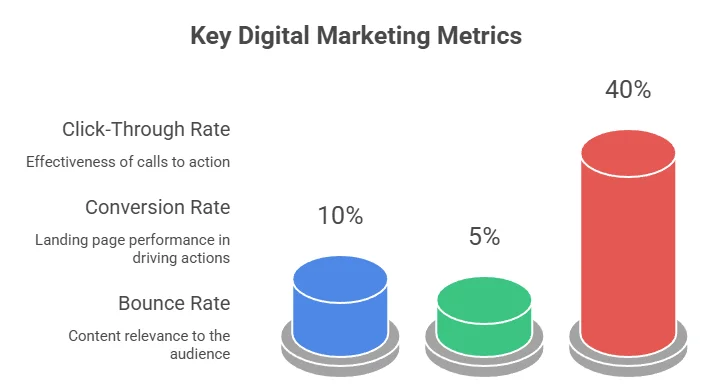
By analyzing these metrics, you’ll be able to pinpoint what works and adapt your strategy accordingly. For deeper insights, consider integrating your tracking with tools like Tableau or HubSpot Analytics. These platforms can visualize your data, making it easier to spot anomalies and trends in your traffic.
Ultimately, the goal of analyzing click data is to enable a continuous cycle of improvement. As you collect and analyze your data, your marketing strategies will grow more refined, leading to better engagement and conversion outcomes. Remember to prioritize what’s serving your audience best—it’s not just about clicks; it’s about creating valuable experiences that lead to action. Incorporate these strategies into your marketing plan to stay ahead of the competition. Keep evolving with your audience’s needs and preferences; tracking click data will be a cornerstone of your data-driven decision-making process.
Common Challenges in Tracking Affiliate Links and How to Overcome Them
Tracking affiliate links is essential for anyone looking to maximize their earnings in the affiliate marketing space. However, several common challenges can make this process complicated. Recognizing these hurdles and knowing how to overcome them can enhance your tracking efficiency and, ultimately, your revenue.
Understanding the Importance of Accurate Tracking
Without accurate tracking, you may miss opportunities to optimize your strategies. The importance lies in being able to see which links perform well, where your traffic is coming from, and what content converts best. However, several common challenges can hinder effective tracking.
Common Challenges in Tracking Affiliate Links
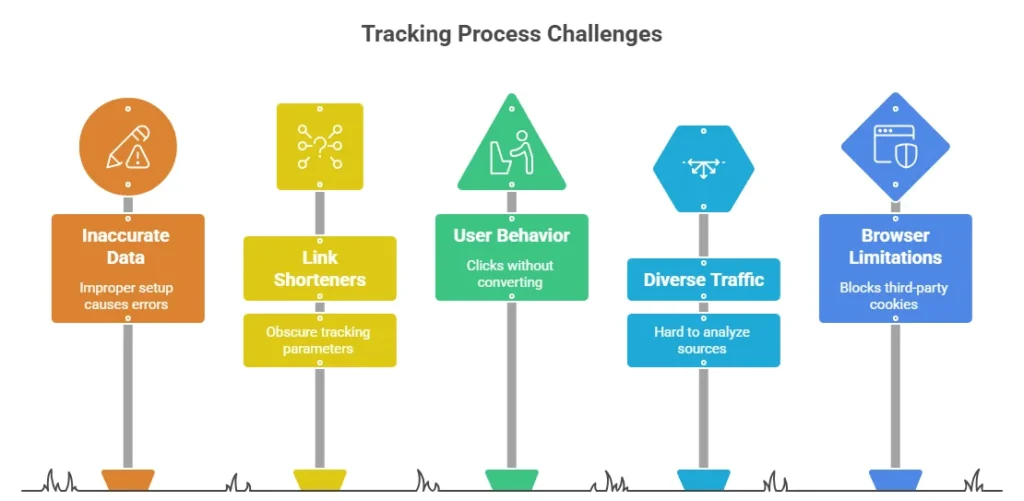
Identifying issues in your tracking processes is the first step to overcoming them. Here are some frequent challenges:
- Inaccurate Data Capture: Sometimes, data may not be recorded accurately due to improper setup or configuration of tracking tools.
- Link Shorteners: While they can simplify sharing links, they may also obfuscate tracking parameters.
- User Behavior: People may click on your affiliate links but not convert. Understanding their behavior is critical.
- Diverse Traffic Sources: Managing traffic from multiple channels makes it tough to analyze which sources are effective.
- Browser Limitations: Some browsers block third-party cookies, impacting your data collection.
Overcoming Tracking Challenges
Now that we’ve laid out the common challenges, it’s time to look at solutions. Here are strategies you can employ to make tracking your affiliate links a breeze:
1. Set Up Goals in Google Analytics
Creating specific goals in Google Analytics can guide you in tracking your affiliate link performance. You can define what a conversion looks like (such as a purchase or sign-up) and track the paths users take to achieve those goals. Here’s how to set them up:
- Log into your Google Analytics account.
- Navigate to the “Admin” section.
- Under “View,” click on “Goals.”
- Select “New Goal” and follow the setup wizard.
2. Use Unique Tracking Parameters
Ensure that each affiliate link has specific tracking parameters (also known as UTM parameters). This method helps distinguish the sources of each click and allows for better analysis. You might use parameters like:
- utm_source: Identifies the source or blog where the link was shared.
- utm_medium: Specifies the type of marketing medium (email, PPC, etc.).
- utm_campaign: Names the specific campaign promoting the link.
3. Monitor Link Health Regularly
Link rot is a significant problem in affiliate marketing. Regularly check that your links are functional and direct users to the correct landing pages. Tools like Dead Link Checker can help automate this process.
4. Use Link Tracking Software
Consider utilizing specialized link tracking software such as Bitly or Google Analytics. These tools provide advanced tracking features that enable you to analyze performance metrics effectively.
5. Analyze Data to Adapt Strategies
Once you start collecting data, observe it regularly to understand your audience. Are there certain links that outperform others? What times do users click your links the most? Use this data to adjust your strategies accordingly.
Stay Informed
The world of affiliate marketing is ever-changing. Regularly stay updated with trends and shifts in consumer behavior. Websites like SitePoint and AyA Digital offer useful insights that can keep your strategies fresh and effective.
By acknowledging the common challenges in tracking affiliate links and implementing these solutions, you can significantly improve your ability to monitor performance accurately. Don’t let obstacles deter you from achieving your affiliate marketing goals. Instead, face them head-on, and watch your success grow.
Conclusion
Tracking affiliate link clicks using Google Analytics 4 is a game-changer for anyone involved in affiliate marketing. By taking full advantage of GA4’s features, you can gain invaluable insights into how your affiliate links are performing. Understanding the benefits of monitoring affiliate marketing performance allows you to gauge your campaigns more effectively. With well-defined events and parameters set up for your affiliate links, you’re equipped to gather precise data that can illuminate the effectiveness of your strategies.
As you analyze click data, you’re empowered to refine your marketing tactics, enabling optimized campaigns that resonate with your audience. You can identify what works and what doesn’t, making informed decisions that align with user behavior. However, it’s essential to acknowledge the common challenges that come with tracking affiliate links. By being proactive in addressing these issues—such as data discrepancies or improper setup—you can ensure accurate performance measurements.
Utilizing Google Analytics 4 effectively isn’t just about collecting clicks; it’s about transforming those clicks into conversions. When you have a clear view of how your affiliates are performing, you can tweak your approach for maximum impact. Ultimately, the right tracking strategies will not only help you understand your audience better but also bolster your overall affiliate marketing success. Staying engaged and responsive to this data will keep your strategies fresh and aligned with current trends, paving the way for sustained growth in your affiliate endeavors.